Main Content

pre6GReferenceSignal

Pre-6G reference signal symbols

Since R2026a

    Description

    Add-On Required: This feature requires the 6G Exploration Library for 5G Toolbox add-on.

    sym = pre6GReferenceSignal(carrier,rs) returns reference signal (RS) symbols for 6G research and prototyping. carrier and rs are the carrier and reference signal configuration parameters, respectively.

    example

    sym = pre6GReferenceSignal(___,Name=Value) specifies options using one or more name-value arguments. For example, UseGPU="on" enables GPU processing.

    example

    Examples

    collapse all

    Create a pre-6G carrier configuration object with default parameters. Set a batch size of five. Create an empty resource grid for the configuration and batch size.

    carrier = pre6GCarrierConfig;
    B = 5;
    grid = pre6GResourceGrid(carrier,1,BatchSize=B);

    Create a reference signal configuration object with default parameters. Get 0-based reference signal indices for the reference signal configuration.

    rs = pre6GReferenceSignalConfig;
    rs.SymbolLocations = (0:7)';
    rs.TimeDomainCDM = 8;
    rsInd = pre6GReferenceSignalIndices(carrier,rs,BatchSize=B);

    Create a data channel configuration object. Use the reference signal indices as reserved resource elements for the physical channel configuration object.

    Get 0-based data indices and resource mapping information for the physical channel configuration.

    ch = pre6GPhysicalChannelConfig(ReservedRE=rsInd-1);
    [dataInd,info] = pre6GPhysicalChannelIndices(carrier,ch,BatchSize=B);

    Generate a random codeword for the physical channel. Generate the data and reference signal symbols. Assign the data and reference symbols to the grid.

    cw = randi([0 1],[info.G,B]);
    sym = pre6GPhysicalChannel(carrier,ch,cw);
    rsSym = pre6GReferenceSignal(carrier,rs,BatchSize=B);
    grid(rsInd) = rsSym;
    grid(dataInd) = sym;

    Plot the resource element assignments for the first batch element.

    map = zeros(size(grid,1),size(grid,2));
    map(dataInd(:,1,1)) = 1;
    map(rsInd(:,1,1)+1) = 2;
    
    figure;
    image(map+1);
    axis xy;
    colormap([1 1 1; 0.3 0.3 1; 1 1 0]);
    xlabel('OFDM Symbols');
    ylabel('Subcarriers');
    title('Physical Channel and Reference Signal Resource Elements');
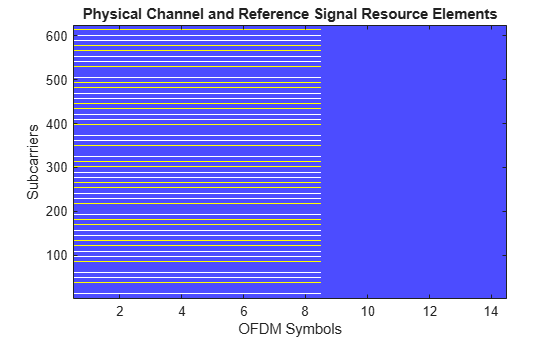
    Figure contains an axes object. The axes object with title Physical Channel and Reference Signal Resource Elements, xlabel OFDM Symbols, ylabel Subcarriers contains an object of type image.

    Input Arguments

    collapse all

    Carrier configuration parameters for a specific OFDM numerology, specified as a pre6GCarrierConfig object. This function uses only the NCellID, NSizeGrid, and SymbolsPerSlot properties of the pre6GCarrierConfig object.

    RS configuration parameters, specified as a pre6GReferenceSignalConfig object. This function uses only these pre6GReferenceSignalConfig object properties:

    Name-Value Arguments

    collapse all

    Specify optional pairs of arguments as Name1=Value1,...,NameN=ValueN, where Name is the argument name and Value is the corresponding value. Name-value arguments must appear after other arguments, but the order of the pairs does not matter.

    Example: UseGPU='on' enables GPU processing.

    Enable GPU processing, specified as one of these values:

    • "off" — The function executes on the CPU.

    • "on" — The function executes on the GPU and returns the output symbols as a gpuArray (Parallel Computing Toolbox) object on the GPU.

    • "auto" — If a GPU is available, the function automatically executes on the GPU and returns the output symbols as a gpuArray object on the GPU. If no GPUs are available, the function executes on the CPU.

    To use a GPU to accelerate computations in MATLAB®, you must have Parallel Computing Toolbox™ and a supported GPU device. For more information on supported devices, see GPU Computing Requirements (Parallel Computing Toolbox).

    Data Types: char | string

    Batch size for parallel processing, specified as a positive integer. This input determines the third dimension of the sym output, which you can use to separate your data for parallel processing.

    Output data type, specified as "single" or "double".

    Data Types: char | string

    Output Arguments

    collapse all

    RS symbols, returned as a complex 3-D array of size NRE-by-P-by-B, where NRE is the number of RS resource elements (REs), P is the number of ports, and B is the BatchSize name-value argument.

    Data Types: single | double
    Complex Number Support: Yes

    Extended Capabilities

    expand all

    Version History

    Introduced in R2026a

    See Also

    Functions

    Objects