Custom Variable Mass 3DOF (Body Axes)
R2026bImplement three-degrees-of-freedom equations of motion of custom variable mass with respect to body axes
Custom Variable Mass 3DOF (Body Axes) block
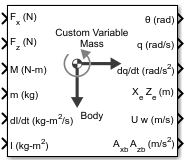
To add a block to a model, double-click the canvas and start typing the block name. Then, select the block from the list.
Libraries:
Aerospace Blockset /
Equations of Motion /
3DOF
Description
The Custom Variable Mass 3DOF (Body Axes) block implements three-degrees-of-freedom equations of motion of custom variable mass with respect to body axes. It considers the rotation in the vertical plane of a body-fixed coordinate frame about a flat Earth reference frame. For more information about the rotation and equations of motion, see Algorithms.
Ports
Input
Applied force along the body x-axis, specified as a scalar, in the units selected in Units.
Data Types: double
Applied force along the body z-axis, specified as a scalar, in the units selected in Units.
Data Types: double
Applied pitching moment, specified as a scalar, in the units selected in Units.
Data Types: double
Rate of change of mass (positive if accreted, negative if ablated), specified as a scalar.
Dependencies
To enable this port, select Include mass flow relative velocity.
Data Types: double
Mass, specified as a scalar, in the units selected in Units.
Data Types: double
Rate of change of inertia tensor, Iyy, specified as scalar, in the units selected in Units.
Dependencies
To enable this port, set Mass type to
Custom Variable.
Data Types: double
Inertia tensor, specified as a scalar, in the units selected in Units.
Dependencies
To enable this port, set Mass type to Custom
Variable.
Data Types: double
Gravity, specified as a scalar.
Dependencies
To enable this port, set Gravity source to
External.
Data Types: double
Relative velocity at which mass is accreted to or ablated from the body in body-fixed axes, specified as a two-element vector.
Dependencies
To enable this port, select Include mass flow relative velocity.
Data Types: double
Output
Pitch attitude, within ±pi, returned as a scalar, in radians (θ).
Data Types: double
Pitch angular rate, returned as a scalar, in radians per second.
Data Types: double
Location of the body in the flat Earth reference frame, (Xe, Ze), returned as a two-element vector.
Data Types: double
Velocity of the body resolved into the body-fixed coordinate frame, (u, w), returned as a two-element vector.
Data Types: double
Gravity, returned as a scalar.
Dependencies
To enable this port, select the Output mass properties for acceleration computation parameter.
Data Types: double
Parameters
Main
Input and output units, specified as Metric (MKS), English (Velocity in ft/s), or English (Velocity in kts).
| Units | Forces | Moment | Acceleration | Velocity | Position | Mass | Inertia |
|---|---|---|---|---|---|---|---|
Metric (MKS) | Newton | Newton-meter | Meters per second squared | Meters per second | Meters | Kilogram | Kilogram meter squared |
English (Velocity in ft/s) | Pound | Foot-pound | Feet per second squared | Feet per second | Feet | Slug | Slug foot squared |
English (Velocity in kts) | Pound | Foot-pound | Feet per second squared | Knots | Feet | Slug | Slug foot squared |
Programmatic Use
Block Parameter:
units |
| Type: character vector |
Values: Metric (MKS) | English (Velocity in ft/s) | English (Velocity in kts) |
Default: Metric (MKS) |
Body or wind axes, specified as Wind or
Body.
Programmatic Use
Block Parameter:
axes |
| Type: character vector |
Values:
Wind | Body |
Default:
Body |
Mass type, specified according to the following table.
| Mass Type | Description | Default for |
|---|---|---|
Fixed | Mass is constant throughout the simulation. | |
Simple Variable | Mass and inertia vary linearly as a function of mass rate. | |
Custom Variable | Mass and inertia variations are customizable. |
The Custom Variable selection conforms to the
previously described equations of motion.
Programmatic Use
Block Parameter:
mtype |
| Type: character vector |
Values:
Fixed | Simple Variable |
Custom Variable |
Default:
'Custom Variable' |
Initial velocity of the body, (V0), specified as a scalar.
Programmatic Use
Block
Parameter:
v_ini |
| Type: character vector |
Values:
'100' | scalar |
Default:
'100' |
Initial pitch attitude of the body, (θ0), specified as a scalar.
Programmatic Use
Block Parameter: theta_ini |
| Type: character vector |
Values:
'0' | scalar |
Default: '0' |
Initial pitch rotation rate, (q0), specified as a scalar.
Programmatic Use
Block
Parameter:
q_ini |
| Type: character vector |
Values:
'0' | scalar |
Default:
'0' |
Initial angle between the velocity vector and the body, (α0), specified as a scalar.
Programmatic Use
Block Parameter: alpha_ini |
| Type: character vector |
Values:
'0' | scalar |
Default: '0' |
Initial location of the body in the flat Earth reference frame, specified as a two-element vector.
Programmatic Use
Block Parameter:
pos_ini |
| Type: character vector |
Values:
'[0 0]' | two-element vector |
Default:
'[0 0]' |
Gravity source, specified as:
External | Variable gravity input to block |
Internal | Constant gravity specified in mask |
Programmatic Use
Block Parameter: g_in |
| Type: character vector |
Values: 'Internal' | 'External' |
Default: 'Internal' |
Acceleration due to gravity, specified as a double scalar and used if internal gravity source
is selected. If gravity is to be neglected in the simulation, this value can be set to
0.
Dependencies
To enable this parameter, set Gravity Source to
Internal.
Programmatic Use
Block Parameter: g |
| Type: character vector |
Values:
'9.81' | scalar |
Default: '9.81' |
Select this check box to add a mass flow relative velocity port. This is the relative velocity at which the mass is accreted or ablated.
Programmatic Use
Block Parameter: vre_flag |
| Type: character vector |
Values: off | on |
Default:
'off' |
Select this check box to enable ports for mass properties for acceleration. You can then use these ports as inputs for these blocks:
Programmatic Use
Block Parameter:
mass_flag |
| Type: character vector |
Values:
'off' | 'on' |
Default:
off |
State Attributes
Assign a unique name to each state. You can use state names instead of block paths during linearization.
The number of names must match the number of states, as shown for each item, or be empty. Set all or none of the block states.
To assign names to single-variable states, enter unique names between quotes, for example,
'q'or"q".To assign names to two-variable states, enter a comma-separated list surrounded by braces, for example,
{'Xe','Ze'}.If a state parameter is empty (
' '), no name is assigned.To assign state names with a variable in the MATLAB® workspace, enter the variable without quotes. A variable can be a character vector, cell array of character vectors, or string.
Velocity state names, specified as a comma-separated list surrounded by braces.
Programmatic Use
Block Parameter: vel_statename |
| Type: character vector |
Values:
'' | comma-separated list surrounded by braces |
Default: '' |
Position state names, specified as a comma-separated list surrounded by braces.
Programmatic Use
Block Parameter: pos_statename |
| Type: character vector |
Values:
'' | comma-separated list surrounded by braces |
Default: '' |
Pitch angular rate state name, specified as a character vector or string.
Programmatic Use
Block Parameter:
q_statename |
| Type: character vector | string |
Values:
'' | scalar |
Default:
'' |
Pitch attitude state name, specified as a character vector or string.
Programmatic Use
Block Parameter:
theta_statename |
| Type: character vector | string |
Values:
'' |
Default:
'' |
Algorithms
The Custom Variable Mass 3DOF (Body Axes) block considers the rotation in the vertical plane of a body-fixed coordinate frame about a flat Earth reference frame.
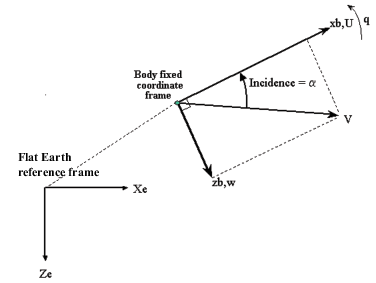
The equations of motion are
where the applied forces are assumed to act at the center of gravity of the body. Input variables are Fx, Fz, My, (dm/dt), m, (dIyy/dt), and Iyy. ure, wre, and g are optional input variables.
Extended Capabilities
C/C++ Code Generation
Generate C and C++ code using Simulink® Coder™.
Version History
Introduced in R2006aAs a result of the removal of the acceleration ports, the Include inertial acceleration parameter has been replaced with Output mass properties for acceleration computation for Custom Variable Mass 3DOF (Body Axes).
Related to this change, the block output ports have changed:
| Block | Output Ports Removed | Output Ports Added |
|---|---|---|
Custom Variable Mass 3DOF (Body Axes) |
|
|
The 3DOF equations of motion have been updated. Existing models created prior to R2021b that contain 3DOF equations of motion blocks continue to run. If you replace a pre-R2021b version of a 3DOF equation of motion block with an R2021b or later version, your updated model might have a higher tendency for algebraic loops. For an example of how to remove algebraic loops using unit delays, see Remove Algebraic Loops. For further information about algebraic loops, see Identify Algebraic Loops in Your Model.
MATLAB Command
You clicked a link that corresponds to this MATLAB command:
Run the command by entering it in the MATLAB Command Window. Web browsers do not support MATLAB commands.


Select a Web Site
Choose a web site to get translated content where available and see local events and offers. Based on your location, we recommend that you select: .
You can also select a web site from the following list
How to Get Best Site Performance
Select the China site (in Chinese or English) for best site performance. Other MathWorks country sites are not optimized for visits from your location.
Americas
- América Latina (Español)
- Canada (English)
- United States (English)
Europe
- Belgium (English)
- Denmark (English)
- Deutschland (Deutsch)
- España (Español)
- Finland (English)
- France (Français)
- Ireland (English)
- Italia (Italiano)
- Luxembourg (English)
- Netherlands (English)
- Norway (English)
- Österreich (Deutsch)
- Portugal (English)
- Sweden (English)
- Switzerland
- United Kingdom (English)