Cepstral Feature Extractor
(To be removed) Extract cepstral features from audio segment
The Cepstral Feature Extractor block will be removed in a future release. For more information, see Version History.
Libraries:
Audio Toolbox /
Measurements
Description
The Cepstral Feature Extractor block extracts cepstral features from an audio segment. Cepstral features are commonly used to characterize speech and music signals.
Examples
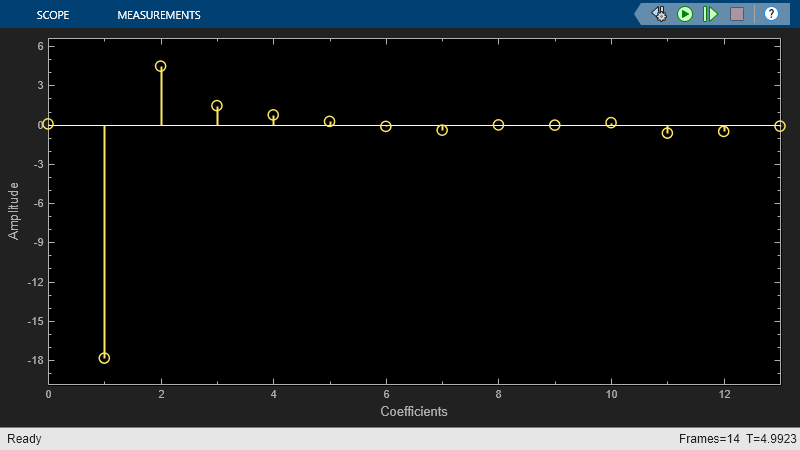
Extract Cepstral Coefficients
Use the Cepstral Feature Extractor block to extract and visualize cepstral coefficients from an audio file.
Ports
Input
Audio input to the cepstral feature extractor, specified as a column vector or a matrix. If specified as a matrix, the columns are treated as independent audio channels.
Data Types: single | double
Output
Cepstral coefficients, returned as a column vector or a matrix. If the coefficients matrix is an N-by-M matrix, N is determined by the values you specify in the Number of coefficients to return and Log energy usage parameters. M equals the number of input audio channels.
When the Log energy usage parameter is set to:
Append–– The block prepends the log energy value to the coefficients vector. The length of the coefficients vector is 1 + NumCoeffs, where NumCoeffs is the value specified in the Number of coefficients to return parameter.Replace–– The block replaces the first coefficient with the log energy of the signal. The length of the coefficients vector is NumCoeffs.Ignore–– The block does not calculate or return the log energy.
This port is unnamed until you select Output delta parameter, the Output delta-delta parameter, or both.
Data Types: single | double
Change in coefficients over consecutive calls to the algorithm, returned as a column vector or a matrix. The delta array is of the same size and data type as the coeffs array.
Dependencies
To enable this port, select the Output delta parameter.
Data Types: single | double
Change in delta values over consecutive calls to the algorithm, returned as a column vector or a matrix. The deltaDelta array is the same size and data type as the coeffs and delta arrays.
Dependencies
To enable this port, select the Output delta-delta parameter.
Data Types: single | double
Parameters
If a parameter is listed as tunable, then you can change its value during simulation.
Type of filter bank, specified as either Mel or
Gammatone:
Mel–– The block computes the mel frequency cepstral coefficients (MFCC).Gammatone–– The block computes the gammatone cepstral coefficients (GTCC).
Tunable: No
Input signal domain, specified as either Time
or Frequency.
Tunable: No
Number of coefficients to return, specified as an integer in the range [2, v], where v is the number of valid passbands. The number of valid passbands depends on the type of filter bank:
Mel–– The number of valid passbands is defined assum(κ <= floor(fs/2))-2, whereκis the number of band edges in the mel filter bank andfsis the sample rate.Gammatone–– The number of valid passbands is defined asceil(, wherehz2erb(R(2))-hz2erb(R(1)))Ris the frequency range of the gammatone filter bank.
Tunable: No
Data Types: single | double
Type of nonlinear rectification applied prior to the discrete cosine transform.
Tunable: No
When you select this parameter, the FFT length is equal to the number of rows in the input signal.
Tunable: No
Dependencies
To enable this parameter, set Domain of the input
signal to Time.
FFT length, specified as a positive integer. The default,
[], means that the FFT length is equal to the number
of rows in the input signal.
Tunable: No
Dependencies
To enable this parameter, set Domain of the input
signal to Time and select the
Inherit FFT length from input dimensions
parameter.
Data Types: single | double | int8 | int16 | int32 | int64 | uint8 | uint16 | uint32 | uint64
Specify how the log energy is shown in the coefficients vector output, specified as:
Append–– The block prepends the log energy to the coefficients vector. The length of the coefficients vector is 1 + NumCoeffs, where NumCoeffs is the value specified in the Number of coefficients to return parameter.Replace–– The block replaces the first coefficient with the log energy of the signal. The length of the coefficients vector is NumCoeffs.Ignore–– The block does not calculate or return the log energy.
Tunable: No
When you select this parameter, an additional output port, delta, is added to the block. This port outputs the change in coefficients over consecutive calls to the algorithm.
Tunable: No
When you select this parameter, an additional output port, deltaDelta, is added to the block. This port outputs the change in delta values over consecutive calls to the algorithm.
Tunable: No
When you select this parameter, the block inherits its sample rate from the input signal. When you clear this parameter, you specify the sample rate in Input sample rate (Hz) parameter.
Tunable: No
Input sample rate in Hz, specified as a real positive scalar.
Dependencies
To enable this parameter, clear the Inherit sample rate from input parameter.
Code generation–– Simulate model using generated C code. The first time you run a simulation, Simulink® generates C code for the block. The C code is reused for subsequent simulations, as long as the model does not change. This option requires additional startup time, but the speed of the subsequent simulations is comparable toInterpreted execution.Interpreted execution–– Simulate model using the MATLAB® interpreter. This option shortens startup time but has a slower simulation speed thanCode generation. In this mode, you can debug the source code of the block.
Tunable: No
Advanced Tab
Frequency range of the gammatone filter bank in Hz, specified as a positive, monotonically increasing two-element row vector. The maximum frequency range can be any finite number. The center frequencies of the filter bank are equally spaced across the frequency range on the ERB scale.
Tunable: No
Dependencies
To enable this parameter, set Filter bank type to
Gammatone.
Band edges of the filter bank in Hz, specified as a nonnegative monotonically increasing row vector in the range [0, ∞). The maximum bandedge frequency can be any finite number. The number of bandedges must be in the range [4, 80].
The default band edges are spaced linearly for the first ten and then logarithmically thereafter. The default band edges are set as recommended by [1].
Tunable: No
Dependencies
To enable this parameter, set Filter bank type to
Mel.
Mel filter bank design domain, specified as either
Hz or Bin. The
filter bank is designed as overlapped triangles with band edges specified by
the Band edges of filter bank (Hz) parameter.
The band edges are specified in Hz. When you set the design domain to:
Tunable: No
Dependencies
To enable this parameter, set Filter bank type to
Mel.
Normalization technique used to normalize the weights of the filter bank, specified as:
Bandwidth–– The weights of each bandpass filter are normalized by the corresponding bandwidth of the filter.Area–– The weights of each bandpass filter are normalized by the corresponding area of the bandpass filter.None–– The weights of the filter are not normalized.
Tunable: No
Block Characteristics
Data Types |
|
Direct Feedthrough |
|
Multidimensional Signals |
|
Variable-Size Signals |
|
Zero-Crossing Detection |
|
Algorithms
Auditory cepstrum coefficients are popular features extracted from speech signals for use in recognition tasks. In the source-filter model of speech, cepstral coefficients are understood to represent the filter (vocal tract). The vocal tract frequency response is relatively smooth, whereas the source of voiced speech can be modeled as an impulse train. As a result, the vocal tract can be estimated by the spectral envelope of a speech segment.
The motivating idea of cepstral coefficients is to compress information about the vocal tract (smoothed spectrum) into a small number of coefficients based on an understanding of the cochlea. Although there is no hard standard for calculating the coefficients, the basic steps are outlined by the diagram.

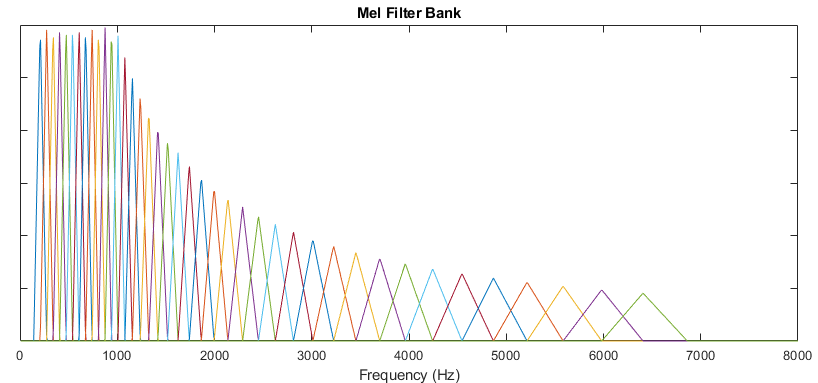
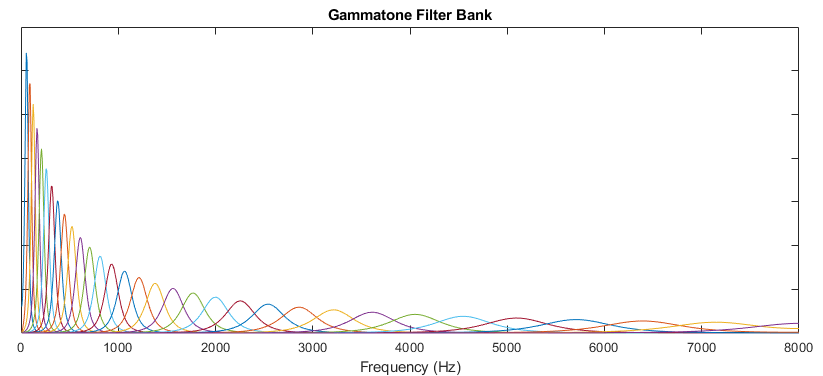
Two popular implementations of the filter bank are the mel filter bank and the gammatone filter bank.
The default mel filter bank linearly spaces the first 10 triangular filters and logarithmically spaces the remaining filters.
The default gammatone filter bank is composed of gammatone filters spaced linearly
on the ERB scale between 50 and 8000 Hz. The filter bank is designed by gammatoneFilterBank.
If the input (x) is a time-domain signal, the log energy is computed using the following equation:
If the input (x) is a frequency-domain signal, the log energy is computed using the following equation:
References
[1] Auditory Toolbox. https://engineering.purdue.edu/~malcolm/interval/1998-010/AuditoryToolboxTechReport.pdf
[2] ETSI ES 201 108 V1.1.3 (2003-09). https://www.etsi.org/deliver/etsi_es/201100_201199/201108/01.01.03_60/es_201108v010103p.pdf
Extended Capabilities
C/C++ Code Generation
Generate C and C++ code using Simulink® Coder™.
Version History
Introduced in R2018aThe Cepstral Feature Extractor block will be removed in a future release. Use the MFCC block or a combination of the Auditory Spectrogram, Cepstral Coefficients, and Audio Delta blocks instead.
| Cepstral Feature Extractor Configuration | Recommended Replacement |
|---|---|
Filter bank type parameter set to
| Use the MFCC block. |
Filter bank type parameter set to
| Use the Auditory Spectrogram block combined with the Cepstral Coefficients block. See Extract GTCC from Audio in Simulink for an example. |
Output delta or Output delta-delta parameters selected | If using the MFCC block, select the Append delta or Append delta-delta parameters. If using the Cepstral Coefficients block instead, use the Audio Delta block to extract delta features. |
Log energy usage parameter set to
| No replacement |
Band edges of Mel filter bank (Hz) parameter specified | No replacement |
Domain for Mel filter bank design
parameter set to | No replacement |
See Also
MFCC | Cepstral
Coefficients | mfcc | gtcc | cepstralCoefficients | audioFeatureExtractor
MATLAB Command
You clicked a link that corresponds to this MATLAB command:
Run the command by entering it in the MATLAB Command Window. Web browsers do not support MATLAB commands.
Select a Web Site
Choose a web site to get translated content where available and see local events and offers. Based on your location, we recommend that you select: .
You can also select a web site from the following list
How to Get Best Site Performance
Select the China site (in Chinese or English) for best site performance. Other MathWorks country sites are not optimized for visits from your location.
Americas
- América Latina (Español)
- Canada (English)
- United States (English)
Europe
- Belgium (English)
- Denmark (English)
- Deutschland (Deutsch)
- España (Español)
- Finland (English)
- France (Français)
- Ireland (English)
- Italia (Italiano)
- Luxembourg (English)
- Netherlands (English)
- Norway (English)
- Österreich (Deutsch)
- Portugal (English)
- Sweden (English)
- Switzerland
- United Kingdom (English)
