Virtual Vehicle Solver Configuration Settings
R2026bThe virtual vehicle template uses a data dictionary,
VehicleConfig.sldd, to store the solver configuration settings for data
objects. To view the solver configuration settings, in the Model Explorer, navigate to Simulink Root > ConfiguredVirtualVehicleModel > External Data > VirtualVehicleTemplate > Configurations.
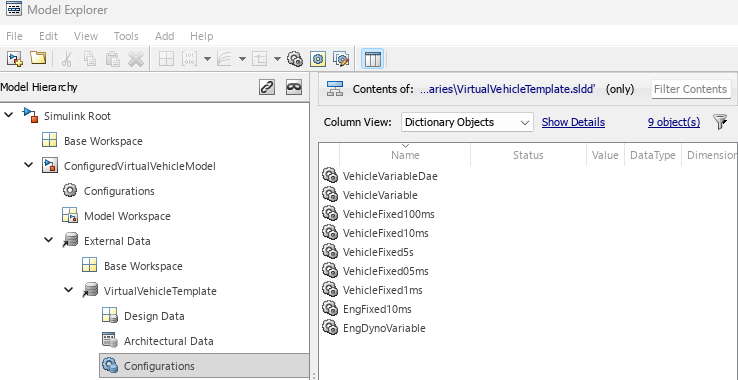
By default, the Virtual Vehicle Composer app uses the
VehicleConfig.sldd data dictionary to configure the virtual vehicle
model elements with these data objects. The data objects contain these solver parameter
settings.
| Virtual Vehicle Model Element | Default | Solver Parameter Settings | ||
|---|---|---|---|---|
| Type | Solver | Fixed-step size | ||
All Simulink® plant models | VehicleVariable |
|
| N/A |
All Simscape™ plant models | VehicleVariableDae |
|
| N/A |
All powertrain system controllers, including electric vehicles (EVs) and hybrid-electric vehicles (HEVs) | VehicleFixed10ms |
|
|
|
All brake system controllers | VehicleFixed1ms |
|
|
|
Thermal system | VehicleFixed100ms |
|
|
|
Engine dynamometer plant models | EngDynoVariable |
|
| N/A |
Engine dynamometer controllers | EngFixed10ms |
|
|
|
None | VehicleFixed05ms |
|
|
|
None | VehicleFixed5s |
|
|
|
Change Solver Configuration Settings
During simulation, if your virtual vehicle model fails to converge, you might want to
change the solver configuration settings for data objects in the
VehicleConfig.sldd data dictionary. For help choosing a solver,
see Choose a Solver.
To change the solver settings for a data object:
In the Model Explorer, navigate to the
VehicleConfig.sldddata object configuration setting that you want to change. For example, navigate to Simulink Root > ConfiguredVirtualVehicleModel > External Data > VirtualVehicleTemplate > Configurations. Select the data objectVehicleVariable.In the right pane of the Model Explorer, click Open.

In the Configuration Parameters left pane, select Solver. Specify new solver parameter settings for the data object. For example, for
VehicleVariable, change Solver fromode23tbtoodeN.
Click OK. The data dictionary contains the modified solver settings for the data object.

