updateReferences
Update model with ARXML definitions of AUTOSAR reference elements
For updating a model with ARXML definitions of AUTOSAR elements, R2019a introduced the
ARXML importer function updateAUTOSARProperties. Use the
updateAUTOSARProperties function instead of
updateReferences. For more information, see Import and Reference Shared AUTOSAR Element Definitions and the updateAUTOSARProperties reference page.
Description
updateReferences(
updates the specified open model with AUTOSAR reference elements in the XML files
associated with ar,modelname)arxml.importer object ar. Reference elements are
definitions of packageable AUTOSAR elements that multiple components and services
can share. The update operation generates a report that details the elements added
to the model. On a read-only basis, the model can reference the imported elements.
Model builds export the references to AUTOSAR software component ARXML files.
If you do not specify Name,Value argument pairs, the function
imports all supported reference element definitions found
in the XML files, except ApplicationDataType elements. Import of
ApplicationDataType elements must be explicitly
requested.
updateReferences(
updates the specified open model with AUTOSAR reference elements, using a
ar,modelname,Name,Value)Name,Value argument pair to specify a specific element
category, package, or path.
Examples
Update model mySWC with AUTOSAR reference
elements described in ExternalElements.arxml and generate an
update report.
open_system('mySWC')
ar = arxml.importer('ExternalElements.arxml');
updateReferences(ar,'mySWC');
### Updating references in model mySWC
### Saving original model as mySWC_backup.slx
### Creating HTML report mySWC_update_report.html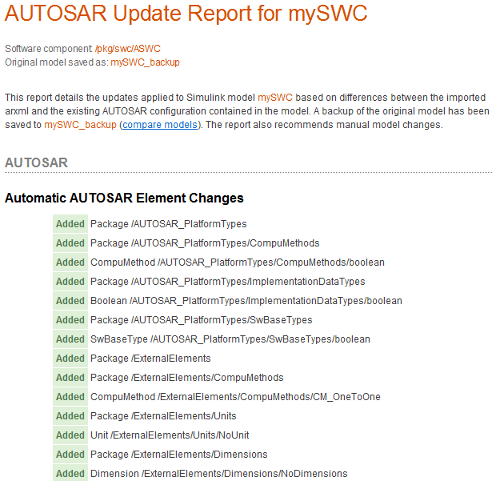
Update model mySWC with two AUTOSAR
reference elements, specified by root paths
/ExternalElements/CompuMethods/RpmCm and
/AUTOSAR_PlatformTypes/ImplementationDataTypes/uint16.
open_system('mySWC')
ar = arxml.importer('ExternalElements.arxml');
updateReferences(ar,'mySWC','RootPath',{'/ExternalElements/CompuMethods/RpmCm',...
                           '/AUTOSAR_PlatformTypes/ImplementationDataTypes/uint16'});
Update model mySWC with AUTOSAR reference
elements from package
/AUTOSAR_PlatformTypes/CompuMethods.
open_system('mySWC')
ar = arxml.importer('ExternalElements.arxml');
updateReferences(ar,'mySWC','Package',{'/AUTOSAR_PlatformTypes/CompuMethods'});
Update model mySWC with AUTOSAR reference
elements of category ImplementationDataType. Importing
ImplementationDataType elements also imports dependent
elements, such as SwBaseType elements.
open_system('mySWC')
ar = arxml.importer('ExternalElements.arxml');
updateReferences(ar,'mySWC','Category',{'ImplementationDataType'});
Update model mySWC with AUTOSAR reference
elements of category ApplicationDataType. Importing
ApplicationDataType elements requires specifying a path
to an associated AUTOSAR data type mapping set, using a DataTypeMappingSet argument.
ApplicationDataType elements must be explicitly requested
using Name,Value arguments such as RootPath or Category.These
calls combine DataTypeMappingSet with other
Name,Value arguments.
open_system('mySWC')
ar = arxml.importer('ExternalElements.arxml');

% Specify ADT RootPath and DataTypeMappingSet
updateReferences(ar,'mySWC','RootPath',{'/pkg/ApplicationDataTypes/AppType1'},...
    'DataTypeMappingSet', {'/AUTOSAR_PlatformTypes/DataTypeMappingSets/MapSet1'};

% Specify ADT Category and DataTypeMappingSet
updateReferences(ar,'mySWC','Category',{'ApplicationDataType'},...
  'DataTypeMappingSet', {'/AUTOSAR_PlatformTypes/DataTypeMappingSets/Mapet1'});
Input Arguments
Name-Value Arguments
Version History
Introduced in R2016b

