Main Content

sinr

Display or compute signal-to-interference-plus-noise (SINR) ratio

Description

sinr(txs) displays the signal-to-interference-plus-noise ratio (SINR) for transmitter sites txs in the current Site Viewer. The function generates map contours using SINR values that are computed for receiver site locations on the map. For each location, the signal source is the transmitter site in txs with the greatest signal strength. The remaining transmitter sites in txs with the same transmitter frequency act as sources of interference. If txs is scalar or there are no sources of interference, Site Viewer displays signal-to-noise ratio (SNR).

This function only supports plotting for antenna sites with a CoordinateSystem property value of "geographic".

example

sinr(txs,propmodel) displays the SINR map using the propagation model specified by propmodel.

sinr(___,Name=Value) sets properties using one or more name-value arguments, in addition to the input argument combinations in the previous syntaxes. For example, sinr(txs,MaxRange=8000) specifies the range of the SINR map region as 8000 m from the site location.

pd = sinr(txs,___) returns the computed SINR data in the propagation data object pd. This syntax ignores name-value arguments for the SINR map display and does not display data in Site Viewer.

r = sinr(rxs,txs,___) returns the SINR, in dB, computed at the receiver sites due to the transmitter sites.

Examples

collapse all

Define names and location of three sites in Boston.

name = ["Fenway Park","Faneuil Hall","Bunker Hill Monument"];
lat = [42.3467 42.3598 42.3763];
lon = [-71.0972 -71.0545 -71.0611];

Create an array of transmitter sites.

txs = txsite(Name=name, ...
    Latitude=lat, ...
    Longitude=lon, ...
    TransmitterFrequency=2.5e9);

Display the SINR map. Each location on the map is colored using the strongest signal available at that location.

sinr(txs)
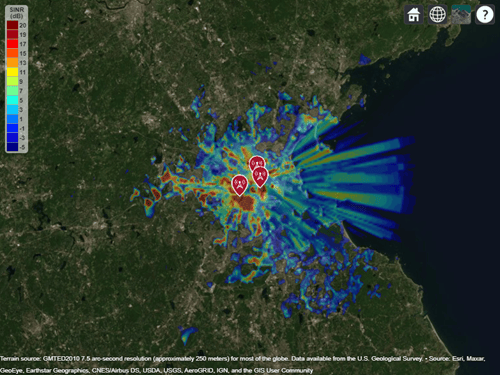
SINR map for the three transmitters

Input Arguments

collapse all

Transmitter site, specified as a txsite object or an array of txsite objects.

This function only supports plotting antenna sites when the CoordinateSystem property is set to "geographic".

Receiver site, specified as a rxsite object or an array of rxsite objects.

This function only supports plotting antenna sites when the CoordinateSystem property is set to "geographic".

Propagation model to use for the path loss calculations, specified as one of these options:

  • "freespace" — Free space propagation model

  • "rain" — Rain propagation model

  • "gas" — Gas propagation model

  • "fog" — Fog propagation model

  • "close-in" — Close-in propagation model

  • "longley-rice" — Longley-Rice propagation model

  • "tirem" — TIREM™ propagation model

  • "raytracing" — Ray tracing propagation model that uses the shooting and bouncing rays (SBR) method. When you specify a ray tracing model as input, the function incorporates multipath interference by using a phasor sum.

  • A propagation model created using the propagationModel function. For example, you can create a ray tracing propagation model that uses the image method by specifying propagationModel("raytracing",Method="image").

  • A composite propagation model. Create a composite propagation model from individual propagation models by using the add function. For information about the types of propagation models that can be combined, see Choose a Propagation Model.

The default depends on the coordinate system of the antenna sites and the value of the Map argument.

Coordinate SystemDefault Propagation Model
"geographic"
  • "longley-rice" when Map specifies terrain data.

  • "freespace" when Map does not specify terrain data.

"cartesian"
  • "freespace" when Map specifies "none".

  • "raytracing" when Map specifies the name of a glTF™ file, the name of an STL file, or a triangulation object. The default ray tracing model uses the shooting and bouncing rays (SBR) method.

Terrain propagation models, including "longley-rice" and "tirem", are only supported for sites with a CoordinateSystem value of "geographic".

You can also specify the propagation model by using the PropagationModel name-value argument. If you specify both propmodel and PropagationModel, the function uses the value of PropagationModel.

Name-Value Arguments

expand all

Specify optional pairs of arguments as Name1=Value1,...,NameN=ValueN, where Name is the argument name and Value is the corresponding value. Name-value arguments must appear after other arguments, but the order of the pairs does not matter.

Example: sinr(txs,MaxRange=8000) specifies the range of the SINR map region as 8000 m from the site location.

Before R2021a, use commas to separate each name and value, and enclose Name in quotes.

Example: sinr(txs,"MaxRange",8000) specifies the range of the SINR map region as 8000 m from the site location.

General

expand all

Signal source of interest, specified as one of these options:

  • "strongest" — Color each location on the map using the strongest signal available at that location.

  • A txsite object — Color all locations using the specified transmitter site as the signal source of interest.

  • An array of txsite objects — Color each receiver site specified by rxs using the corresponding transmitter site as the signal source of interest. The sizes of the array and rxs must match.

Propagation model to use for the path loss calculations, specified as one of these options:

  • "freespace" — Free space propagation model

  • "rain" — Rain propagation model

  • "gas" — Gas propagation model

  • "fog" — Fog propagation model

  • "close-in" — Close-in propagation model

  • "longley-rice" — Longley-Rice propagation model

  • "tirem" — TIREM propagation model

  • "raytracing" — Ray tracing propagation model that uses the shooting and bouncing rays (SBR) method. When you specify a ray tracing model as input, the function incorporates multipath interference by using a phasor sum.

  • A propagation model created using the propagationModel function. For example, you can create a ray tracing propagation model that uses the image method by specifying propagationModel("raytracing",Method="image").

  • A composite propagation model. Create a composite propagation model from individual propagation models by using the add function. For information about the types of propagation models that can be combined, see Choose a Propagation Model.

The default depends on the coordinate system of the antenna sites and the value of the Map argument.

Coordinate SystemDefault Propagation Model
"geographic"

  • "longley-rice" when Map specifies terrain data.

  • "freespace" when Map does not specify terrain data.

"cartesian"
  • "freespace" when Map specifies "none".

  • "raytracing" when Map specifies the name of a glTF file, the name of an STL file, or a triangulation object. The default ray tracing model uses the shooting and bouncing rays (SBR) method.

Terrain propagation models, including "longley-rice" and "tirem", are only supported for sites with a CoordinateSystem value of "geographic".

You can also specify the propagation model by using the propmodel argument. If you specify both propmodel and PropagationModel, the function uses the value of PropagationModel.

Total noise power at receiver, specified as a scalar in dBm. The default value assumes that the receiver bandwidth is 1 MHz and receiver noise figure is 7 dB.

The receiver noise in dBm, N, is represented by the equation:

N=174+10*log(B)+F

where:

  • B is the receiver bandwidth in Hz.

  • F is the noise figure in dB.

Mobile receiver gain, specified as a scalar in dBi. The receiver gain values include the antenna gain and the system loss. If you call the function using an output argument, the default value is computed using rxs.

Height above the ground of the phase center of the receiver antenna, specified as a scalar in m. If you specify an output argument, by default, the function uses the receiver sites in rxs.

Map for visualization or surface data, specified as a siteviewer object, a triangulation object, a string scalar, or a character vector. Valid and default values depend on the coordinate system.

Coordinate SystemValid Map ValuesDefault Map Value
"geographic"
  • A siteviewer object.a

  • A terrain name, if the function is called with an output argument. Valid terrain names are:

    • "none" — Terrain elevation is 0 everywhere.

    • "gmted2010" — USGS GMTED2010 terrain data. This option requires an internet connection.

    • The name of custom terrain data added using the addCustomTerrain function, specified using a string scalar or a character vector.

  • If the function is not called with an output, the current siteviewer object, or a new siteviewer object if none are open. By default, siteviewer objects use USGS GMTED2010 terrain data.

  • If the function is called with an output, "gmted2010".

"cartesian"
  • "none"

  • A siteviewer object.

  • The name of a glTF file, specified using a string scalar or a character vector.

  • The name of an STL file, specified using a string scalar or a character vector.

  • A triangulation object.

  • "none"

a Alignment of boundaries and region labels are a presentation of the feature provided by the data vendors and do not imply endorsement by MathWorks®.

In most cases, if you specify this argument as a value other than a siteviewer or "none", then you must also specify an output argument.

For Plotting SINR

expand all

Values of SINR for display, specified as a numeric vector. Each value is displayed as a different colored, filled on the contour map. The function derives the contour colors using the Colormap and ColorLimits arguments.

Maximum range of the SINR map from each transmitter site, specified as a positive numeric scalar in m representing great circle distance. MaxRange defines the region of interest on the map to plot. The default value depends on the type of propagation model.

Type of Propagation ModelDefault Maximum Range
Atmospheric or empirical30 km
TerrainThe minimum of 30 km and the distance to the furthest building
Ray tracing500 m

For more information about the types of propagation models, see Choose a Propagation Model.

Data Types: double

Resolution of receiver site locations used to compute SINR values, specified as "auto" or a numeric scalar in m. The resolution defines the maximum distance between the locations. If the resolution is "auto", the function computes a value scaled to MaxRange. Decreasing the resolution increases the quality of the SINR map and the time required to create it.

Colormap for the filled contours, specified as a colormap name or as an M-by-3 array of RGB triplets that define M individual colors.

This table lists the colormap names.

Colormap NameColor Scale

parula

Colorbar showing the colors of the parula colormap. The colormap starts at dark blue and transitions to lighter blue, green, orange and yellow. The transitions between colors are more perceptually uniform than in most other colormaps.

turbo

Colorbar showing the colors of the turbo colormap. The colormap starts at dark blue and transitions to lighter blue, bright green, orange, yellow, and dark red. This colormap is similar to jet, but the transitions between colors are more perceptually uniform than in jet.

hsv

Colorbar showing the colors of the hsv colormap. The colormap starts at red and transitions to yellow, bright green, cyan, dark blue, magenta, and bright orange.

hot

Colorbar showing the colors of the hot colormap. The colormap starts at dark red and transitions to bright red, orange, yellow, and white.

cool

Colorbar showing the colors of the cool colormap. The colormap starts at cyan and transitions to light blue, light purple, and magenta.

spring

Colorbar showing the colors of the spring colormap. The colormap starts at magenta and transitions to pink, light orange, and yellow.

summer

Colorbar showing the colors of the summer colormap. The colormap starts at medium green and transitions to yellow.

autumn

Colorbar showing the colors of the autumn colormap. The colormap starts at bright orange and transitions to yellow.

winter

Colorbar showing the colors of the winter colormap. The colormap starts at dark blue and transitions to bright green.

gray

Colorbar showing the gray colormap. The colormap starts at black and transitions to white.

bone

Colorbar showing the bone colormap. This colormap has colors that are approximately gray with a slight blue color tint. The colormap starts at dark gray and transitions to white.

copper

Colorbar showing the copper colormap. This colormap starts at black and transitions to a medium orange, similar to the color of copper.

pink

Colorbar showing the pink colormap. This colormap starts at dark red and transitions to dark pink, tan, and white.

sky (since R2023a)

Colorbar showing the sky colormap. This colormap starts at a very light shade of blue and transitions to a darker shade of blue.

abyss (since R2023b)

Colorbar showing the abyss colormap. This colormap starts at a very dark shade of blue and transitions to a lighter shade of blue.

nebula (since R2025a)

Colorbar showing the nebula colormap. This colormap starts at a medium shade of blue and transitions to a bright shade of red.

jet

Colorbar showing the colors of the jet colormap. The colormap starts at dark blue and transitions to light blue, bright green, orange, yellow, and dark red.

lines

Colorbar showing the colors of the lines colormap. The colormap contains a repeating pattern of colors: dark blue, dark orange, dark yellow, dark purple, medium green, light blue, and dark red.

colorcube

Colorbar showing the colors of the colorcube colormap. The colormap is a course sampling of the RGB colorspace.

prism

Colorbar showing the colors of the prism colormap. The colormap contains a repeating pattern of colors: red, orange, yellow, green, blue, and purple.

flag

Colorbar showing the colors of the flag colormap. The colormap contains a repeating pattern of colors: red, white, blue, and black.

white

Colorbar showing the white colormap, which is entirely white.

Data Types: char | string | double

Color limits for the colormap, specified as a two-element vector of the form [cmin cmax]. The value of cmin must be less than cmax.

The color limits indicate the SINR values that map to the first and last colors in the colormap.

Show signal strength color legend on map, specified as true or false.

Data Types: logical

Transparency of the SINR map, specified as a numeric scalar in the range 0 to 1. 0 is transparent and 1 is opaque.

Output Arguments

collapse all

SINR data, returned as a propagationData object with these properties:

  • Name has a value of 'SINR Data'.

  • Data contains a table with Latitude, Longitude, and SINR table variables.

  • DataVariableName has a value of 'SINR'.

SINR at the receiver due to the transmitter sites, returned as a numeric vector. The length of the vector matches the number of receiver sites.

Data Types: double

Limitations

When you specify a RayTracing object as input to the sinr function, the value of the MaxNumDiffractions property must be 0 or 1.

References

[1] International Telecommunications Union Radiocommunication Sector. Effects of Building Materials and Structures on Radiowave Propagation Above About 100MHz. Recommendation P.2040. ITU-R, approved August 23, 2023. https://www.itu.int/rec/R-REC-P.2040/en.

[2] International Telecommunications Union Radiocommunication Sector. Electrical Characteristics of the Surface of the Earth. Recommendation P.527. ITU-R, approved September 27, 2021. https://www.itu.int/rec/R-REC-P.527/en.

[3] Mohr, Peter J., Eite Tiesinga, David B. Newell, and Barry N. Taylor. “Codata Internationally Recommended 2022 Values of the Fundamental Physical Constants.” NIST, May 8, 2024. https://www.nist.gov/publications/codata-internationally-recommended-2022-values-fundamental-physical-constants.

[4] "IEEE Standard Definitions of Terms for Antennas." IEEE Std 145-2013 (Revision of IEEE Std 145-1993), March 2014, 1–50. https://doi.org/10.1109/IEEESTD.2014.6758443.

Extended Capabilities

expand all

Version History

Introduced in R2019b

expand all