Linearize Simulink Model to a Sparse Second-Order Model Object
R2026bThis example shows how to linearize a Simulink® Model to obtain a sparse second-order model object (mechss). The Simulink model sparseSimulinkModel.slx contains a plant modeled using a Sparse Second Order block connected in a feedback loop with a PID controller and an actuator and sensor. The sensor and actuator are modeled using transfer functions. You need a Simulink Control Design™ license to perform linearization.
For more information on sparse models, see Sparse Model Basics.
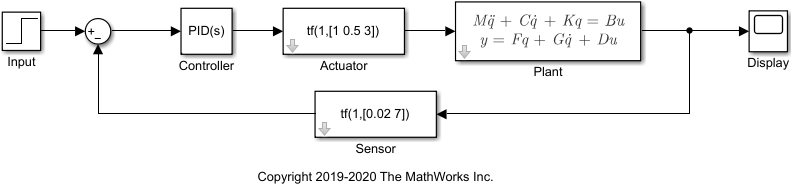
Load the model data contained in linData.mat and open the Simulink model.
load("linData.mat")
mdl = "sparseSimulinkModel";
open_system(mdl);
Next, construct the linearization I/O settings using linio (Simulink Control Design) and linearize the Simulink model.
sys_io(1) = linio(mdl + "/Controller",1,"input");
sys_io(2) = linio(mdl + "/Plant",1,"output");
sys = linearize(mdl,sys_io)
Sparse continuous-time second-order model with 1 outputs, 1 inputs, and 3418 degrees of freedom.
Model Properties

Use "spy" and "showStateInfo" to inspect model structure.
Type "help mechssOptions" for available solver options for this model.
The resultant linearized model sys is a mechss model object with 3418 degrees of freedom, 1 input and 1 output.
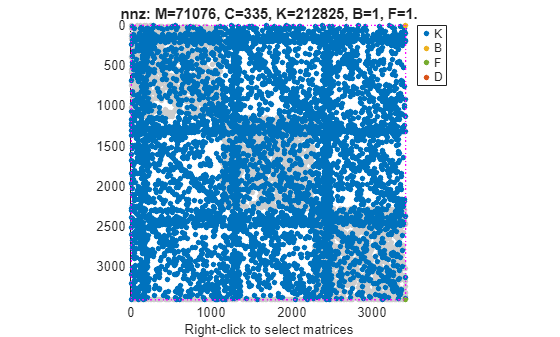
You can use spy to visualize the sparsity of the sparse model. Right-click on the plot to select the matrices to display.
spy(sys)
Use showStateInfo to view the partition information of the sparse second-order model sys.
showStateInfo(sys)
The state groups are:

    Type                               Name                            Size
  -------------------------------------------------------------------------
  Component    sparseSimulinkModel/Actuator/Internal/CT/State-Space       2
  Component     sparseSimulinkModel/Sensor/Internal/CT/State-Space        1
  Component             sparseSimulinkModel/.../Integrator                1
  Component               sparseSimulinkModel/.../Filter                  1
  Component                 sparseSimulinkModel/Plant                  3408
  Signal                                                                  5
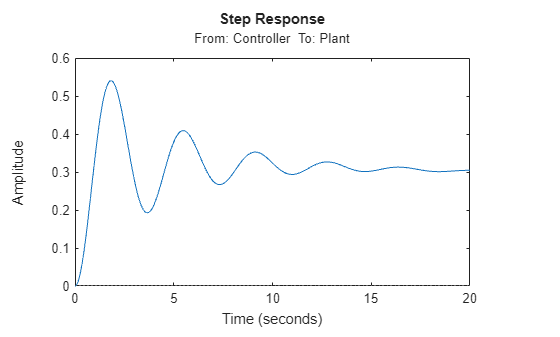
Examine the step response of the sparse second-order model. You must specify the final time or the time vector for sparse models.
t = 0:0.01:20;
stepplot(sys,t)
See Also
linearize (Simulink Control Design) | linio (Simulink Control Design) | mechss | showStateInfo | xsort | spy | Sparse Second
Order

