subscene
R2026bDescription
Add-On Required: This feature requires the 3D Asset Processing Library for MATLAB add-on.
Examples
Create three meshes: a large base, a medium platform, and a small block.
faces = [1 2 3; 1 3 4; 5 7 6; 5 8 7; 1 5 6; 1 6 2; 2 6 7; 2 7 3; 3 7 8; 3 8 4; 4 8 5; 4 5 1];

baseMeshVerts = [0 0 0; 6 0 0; 6 4 0; 0 4 0; 0 0 0.5; 6 0 0.5; 6 4 0.5; 0 4 0.5];
baseMesh = asset3d.Mesh(baseMeshVerts,faces,FaceColors=uint8([70 130 180]));

platformVerts = [0 0 0; 4 0 0; 4 3 0; 0 3 0; 0 0 0.6; 4 0 0.6; 4 3 0.6; 0 3 0.6];
platformMesh = asset3d.Mesh(platformVerts,faces,FaceColors=uint8([80 180 80]));

blockVerts = [0 0 0; 1.5 0 0; 1.5 1.5 0; 0 1.5 0; 0 0 0.8; 1.5 0 0.8; 1.5 1.5 0.8; 0 1.5 0.8];
blockMesh = asset3d.Mesh(blockVerts,faces,FaceColors=uint8([200 80 80]));
Create a scene and add meshes in this parent-child hierarchy: base > platform > block.
scene = asset3d.Scene;

Tplatform = eye(4);
Tplatform(1:3,4) = [1; 0.5; 0.5];

Tblock = eye(4);
Tblock(1:3,4) = [1.25; 0.75; 0.6];

addMesh(scene,baseMesh,Name="base_slab",NodeName="base")
addMesh(scene,platformMesh,Name="platform",NodeName="middle",ParentNodeName="base",Transform=Tplatform)
addMesh(scene,blockMesh,Name="block",NodeName="top",ParentNodeName="middle",Transform=Tblock)
Display the scene graph to inspect the hierarchy.
dispGraph(scene)
world
    └── base [Mesh: 12 faces]
        └── middle [Mesh: 12 faces]
            └── top [Mesh: 12 faces]
Flatten the scene into a single mesh and display the mesh.
concatenatedMesh = flatten(scene)
concatenatedMesh =
  Mesh with properties:

         Vertices: [24×3 double]
            Faces: [36×3 double]
      FaceNormals: [36×3 double]
    VertexNormals: [24×3 double]
           UpAxis: "Z"

           Bounds: [2×3 double]
         Centroid: [2.9067 1.9534 0.4987]
          Extents: [6 4 1.4000]
             Area: 99.7000
           Volume: 21.0000
     IsWatertight: 1

       FaceColors: [36×4 uint8]
     VertexColors: []
               UV: [0×2 double]
         Material: []
Display both the scene and the concatenated mesh. The figures are identical because flatten combines all meshes into one while preserving their spatial arrangement.
figure
subplot(1,2,1)
patch(scene,EdgeColor="k")
axis equal
title("Scene")
subplot(1,2,2)
patch(concatenatedMesh,EdgeColor="k")
axis equal
title("Concatenated Mesh")
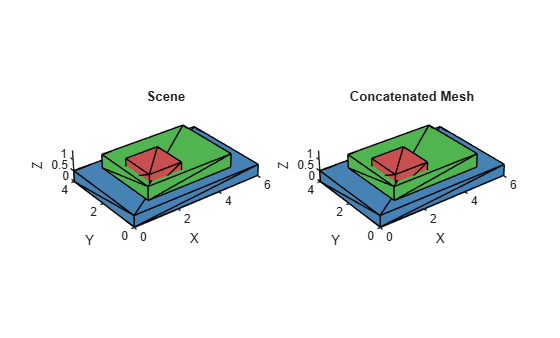
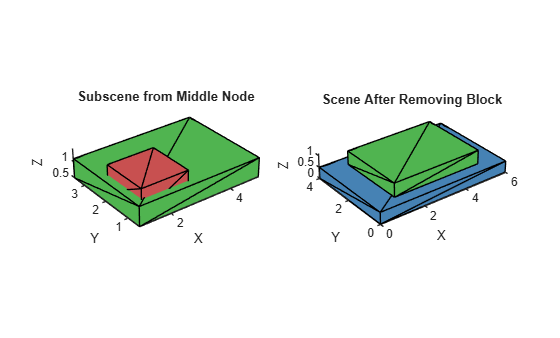
Extract the "middle" node as a subscene. Because "top" is a child of "middle", the subscene includes both the platform and the block.
middleScene = subscene(scene,"middle");Remove the "block" mesh from the original scene.
removeMesh(scene,"block")Display the extracted subscene and the scene after removing the block.
figure
subplot(1,2,1)
patch(middleScene,EdgeColor="k")
axis equal
title("Subscene from Middle Node")
subplot(1,2,2)
patch(scene,EdgeColor="k")
axis equal
title("Scene After Removing Block")
Input Arguments
Output Arguments
Version History
Introduced in R2026b
See Also
Scene | flatten | addMesh | removeMesh | dispGraph

