Trajectory
Description
Add-On Required: This feature requires the Scenario Builder for Automated Driving Toolbox add-on.
The Trajectory object
creates a trajectory using timestamps and waypoints.
Creation
Syntax
Description
creates a trajectory object, trajectory = scenariobuilder.Trajectory(timestamps,x,y,z)trajectory, using the specified timestamps
timestamps and the corresponding xyz-coordinates
of waypoints. x, y, and z
specify the first, second, and third columns of the Position property,
respectively.
creates a trajectory object, trajectory = scenariobuilder.Trajectory(timestamps,waypoints)trajectory, using the specified timestamps
timestamps and the corresponding waypoints
waypoints. The waypoints argument specifies
the Position property.
sets writable properties using one or more name-value arguments, in addition to any
combination of input arguments from the previous syntaxes. For example,
trajectory = scenariobuilder.Trajectory(___,Name=Value)Attributes=attributes specifies the optional trajectory attributes
attributes.
Input Arguments
Timestamps of the waypoint data, specified as an N-element
numeric column vector, an N-element datetime array, or an N-element duration array. N is the number of timestamps. Each
element in the timestamps argument specifies the time at which
the corresponding waypoint data was collected. If you specify an
N-element numeric column vector, units must be in seconds.
When you initialize the object with timestamp and waypoint data, the object arranges the data by the input timestamps in increasing order.
This argument sets the Timestamps property.
x-coordinates of waypoints in the world coordinate system in ENU (East-North-Up) frame of reference, specified as an N-element numeric column vector. N is the number of timestamps. Units are in meters.
This argument sets the first column of Position property.
Data Types: single | double
y-coordinates of waypoints in the world coordinate system in ENU frame of reference, specified as an N-element numeric column vector. N is the number of timestamps. Units are in meters.
This argument sets the second column of Position property.
Data Types: single | double
z-coordinates of waypoints in the world coordinate system in ENU frame of reference, specified as an N-element numeric column vector. N is the number of timestamps. Units are in meters.
This argument sets the third column of Position property.
Data Types: single | double
Trajectory waypoints, specified as a real-valued N-by-3 matrix. N is the number of waypoints. Each row represents the x-, y-, and z-coordinates of a waypoint.
Waypoints are in the world coordinate system in ENU frame of reference. Units are in meters.
This argument sets the Position property.
Data Types: single | double
Name-Value Arguments
Specify optional pairs of arguments as
Name1=Value1,...,NameN=ValueN, where Name is
the argument name and Value is the corresponding value.
Name-value arguments must appear after other arguments, but the order of the
pairs does not matter.
Example:
scenariobuilder.Trajectory(Name="Trajectory1") specifies the name of
the trajectory object as "Trajectory1".
Name of the trajectory object, specified as a string scalar or character vector.
This argument sets the Name property.
Data Types: char | string
Orientation angles at each waypoint, specified as a real-valued N-by-3 matrix. N is the number of waypoints. Each row specifies the Euler rotation angles relative to the z-, y-, and x-axes of the corresponding waypoint in the form [yaw pitch roll].
Orientations are in the local coordinate system. Units are in radians.
This argument sets the Orientation property.
Note
If you do not specify the Orientation name-value
argument, by default, the Trajectory object computes the value of the Orientation property by using the value of the
Position property.
Data Types: double
Anchor of trajectory, specified as a three-element row vector.
For a trajectory created from GPS data, the LocalOrigin
value defines the anchor for the local coordinate system, specified as a
three-element row vector of the form [latitude
longitude
altitude]. Units of latitude and longitude are in degrees, and
units of altitude are in meters.
For a trajectory created from sensor data other than GPS data, the
LocalOrigin value defines the origin of the local Cartesian
coordinate system, specified as a three-element row vector of the form
[x
y
z]. Units are in meters.
This argument sets the LocalOrigin property.
Data Types: single | double
Reference time of the trajectory, specified as a nonnegative scalar. The data
type of the TimeOrigin value and the data type of the
Timestamps property must be the same. If you specify a
nonnegative scalar, units must be in seconds.
The trajectory object subtracts the TimeOrigin value from
all timestamps and updates the Timestamps property with the
subtracted timestamps.
This argument sets the TimeOrigin property.
Data Types: single | double
Optional trajectory attributes, specified as an N-by-1 array. N is the number of timestamps. Each element in the array contains additional trajectory attributes recorded at the corresponding timestamp.
This argument sets the Attributes property.
Properties
Name of the trajectory object, specified as a string scalar or character vector.
Data Types: char | string
This property is read-only.
Number of waypoints in the trajectory data, represented as a nonnegative integer.
Data Types: uint8 | uint16 | uint32 | uint64
This property is read-only.
Time duration for which the trajectory data was acquired, represented as a nonnegative scalar. Units are in seconds.
Data Types: double
This property is read-only.
Mean sample rate of the trajectory waypoints, represented as a nonnegative scalar. This value defines the number of waypoints recorded per second. Units are in hertz.
Data Types: double
This property is read-only.
Mean sample time of the trajectory waypoints, represented as a nonnegative scalar. This value defines the mean time interval between two consecutive waypoint samples. Units are in seconds.
Data Types: double
This property is read-only after object creation. To set this property, use the
timestamps
argument when calling the scenarioBuilder.Trajectory
function.
Timestamps of the waypoint data, represented as an N-element
numeric column vector, an N-element datetime array, or an N-element duration array. N is the number of timestamps. Each
element in the Timestamps property specifies the time at which the
waypoint data was collected. If you specify an N-element numeric
column vector, units must be in seconds.
When you initialize the object with timestamps and waypoint data, the object arranges the data in increasing order of the input timestamps.
This property is read-only after object creation. To set this property, use the
waypoints
argument, or x, y, and z
arguments when calling the scenarioBuilder.Trajectory
function.
Position of each waypoint, represented as a real-valued N-by-3 matrix. N is the number of waypoints. Each row represents the x-, y-, and z-coordinates of a waypoint.
Position of waypoints are in the world coordinate system in ENU frame of reference. Units are in meters.
Data Types: single | double
Orientation angles at each waypoint, specified as a real-valued N-by-3 matrix. N is the number of waypoints. Each row specifies the Euler rotation angles relative to the z-, y-, and x-axes of the corresponding waypoint in the form [yaw pitch roll].
Orientations are in the local coordinate system. Units are in radians.
Note
If you do not specify the Orientation name-value argument,
by default, the Trajectory object computes the value of the Orientation property by using the value of the
Position property.
Data Types: double
This property is read-only.
Velocity at each waypoint, represented as a real-valued N-by-3 matrix. N is the number of waypoints. Each row represents the velocity in the x-, y-, and z-directions at the corresponding waypoint. Units are in meters per second.
Data Types: double
This property is read-only.
Course angle at each waypoint, represented as a real-valued N-element column vector. N is the number of waypoints. Each row represents the course angle at a waypoint. Units are in degrees.
Data Types: double
This property is read-only.
Ground speed at each waypoint, represented as a real-valued N-element column vector. N is the number of waypoints. Each row represents the ground speed at a waypoint. Units are in meters per second.
Data Types: double
This property is read-only.
Acceleration at each waypoint, represented as a real-valued N-by-3 matrix. N is the number of waypoints. Each row represents the acceleration relative to the x-, y-, and z-axes of the corresponding waypoint.
Accelerations are in the local coordinate system. Units are in meters per second squared.
Data Types: double
This property is read-only.
Angular velocity at each waypoint, represented as a real-valued N-by-3 matrix. N is the number of waypoints. Each row represents the angular velocities relative to the x-, y-, and z-axes of the corresponding waypoint.
Angular velocities are in the local coordinate system. Units are in radian per second squared.
Data Types: double
Anchor of trajectory, specified as a three-element row vector.
For a trajectory created from GPS data, the LocalOrigin value
defines the anchor for the local coordinate system, specified as a three-element row
vector of the form [latitude
longitude
altitude]. Units of latitude and longitude are in degrees, and units
of altitude are in meters.
For a trajectory created from sensor data other than GPS data, the
LocalOrigin value defines the origin of the local Cartesian
coordinate system, specified as a three-element row vector of the form
[x
y
z]. Units are in meters.
Data Types: single | double
Reference time of the trajectory, specified as a nonnegative scalar. The data type
of the TimeOrigin value and the data type of the
Timestamps property must be the same. If you specify a
nonnegative scalar, units must be in seconds.
The trajectory object subtracts the TimeOrigin value from all
timestamps and updates the Timestamps property with the subtracted
timestamps. By default, the value of the TimeOrigin property is the
first value of the input timestamps you specify timestamps(1).
When you use the normalizeTimestamps object function for a Trajectory
object, the object function updates the TimeOrigin property of the
Trajectory object with the subtracted timestamp value used for
normalization.
Data Types: single | double
Optional trajectory attributes, specified as an N-by-1 array. N is the number of timestamps. Each element in the array contains additional trajectory attributes recorded at the corresponding timestamp.
Object Functions
add | Add waypoints to trajectory object |
remove | Remove data from sensor data object |
read | Read data from sensor data object |
copy | Create copy of sensor data object |
crop | Crop data from sensor data object |
synchronize | Synchronize sensor data with reference sensor information |
plot | Plot trajectory data |
writeCSV | Write trajectory data into CSV file |
distance | Compute total traveled distance of trajectory data |
normalizeTimestamps | Normalize timestamps of sensor data object |
smooth | Smooth trajectory data |
exportToDrivingScenario | Export trajectory to driving scenario |
exportToRoadRunner | Export trajectory to RoadRunner |
adjustHeight | Adjust height of waypoints in trajectory object to match road height |
convertTimestamps | Convert timestamp format of sensor data object |
Examples
Load recorded GPS trajectory data into the workspace.
load("recordedGPSData.mat","X","Y","Z","timestamps")
Create a trajectory object by using the loaded timestamps and xyz-coordinates.
traj1 = scenariobuilder.Trajectory(timestamps,X,Y,Z)
traj1 =
Trajectory with properties:
Name: ''
NumSamples: 392
Duration: 19.5498
SampleRate: 20.0513
SampleTime: 0.0500
Timestamps: [392×1 double]
Position: [392×3 double]
Orientation: [392×3 double]
Velocity: [392×3 double]
Course: [392×1 double]
GroundSpeed: [392×1 double]
Acceleration: [392×3 double]
AngularVelocity: [392×3 double]
LocalOrigin: [0 0 0]
TimeOrigin: 0
Attributes: []
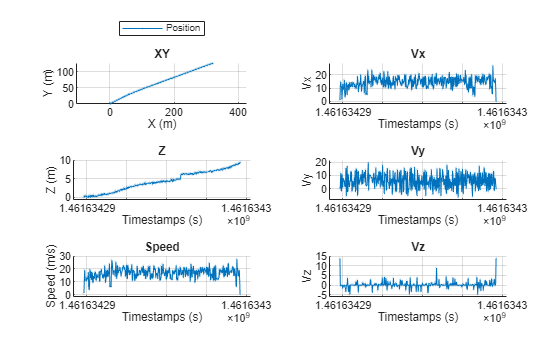
Plot the trajectory object.
plot(traj1,ShowZ=true,ShowSpeed=true,ShowVelocity=true,LineWidth=0.1,MarkerSize=1)
Combine the xyz-coordinates into a waypoint matrix, and create another trajectory by using the timestamps and waypoints.
waypoints = [X Y Z]; traj2 = scenariobuilder.Trajectory(timestamps,waypoints)
traj2 =
Trajectory with properties:
Name: ''
NumSamples: 392
Duration: 19.5498
SampleRate: 20.0513
SampleTime: 0.0500
Timestamps: [392×1 double]
Position: [392×3 double]
Orientation: [392×3 double]
Velocity: [392×3 double]
Course: [392×1 double]
GroundSpeed: [392×1 double]
Acceleration: [392×3 double]
AngularVelocity: [392×3 double]
LocalOrigin: [0 0 0]
TimeOrigin: 0
Attributes: []
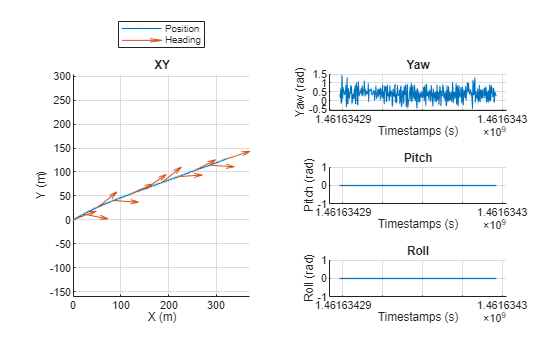
Plot the trajectory object.
plot(traj2,ShowHeading=true,ShowOrientation=true,LineWidth=0.1,MarkerSize=1)
Version History
Introduced in R2024bYou can use the new convertTimestamps object function to convert the timestamps of a sensor data
object to a different format.
You can use the new adjustHeight object function to adjust the
height of the waypoints in the trajectory object to match the road height.
The default value of the TimeOrigin property is now set to the
first value of the input timestamps you specify timestamps(1).
Previously, the default value was set to 0.
See Also
MATLAB Command
You clicked a link that corresponds to this MATLAB command:
Run the command by entering it in the MATLAB Command Window. Web browsers do not support MATLAB commands.
Select a Web Site
Choose a web site to get translated content where available and see local events and offers. Based on your location, we recommend that you select: .
You can also select a web site from the following list
How to Get Best Site Performance
Select the China site (in Chinese or English) for best site performance. Other MathWorks country sites are not optimized for visits from your location.
Americas
- América Latina (Español)
- Canada (English)
- United States (English)
Europe
- Belgium (English)
- Denmark (English)
- Deutschland (Deutsch)
- España (Español)
- Finland (English)
- France (Français)
- Ireland (English)
- Italia (Italiano)
- Luxembourg (English)
- Netherlands (English)
- Norway (English)
- Österreich (Deutsch)
- Portugal (English)
- Sweden (English)
- Switzerland
- United Kingdom (English)