dsp.MovingAverage
R2026bMoving average
Description
The dsp.MovingAverage
System object™ computes the moving average of the input signal along each channel independently
over time. The object uses either the sliding window method or the exponential weighting
method to compute the moving average. In the sliding window method, a window of specified
length moves over the data sample by sample, and the block computes the average over the data
in the window. To change the length of the sliding window during
simulation, pass the window length as an input to the object along with the data input. For
an example, see Tune Window Length During Simulation. (since R2026a) In the
exponential weighting method, the object multiplies the data samples with a set of weighting
factors. The average is computed by summing the weighted data. For more details on these
methods, see Algorithms.
The dsp.MovingAverage object and the movmean function both compute the moving average of the input signal. However,
the object can process large streams of real-time data and handle system states automatically.
The function performs one-time computations on data that is readily available and cannot
handle system states. For a comparison between the two, see System Objects vs MATLAB Functions.
To compute the moving average of the input:
Create the
dsp.MovingAverageobject and set its properties.Call the object with arguments, as if it were a function.
To learn more about how System objects work, see What Are System Objects?
Creation
Syntax
Description
movAvg = dsp.MovingAveragemovAvg, using the default properties.
movAvg = dsp.MovingAverage(Len)WindowLength property to Len.
movAvg = dsp.MovingAverage(Len,Overlap)WindowLength property to Len and the
OverlapLength property to Overlap.
movAvg = dsp.MovingAverage(PropertyName=Value)ForgettingFactor to
0.2.
Properties
Usage
Description
Input Arguments
Output Arguments
Object Functions
To use an object function, specify the
System object as the first input argument. For
example, to release system resources of a System object named obj, use
this syntax:
release(obj)
Examples
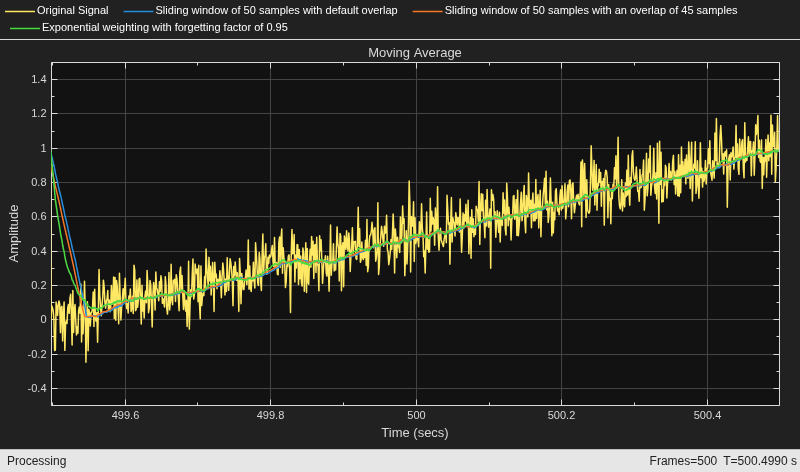
Compute the moving average of a noisy ramp signal using the dsp.MovingAverage object.
Initialization
Set up movavgWindow, movavgWindow_overlap, and movavgExp objects. movavgWindow uses the sliding window method with a window length of 50 samples and a default overlap length of 49 samples, which is one sample less than the specified window length. movavgWindow_overlap uses a window length of 50 samples and an overlap length of 45 samples. movavgExp uses the exponentially weighting method with a forgetting factor of 0.95.
Create a time scope for viewing the output.
FrameLength = 1001;
Fs = 1000;
movavgWindow = dsp.MovingAverage(50);
movavgWindow_overlap = dsp.MovingAverage(50,45);
movavgExp = dsp.MovingAverage(Method="Exponential weighting",...
    ForgettingFactor=0.95);
scope  = timescope(SampleRate=[Fs, Fs, Fs/(50-45), Fs],...
    TimeSpanOverrunAction="Scroll",...
    ShowGrid=true,...
    YLimits=[-0.5 1.5]);
title = "Moving Average";
scope.Title = title;
scope.ChannelNames = {"Original Signal",...
    "Sliding window of 50 samples with default overlap",...
    "Sliding window of 50 samples with an overlap of 45 samples",...
    "Exponential weighting with forgetting factor of 0.95"};
Compute the Average
Generate a ramp signal with an amplitude of 1 and a time span of 2 seconds. Apply the sliding window average and exponentially weighted average to the ramp. View the output in the time scope.
for i = 1:500
    t = (0:0.001:1)';
    unitstep = t>=0;
    ramp = t.*unitstep;
    x = ramp + 0.1 * randn(FrameLength,1);
    y1 = movavgWindow(x);
    y2 = movavgWindow_overlap(x);
    y3 = movavgExp(x);
    scope(x,y1,y2,y3);
end
Since R2026a
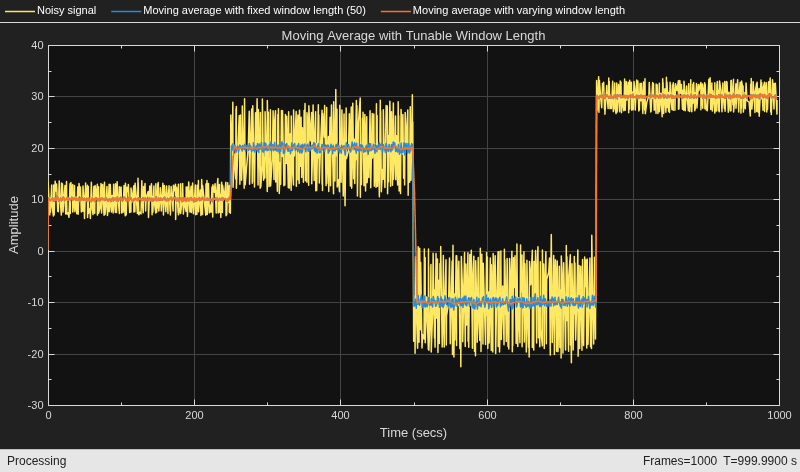
Create two dsp.MovingAverage objects, one with a fixed window length of 50, and the other whose window length varies with the input noise power. Compute the moving average of a noisy square wave signal using these objects. Initialize a time scope to view and compare the moving average outputs.
FrameLength = 100;
Fs = 100;
movAvgFixedWL = dsp.MovingAverage(WindowLength=50);
movavgWL = dsp.MovingAverage(WindowLengthSource="Input port",MaxWindowLength=1000);
scope  = timescope(SampleRate=Fs,...
    TimeSpanOverrunAction="Scroll",...
    TimeSpanSource="Property",...
    TimeSpan=1000,...
    ShowGrid=true,...
    BufferLength=1e7,...
    YLimits=[-30,40]);
title = "Moving Average with Tunable Window Length";
scope.Title = title;
scope.ChannelNames = {"Noisy signal",...
    "Moving average with fixed window length (50)",...
    "Moving average with varying window length"};
Create a noisy square wave signal. The variance of the noise changes every time the signal amplitude changes. Vary the window length of one of the dsp.MovingAverage objects such that it is directly proportional to the noise power. Higher the noise power, greater is the window length.
Compute the moving average of the noisy square wave signal with a fixed window length of 50 and with the varying window length. Compare the two outputs in the time scope.
When the window length is large, the moving average output is smooth even though there is more noise.
count = 1;
noisepower =  [1 7 10 1];
signalBase = 10*[1 2 -1 3];
for index = 1:length(noisepower)
    np = noisepower(index);
    yexp = signalBase(index)*ones(FrameLength,1);
    WL = 50*np;
    for i = 1:250
        x = yexp+sqrt(np)*randn(FrameLength,1);
        y1 = movAvgFixedWL(x);
        y2 = movavgWL(x,WL);
        scope(x,y1,y2)
    end
end
Algorithms
References
[1] Bodenham, Dean. “Adaptive Filtering and Change Detection for Streaming Data.” PH.D. Thesis. Imperial College, London, 2012.
Extended Capabilities
Version History
Introduced in R2016bSee Also
Functions
Objects
dsp.MovingRMS|dsp.MovingMaximum|dsp.MovingMinimum|dsp.MovingStandardDeviation|dsp.MovingVariance|dsp.MedianFilter|powermeter

