Customize Default Naming Rule of Generated Entry-Point C Functions in Subcomponent Models
R2026bEntry-point functions are functions in the generated model code that interface with your external code. The example Customize Generated Entry-Point C Function Names explains and demonstrates how to customize the names of generated entry-point functions. This is a supplementary example, showing an additional option for customizing entry-point function names in code generated from models configured for subcomponent deployment type.
Open and Explore Model
Open the model EntryPoints.
epModel = "EntryPoints";
open_system(epModel)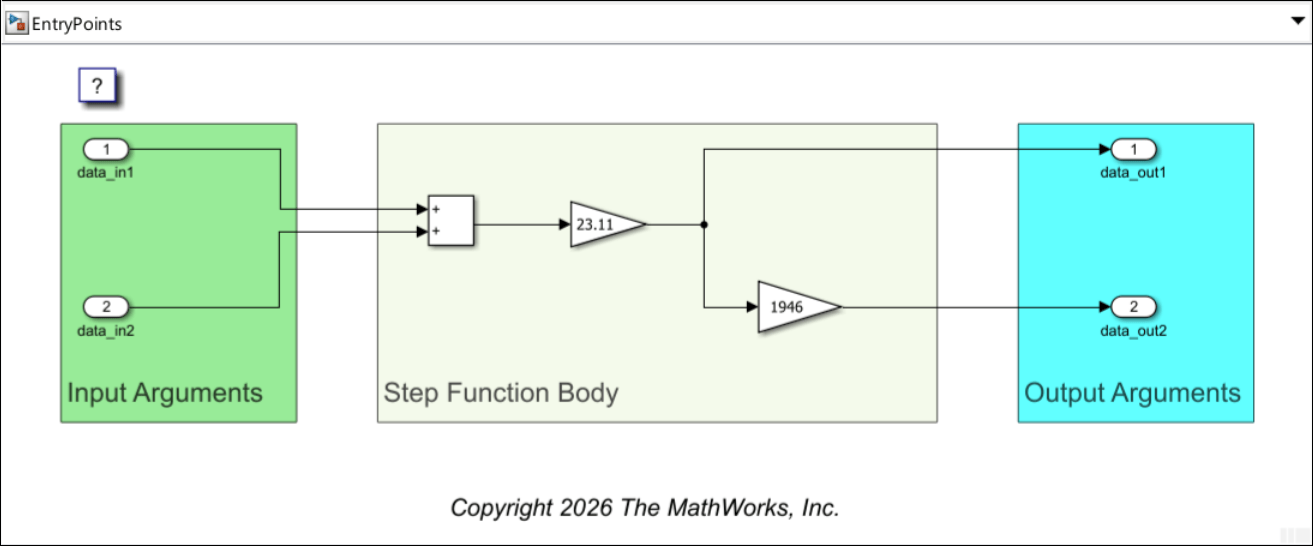
EntryPoints is a nonreusable, single-rate single-tasking model, configured to use the ERT system target file.
Customize Default Naming Rule for Generated Entry-Point C Functions in Subcomponent Models
The example Customize Generated Entry-Point C Function Names demonstrates how you can customize the names of generated entry-point functions directly or by using function customization templates. The names of functions you do not use any of these option with are created according to a default naming rule. When your model is configured for component deployment type, the default naming rule is constant, and you cannot customize it. In contrast, when the model is configured for subcomponent deployment type, the default naming rule is customizable, as shown in this example.
Configure the model for subcomponent deployment type:
Open the Embedded Coder app.
In the Simulink Toolstrip, select the C Code tab.
In the Prepare section, select Automatic > Subcomponent.
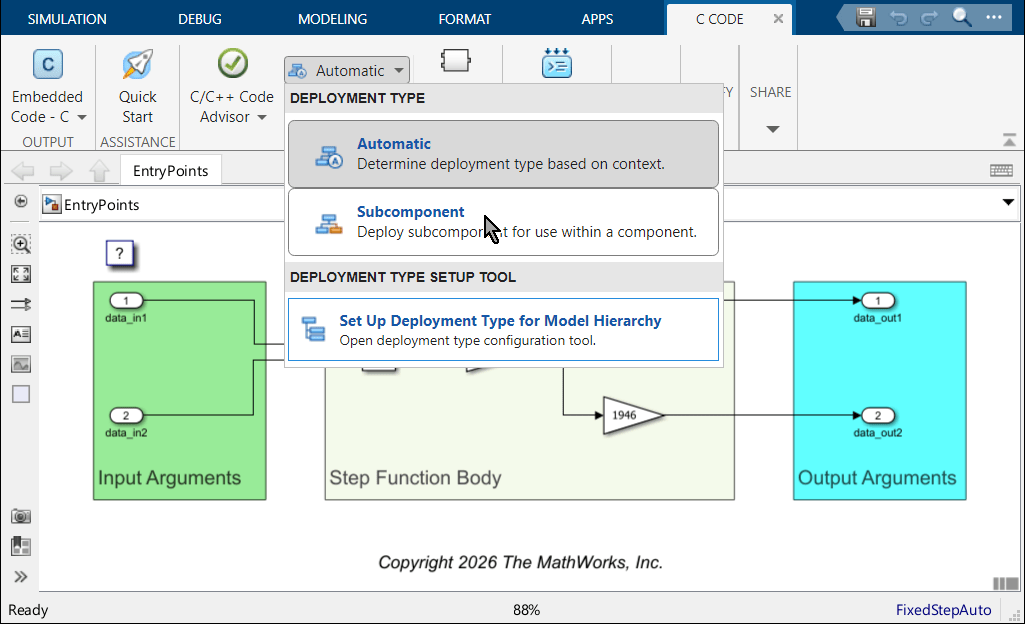
Alternatively, you can specify the deployment type programmatically:
Get a handle to the code mappings object of the model and store it in the variable
codeMapObj.Use the
setDeploymentTypefunction with the code mappings object to specify the deployment type asSubcomponent.
codeMapObj = coder.mapping.api.get(epModel);
setDeploymentType(codeMapObj,"Subcomponent")
Specify Default Naming Rule for Generated Entry-Point Function Names
When the model is configured for subcomponent deployment type, the default naming rule for generated entry-point function names is specified as the value of the configuration parameter Subsystem methods. You specify its value as a combination of valid C language characters and the macros $F, $H, $M, $N, $R, and $U. For the definition of each macro, see Subsystem methods.
Open the Configure Parameters dialog box and navigate to Code Generation > Identifiers.
On the right, locate the parameter Subsystem methods and update its value to
subName_$F$R$M.Click Apply.
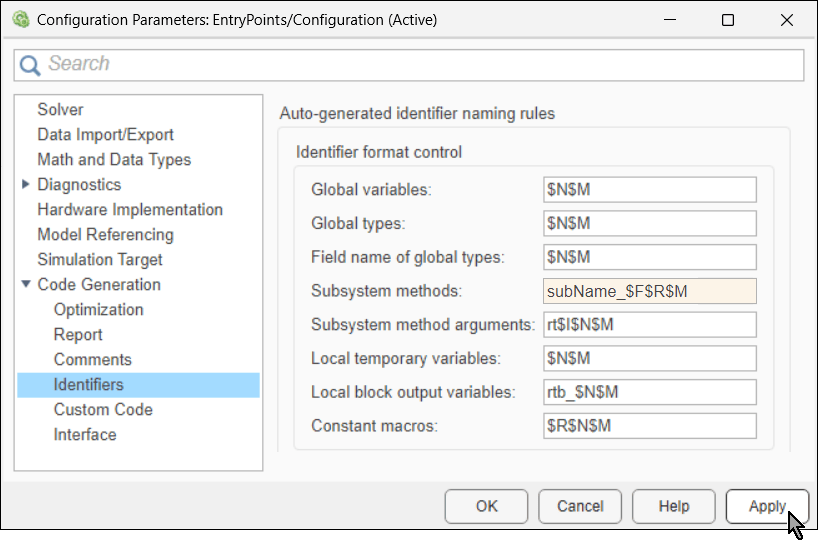
Alternatively, you can use the function set_param to programmatically specify the value of this configure parameter:
set_param(epModel,CustomSymbolStrFcn="subName_$F$R$M")
This is how the macros are used in this naming rule:
The macro
$Fis replaced by the identifier of the function, such asinitialize. The step function of a model configured for subcomponent deployment type has no identifier, so the code generator ignores the macro$Fwhen it creates its name in these settings.The macro
$Ris replaced by the name of the model.The macro
$Mis replaced by an auto generated name-mangling text, required to avoid naming collisions. If there is no name collision, this macro is ignored.
In the Simulink Toolstrip, select the C Coder tab. Then, in the Generate Code section, click Generate Code  to generate code from the model.

Alternatively, use the slbuild function to programmatically generate model code. Use the evalc function to suppress the output of slbuild.
evalc("slbuild(epModel)");
In the Code pane, navigate to the generated header file EntryPoints.h and examine the declaration of the model entry-point functions.
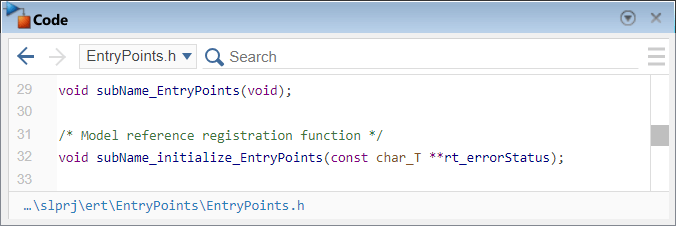
The function names adhere to the naming rules you specified in the configuration parameter Subsystem methods.
See Also
Subsystem methods | setDeploymentType | set_param | slbuild | evalc

