Coding and Minimizing a Fitness Function Using the Genetic Algorithm
R2026bThis example shows how to create and minimize a fitness function for the genetic algorithm solver ga using three techniques:
Basic
Including additional parameters
Vectorized for speed
Basic Fitness Function
The basic fitness function is Rosenbrock's function, a common test function for optimizers. The function is a sum of squares:
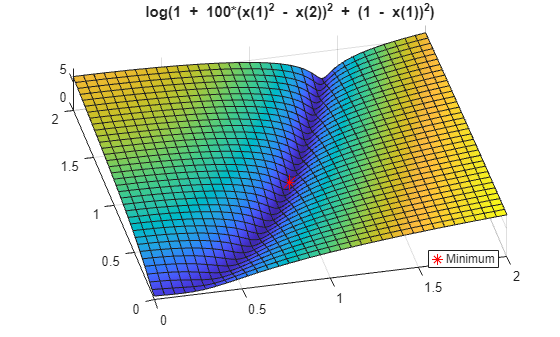
The function has a minimum value of zero at the point [1,1]. Because the Rosenbrock function is quite steep, plot the logarithm of one plus the function.
fsurf(@(x,y)log(1 + 100*(x.^2 - y).^2 + (1 - x).^2),[0,2])
title("log(1 + 100*(x(1)^2 - x(2))^2 + (1 - x(1))^2)")
view(-13,78)
hold on
h1 = plot3(1,1,0.1,"r*",MarkerSize=12);
legend(h1,"Minimum",Location="best");
hold off
Fitness Function Code
The simple_fitness function file implements Rosenbrock's function.
function y = simple_fitness(x)
%SIMPLE_FITNESS fitness function for GA

%   Copyright 2004 The MathWorks, Inc.

  y = 100 * (x(1)^2 - x(2)) ^2 + (1 - x(1))^2;
end
A fitness function must take one input x where x is a row vector with as many elements as number of variables in the problem. The fitness function computes the value of the function and returns that scalar value in its one return argument y.
Minimize Using ga
To minimize the fitness function using ga, pass a function handle to the fitness function as well as the number of variables in the problem. To have ga examine the relevant region, include bounds -3 <= x(i) <= 3. Pass the bounds as the fifth and sixth arguments after numberOfVariables. For ga syntax details, see ga.
ga is a random algorithm. For reproducibility, set the random number stream.
rng default % For reproducibility
FitnessFunction = @simple_fitness;
numberOfVariables = 2;
lb = [-3,-3];
ub = [3,3];
[x,fval] = ga(FitnessFunction,numberOfVariables,[],[],[],[],lb,ub)
ga stopped because it exceeded options.MaxGenerations.
x = 1×2

    1.5083    2.2781
fval =
0.2594
The x returned by the solver is the best point in the final population computed by ga. The fval is the value of the function simple_fitness evaluated at the point x. ga did not find an especially good solution. For ways to improve the solution, see Effects of Genetic Algorithm Options.
Fitness Function with Additional Parameters
Sometimes your fitness function has extra parameters that act as constants during the optimization. For example, a generalized Rosenbrock's function can have extra parameters representing the constants 100 and 1:
a and b are parameters to the fitness function that act as constants during the optimization (they are not varied as part of the minimization). The parameterized_fitness.m file implements this parameterized fitness function.
function y = parameterized_fitness(x,p1,p2)
%PARAMETERIZED_FITNESS fitness function for GA

%   Copyright 2004 The MathWorks, Inc.

y = p1 * (x(1)^2 - x(2)) ^2 + (p2 - x(1))^2;
end
Minimize Using Additional Parameters
Use an anonymous function to capture the values of the additional arguments, namely, the constants a and b. Create a function handle FitnessFunction to an anonymous function that takes one input x, and calls parameterized_fitness with x, a, and b. The anonymous function contains the values of a and b that exist when the function handle is created.
a = 100;
b = 1; % define constant values
FitnessFunction = @(x) parameterized_fitness(x,a,b);
[x,fval] = ga(FitnessFunction,numberOfVariables,[],[],[],[],lb,ub)
ga stopped because it exceeded options.MaxGenerations.
x = 1×2

    1.3198    1.7434
fval =
0.1025
Vectorized Fitness Function
To gain speed, vectorize your fitness function. A vectorized fitness function computes the fitness of a collection of points at once, which generally saves time over evaluating these points individually. To write a vectorized fitness function, have your function accept a matrix, where each matrix row represents one point, and have the fitness function return a column vector of fitness function values.
To change the parameterized_fitness function file to a vectorized form:
Change each variable
x(i)tox(:,i), meaning the column vector of variables corresponding tox(i).Change each vector multiplication
*to.*and each exponentiation^to.^indicating that the operations are element-wise. There are no vector multiplications in this code, so simply change the exponents.
function y = vectorized_fitness(x,p1,p2)
%VECTORIZED_FITNESS fitness function for GA

%   Copyright 2004-2010 The MathWorks, Inc.

y = p1 * (x(:,1).^2 - x(:,2)).^2 + (p2 - x(:,1)).^2;
end
This vectorized version of the fitness function takes a matrix x with an arbitrary number of points, meaning and arbitrary number of rows, and returns a column vector y with the same number of rows as x.
Tell the solver that the fitness function is vectorized in the "UseVectorized" option.
options = optimoptions(@ga,UseVectorized=true);
Include options as the last argument to ga.
VFitnessFunction = @(x) vectorized_fitness(x,100,1);
[x,fval] = ga(VFitnessFunction,numberOfVariables,[],[],[],[],lb,ub,[],options)
ga stopped because it exceeded options.MaxGenerations.
x = 1×2

    1.6219    2.6334
fval =
0.3876
What is the difference in speed? Time the optimization both with and without vectorization.
tic
[x,fval] = ga(VFitnessFunction,numberOfVariables,[],[],[],[],lb,ub,[],options);
ga stopped because it exceeded options.MaxGenerations.
v = toc;
tic
[x,fval] = ga(FitnessFunction,numberOfVariables,[],[],[],[],lb,ub);
ga stopped because it exceeded options.MaxGenerations.
nv = toc;
fprintf("Using vectorization took %f seconds. No vectorization took %f seconds.\n",v,nv)
Using vectorization took 0.119573 seconds. No vectorization took 0.131057 seconds.
In this case, the improvement by vectorization was not great, because computing the fitness function takes very little time. However, for more time-consuming fitness functions, vectorization can be helpful. See Vectorize the Fitness Function.

