regions
R2026bAccess polyshape regions
Description
Examples
Compute a polygon with two solid regions. Then, create a vector whose elements are a single region of the polygon.
P = [0 0; 0 2; 2 2;
     2 0; NaN NaN; 0.5 0.5;
     0.5 1.5; 1.5 1.5; 1.5 0.5;
     NaN NaN; 3 0.5; 3.5 1.5;
     4 0.5; NaN NaN; 3.25 0.6;
     3.75 0.6; 3.5 1];
polyin = polyshape(P);
plot(polyin)
xlim([-0.5 4.5])
ylim([-0.5 2.5])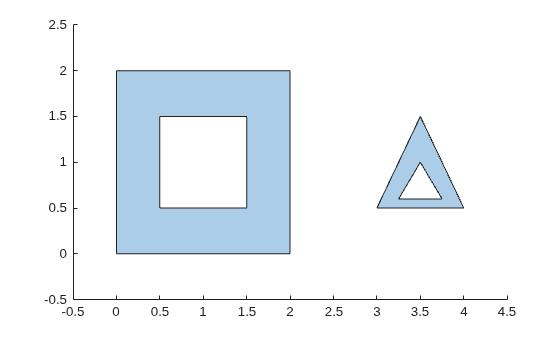
polyout = regions(polyin)
polyout =
  2×1 polyshape array with properties:

    Vertices
    NumRegions
    NumHoles
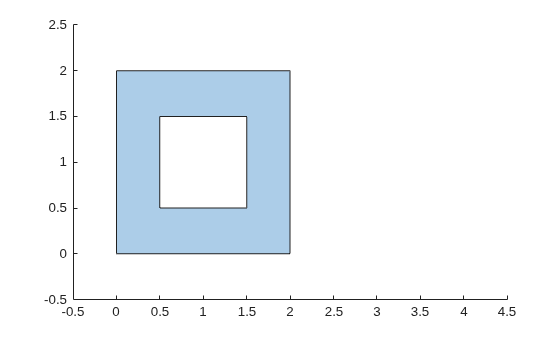
plot(polyout(1))
xlim([-0.5 4.5])
ylim([-0.5 2.5])
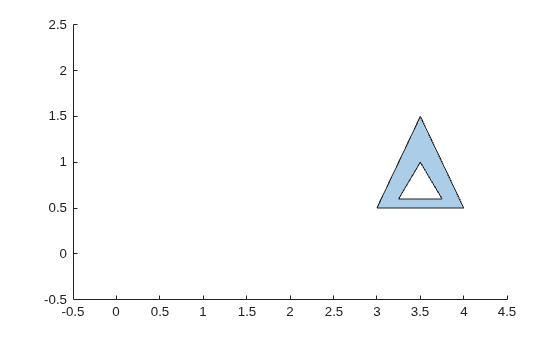
plot(polyout(2))
xlim([-0.5 4.5])
ylim([-0.5 2.5])
Input Arguments
Tips
regions checks for regions or holes with zero enclosed area among
the posyshape regions. If the functions detects any such regions or
holes, it issues a warning and removes them from the resulting regions.
Version History
Introduced in R2017b
See Also
boundary | sortregions | polyshape | holes

