stlwrite
Create STL file from triangulation
Description
stlwrite(
also specifies a file format for the written file. TR,filename,fileformat)fileformat can
be either 'binary' (default) or 'text'.
stlwrite(___,
specifies additional options for writing to the STL file using one or more
Name,Value)Name,Value pair arguments for either of the previous
syntaxes. For example,
stlwrite(TR,'stlbinary','Attribute',attributes) also writes a
uint16 vector of attributes for each triangle in
TR.
Examples
Create a triangulation representing two intersecting rings and write the result to an STL file.
To represent the first ring, define a torus surface with the internal radius of 1 and external radius of 5.
R = 5;
r = 1;
angle = linspace(0,2*pi,50);
angle(end) = []; % Omit the repeated point for 0 and 2pi
[theta,omega] = meshgrid(angle,angle);
Define the coordinates x, y, and z to represent a torus.
X = (R+r.*cos(theta)).*cos(omega);
Y = (R+r.*cos(theta)).*sin(omega);
Z = r.*sin(theta);
Create an alphaShape object with an alpha radius of 2.
shp = alphaShape(X(:),Y(:),Z(:),2);
Extract triangulation from the boundary surface of alphaShape. This triangulation represents the first ring.
[tri,xyz] = shp.boundaryFacets;
t1 = triangulation(tri,xyz);
Define the second ring by rotating the triangulation.
t2 = triangulation(tri,xyz*[1 0 0;0 0 1;0 1 0] + [4 0 0]);
Combine the two triangulations.
Points = [t1.Points;t2.Points];
Connectivity = ...
[t1.ConnectivityList;
    t2.ConnectivityList + size(t1.Points,1)];
trCombined = triangulation(Connectivity,Points);
Plot the resulting triangulation.
p = trisurf(trCombined);
p.EdgeAlpha = 0.4;

Create an STL file from the triangulation.
stlwrite(trCombined,"Rings.stl");Create and plot a 2-D triangulation object.
P = [2.5 8.0;
     6.5 8.0;
     2.5 5.0;
     6.5 5.0;
     1.0 6.5;
     8.0 6.5];
T = [5 3 1;
     3 2 1;
     3 4 2;
     4 6 2];
TR = triangulation(T,P);
triplot(TR)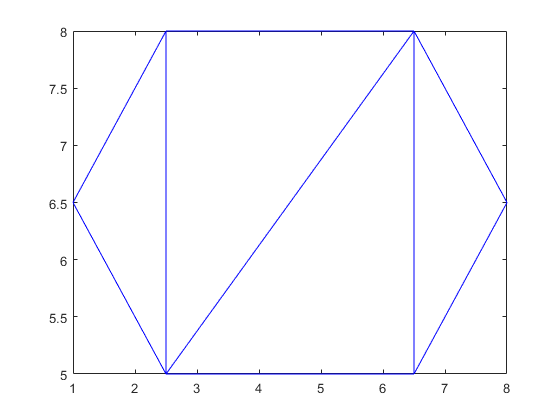
Write the triangulation to a text file named tritext.stl.
stlwrite(TR,"tritext.stl","text")
Input Arguments
Name-Value Arguments
Extended Capabilities
Version History
Introduced in R2018b

