bellhopModel
R2026bDescription
Add-On Required: This feature requires the Underwater Acoustic Channels add-on.
The bellhopModel object provides an interface between MATLAB® and the Bellhop beam tracing model for underwater sound propagation. Configure
Bellhop with parameters calculated in MATLAB. Use the object functions to calculate propagation paths and transmission losses
between underwater sources and receivers with Bellhop. Summarize and visualize the results in
MATLAB.
Creation
Description
creates a
bhModel = bellhopModelbellhopModel object with default property values.
specifies one or more property values using name-value arguments.bhModel = bellhopModel(PropertyName=Value)
Properties
Sound Speed
Underwater sound speeds in meters per second, specified as an M-by-1 positive column vector with at least two rows or an M-by-N positive matrix with at least two rows. M is the number of depth values in the profile. When specified as a matrix, N is the number of range values in the profile.
For more information about the Munk profile, see [1].
Data Types: double
Depths in meters of the underwater sound speed profile, specified as an
M-by-1 real column vector with at least two rows.
M must equal the number of rows in SoundSpeed. A depth of 0 corresponds to a flat sea
surface. Depth is positive toward the sea bottom, with negative values indicating points
above a flat sea surface, such as the crest of a wave.
The limits of SoundSpeedDepth must extend to at least the
minimum depth of SurfaceAltimetryProfile and the maximum
depth of BottomBathymetryProfile if you specify either property. If you specify
sound speeds at depths downward starting from 0 meters in an environment with a non-flat
sea surface, bellhopModel extrapolates from the sound speed at 0 meters
upward to the maximum wave crest of SurfaceAltimetryProfile.
For more information about the Munk profile, see [1].
Data Types: double
Ranges in meters of the underwater sound speed profile, specified as a
1-by-N positive row vector. The object uses
SoundSpeedRange only when SoundSpeed is specified as a matrix. N must equal the
number of columns in SoundSpeed.
Data Types: double
Sound speed interpolation method, specified as one of the values in the table:
| Value | Behavior |
|---|---|
"linear" | One-dimensional linear interpolation. |
"n2-linear" | One-dimensional distance-weighted linear interpolation. |
"pchip" | Shape-preserving piecewise cubic interpolation. |
"cubic-spline" | Cubic spline interpolation. |
"quadrilateral" | Quadrilateral bilinear interpolation. This option is valid only when
|
Data Types: char | string
Sea Bottom
Depths in meters of the sea floor between source and receiver, specified as
"flat" or a two-column positive matrix. When specified as
"flat", the depth for all ranges is the maximum depth specified by
SoundSpeedDepth. When specified as a matrix, specify the first column as
range in meters and the second as sea floor depths in meters.
Data Types: double | char | string
Sea floor reflection coefficients based on sediment type, specified as a scalar or a
two-column complex-valued matrix. When specified as a scalar other than
1 or -1, the scalar value is expanded across
grazing angles 0 degrees through 90 degrees. When specified as a matrix, specify the
first column as the grazing angle in degrees and the second as complex-valued reflection
coefficients.
The object computes the default bottom coefficients using Zoeppritz equations assuming standard fluid-solid interface acoustics between sea water and clayey silt ocean floor.
Data Types: double
Complex Number Support: Yes
Interpolation method for bottom bathymetry, specified as either
"linear" or "curvilinear". Specify
"linear" to use piecewise linear interpolation and
"curvilinear" to use Bellhop's curvilinear interpolation.
Data Types: char | string
Sea Surface
Heights in meters of sea surface between source and receiver, specified as the value
"flat" or a two-column real matrix. When you specify this property
as "flat", the height for all ranges is 0 meters. When you specify
this property as a matrix, specify the first column as range in meters and the second as
sea surface heights in meters.
Data Types: double | char | string
Sea surface reflection coefficients, specified as a scalar or a two-column
complex-valued matrix. When specified as a scalar other than 1 or
-1, the scalar is expanded across grazing angles 0 degrees through
90 degrees. When specified as a matrix, specify the first column as the grazing angle in
degrees and the second as complex-valued reflection coefficients.
Data Types: double
Complex Number Support: Yes
Interpolation method for surface altimetry, specified as either
"linear" or "curvilinear". Specify
"linear" to use piecewise linear interpolation and
"curvilinear" to use Bellhop's curvilinear interpolation.
Data Types: char | string
Volume Attenuation
Seawater attenuation model, specified as either "thorp" or
"francois-garrison". By default, the object uses the Thorp model
[2]. To use the Francois and
Garrison [3] model, specify
SeawaterAttenuation as "francois-garrison".
The Francois and Garrison model computes attenuation using values set by the EffectiveSalinity, EffectiveTemperature, EffectiveAcidity, and EffectiveDepth properties.
Data Types: char | string
Practical salinity in parts per thousand, specified as a positive scalar. Practical
salinity is defined by the Practical Salinity Scale (PSS-78) [4]. The object uses
EffectiveSalinity only when you specify SeawaterAttenuation as "francois-garrison".
Data Types: double
Sea water temperature in degrees Celsius, specified as a scalar.
EffectiveTemperature must be greater than –2. The object uses
EffectiveTemperature only when you specify SeawaterAttenuation as "francois-garrison".
Data Types: single | double
Acidity of sea water on the pH scale, specified as a positive scalar. The object
uses EffectiveAcidity only when you specify SeawaterAttenuation as "francois-garrison".
Data Types: double
Effective depth of sea water in meters, specified as a positive scalar. The object
uses EffectiveDepth only when you specify SeawaterAttenuation as "francois-garrison".
Data Types: double
Ray Tracing
Number of rays to shoot from the source, specified as either
"auto" or a positive integer. Specify NumRays
as "auto" for Bellhop to choose the number of rays
automatically.
Data Types: char | string | double
Angles in degrees of rays shot from the source, specified as a 1-by-2 vector or an Nr-element vector. Positive values correspond to downward angles and negative values correspond to upward angles.
When you specify RayElevationAngles as a 1-by-2 vector, angles
are evenly spaced between the values specified. In this case, the first value is the
lower limit and the second value is the upper limit. When you specify
RayElevationAngles as an
Nr-element vector, each value is the angle
of departure for one ray. Nr must equal
NumRays.
Data Types: double
Step size in meters of the numerical integrator in Bellhop, specified as either
"auto" or a positive scalar. Specify StepSize
as "auto" for Bellhop to choose the step size automatically.
Data Types: double | char | string
Beam shape accompanying each ray, specified as either
"geometric-hat" or "geometric-gaussian".
bellhopModel currently supports geometric beams in Cartesian
coordinates only.
Data Types: char | string
Depth in meters at which Bellhop stops ray tracing, specified as either empty
([]) or a positive scalar. Specify
RayTraceDepthLimit as empty to use the maximum depth defined by
SoundSpeedDepth.
Data Types: double
Range in meters at which rays escape, specified as either empty
([]) or a positive scalar. Specify
RayTraceRangeLimit as empty to use the range between the source
and the receiver.
Data Types: double
Object Functions
propagationPaths | Calculate underwater propagation paths using Bellhop |
transmissionLoss | Calculate transmission loss in underwater environment |
Examples
Create a bellhopModel object with the default parameters.
bhModel = bellhopModel
bhModel =
bellhopModel handle with properties:
SoundSpeed: [27×1 double]
SoundSpeedDepth: [27×1 double]
SSPInterpolationMethod: "linear"
BottomBathymetryProfile: "flat"
BottomReflectionCoefficients: [181×2 double]
SurfaceAltimetryProfile: "flat"
SurfaceReflectionCoefficients: -1
Show all properties
Set the sea water attenuation method to be the Francois and Garrison model.
bhModel.SeawaterAttenuation = "francois-garrison";
get(bhModel) SoundSpeed: [27×1 double]
SoundSpeedDepth: [27×1 double]
SoundSpeedRange: []
SSPInterpolationMethod: "linear"
BottomBathymetryProfile: "flat"
BottomReflectionCoefficients: [181×2 double]
BathymetryInterpolationMethod: "linear"
SurfaceAltimetryProfile: "flat"
SurfaceReflectionCoefficients: -1
AltimetryInterpolationMethod: "linear"
SeawaterAttenuation: "francois-garrison"
EffectiveSalinity: 19.3000
EffectiveTemperature: 33.5000
EffectiveAcidity: 7.5000
EffectiveDepth: 4000
NumRays: "auto"
RayElevationAngles: [-30 30]
StepSize: "auto"
BeamType: "geometric-hat"
RayTraceDepthLimit: []
RayTraceRangeLimit: []
ShowAllProperties: 0
You can also set properties of a bellhopModel object upon creation using name-value arguments. Create a bellhopModel object that uses piecewise cubic interpolation for its underwater sound speed profile.
bhModelModified = bellhopModel(SSPInterpolationMethod="pchip")bhModelModified =
bellhopModel handle with properties:
SoundSpeed: [27×1 double]
SoundSpeedDepth: [27×1 double]
SSPInterpolationMethod: "pchip"
BottomBathymetryProfile: "flat"
BottomReflectionCoefficients: [181×2 double]
SurfaceAltimetryProfile: "flat"
SurfaceReflectionCoefficients: -1
Show all properties
To run this example, you must have Bellhop installed, and you must also configure MATLAB with the Bellhop executable path by using the bellhopConfiguration function.
Create a bellhopModel object with the default configuration.
bhModel = bellhopModel
bhModel =
bellhopModel handle with properties:
SoundSpeed: [27×1 double]
SoundSpeedDepth: [27×1 double]
SSPInterpolationMethod: "linear"
BottomBathymetryProfile: "flat"
BottomReflectionCoefficients: [181×2 double]
SurfaceAltimetryProfile: "flat"
SurfaceReflectionCoefficients: -1
Show all properties
Calculate the propagation paths from a source at (0, 40, 1000) m with an operating frequency of 1000 Hz to a receiver at (20000, 35000, 1500) m.
fc = 1000; srcLocation = [0;40;1e3]; rxLocation = [20e3;35e3;1.5e3]; propPaths = propagationPaths(bhModel,fc,srcLocation,rxLocation)
propPaths = 9×7 table
PathLoss PathDelay PhaseShift AngleOfDeparture AngleOfArrival NumSurfaceReflections NumBottomReflections
________ _________ __________ ________________ ______________ _____________________ ____________________
87.628 26.84 90 0 -2.8651 0 -3.4277 0 0
89.403 26.791 0 0 9.7373 0 -9.9433 0 0
96.489 27.378 108.71 0 17.501 0 17.612 1 1
96.834 27.18 94.175 0 -16.733 0 -16.82 1 1
97.168 27.752 -38.287 0 -19.547 0 19.641 2 1
98.455 26.874 -125.13 0 15.284 0 -15.376 0 1
111.64 28.868 162.11 0 25.236 0 -25.301 1 2
113.84 29.425 -14.018 0 -27.367 0 -27.427 2 2
114.57 29.738 -12.728 0 28.364 0 28.421 2 2
Plot the eigenrays at the receiver location.
propagationPaths(bhModel,fc,srcLocation,rxLocation)
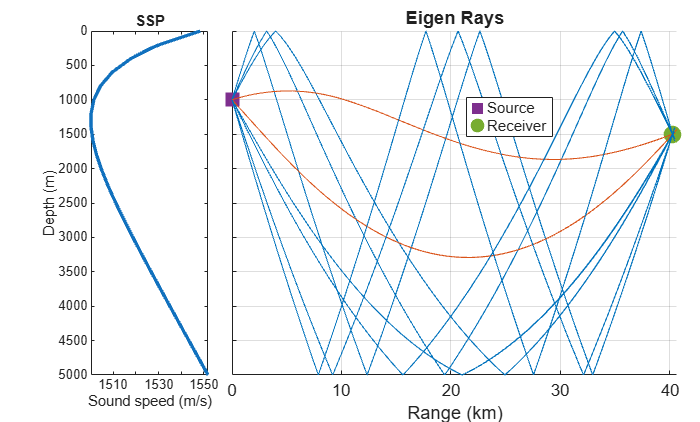
To run this example, you must have Bellhop installed, and you must also configure MATLAB with the Bellhop executable path by using the bellhopConfiguration function.
Create a bellhopModel object with a maximum ray tracing range limit of 20 km.
bhModel = bellhopModel(RayTraceRangeLimit=20e3);
Plot the transmission loss from a source at (500, 300, 700) m with an operating frequency of 1000 Hz.
fc = 1000; srcLocation = [500;300;700]; transmissionLoss(bhModel,fc,srcLocation)
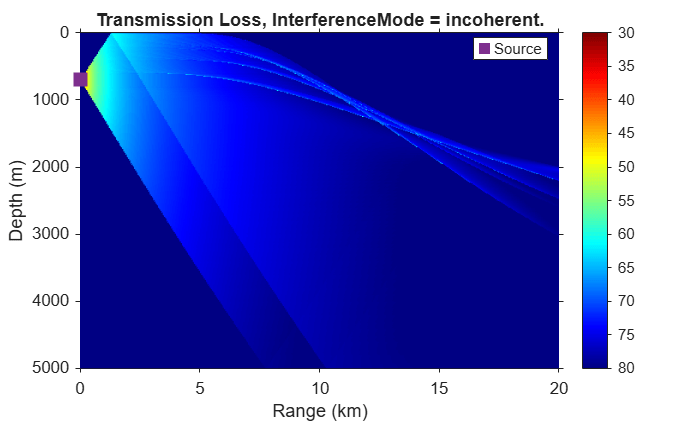
Calculate the transmission loss for a receiver at (400, 3720, 2330) m.
rxLocation = [400;3720;2330]; tl = transmissionLoss(bhModel,fc,srcLocation,rxLocation)
tl = 71.6842
More About
As of R2026b, the bellhopModel object has been internally tested using
Bellhop version 2026_2_2 and Bellhopcuda version 1.5 (CPU and GPU). The
bellhopModel object currently supports Bellhop 2D.
References
[1] Munk, Walter H. “Sound Channel in an Exponentially Stratified Ocean, with Application to SOFAR.” The Journal of the Acoustical Society of America 55, no. 2 (1974): 220–26. https://doi.org/10.1121/1.1914492.
[2] Thorp, William H. “Analytic Description of the Low-Frequency Attenuation Coefficient.” The Journal of the Acoustical Society of America 42, no. 1 (1967): 270–270. https://doi.org/10.1121/1.1910566.
[3] Francois, R. E., and G. R. Garrison. “Sound Absorption Based on Ocean Measurements. Part II: Boric Acid Contribution and Equation for Total Absorption.” The Journal of the Acoustical Society of America 72, no. 6 (1982): 1879–90. https://doi.org/10.1121/1.388673.
[4] UNESCO, IWG. "The Practical Salinity Scale 1978 and the International Equation of State of Seawater 1980." Tenth Report of the Joint Panel on Oceanographic Tables and Standards (JPOTS) 25 (1981).
Version History
Introduced in R2026b
MATLAB Command
You clicked a link that corresponds to this MATLAB command:
Run the command by entering it in the MATLAB Command Window. Web browsers do not support MATLAB commands.
Select a Web Site
Choose a web site to get translated content where available and see local events and offers. Based on your location, we recommend that you select: .
You can also select a web site from the following list
How to Get Best Site Performance
Select the China site (in Chinese or English) for best site performance. Other MathWorks country sites are not optimized for visits from your location.
Americas
- América Latina (Español)
- Canada (English)
- United States (English)
Europe
- Belgium (English)
- Denmark (English)
- Deutschland (Deutsch)
- España (Español)
- Finland (English)
- France (Français)
- Ireland (English)
- Italia (Italiano)
- Luxembourg (English)
- Netherlands (English)
- Norway (English)
- Österreich (Deutsch)
- Portugal (English)
- Sweden (English)
- Switzerland
- United Kingdom (English)