ros2bagwriter
R2026bDescription
Use the ros2bagwriter object to create a ROS 2 bag file in a
folder that you specify. Use the write function to write logs to the ROS
2 bag file. Each log contains a topic, its corresponding timestamp, and a ROS 2 message. After
writing the logs to this ROS 2 bag file, call the delete function to
close the opened ROS 2 bag file, which also generates the metadata file
with .yaml extension and removes the ros2bagwriter object
from memory. You can see this metadata.yaml file in the same folder where
the bag file is generated. The ros2bagwriter object supports
sqlite3 (DB3) and MCAP storage format.
Note
The ros2bagwriter object locks the created ROS 2 bag file. to use the
ROS 2 bag file, delete and clear the ros2bagwriter object.
Creation
Description
bagWriter = ros2bagwriter(path)path and
returns its corresponding ros2bagwriter object. Use the object to write
records into the ROS 2 bag file. Use the path input argument to set
the Path
property.
The name of the ROS 2 bag file is the name of the folder containing it. If the folders
in path are not available, the object creates them and places the ROS
2 bag file accordingly.
bagWriter = ros2bagwriter(path,Name=Value)
You can use the StorageFormat
property to create the ROS 2 bag file in sqlite3 (DB3) and MCAP storage
format.
SplitSize property enables you to set the maximum size of the bag files to a value which will split the bag files after the size of the logged data reaches the specified value. You can also set the maximum bag file duration using SplitDuration property which will split the bag files after reaching the specified elapsed time. If you specify both SplitSize and SplitDuration properties, the bag file will split at the first threshold. You can specify these options and enable compression. You can also create a compressed ROS 2 bag file with ZSTD compression format and write messages to it.
StorageConfigurationProfile property enables you to configure the
configuration profile used in writing messages to a ROS 2 bag file, when the StorageFormat
property is set to "mcap". You can then set this StorageConfigurationProfile to "custom" and use the
StorageConfigurationFile property to configure MCAP writer with your own
customized settings, by proving the path to the .yaml file. This
.yaml file contains the custom storage configuration profile of the
MCAP writer. For more information on how to write the .yaml file, see
Write .yaml file
for MCAP storage format. The MCAP storage format supports only
"file" compression mode for ROS 2 bag file.
Note
For improved and faster performance, it is recommended to use the MCAP storage format when creating a ROS 2 bag file for writing messages to it.
Properties
Examples
Extract the ZIP file that contains the ROS 2 bag log file and specify the full path to the log folder.
unzip("ros2_netwrk_bag.zip");
folderPath = fullfile(pwd,"ros2_netwrk_bag");
Get all the information from the ROS 2 bag log file.
bag2info = ros2("bag","info",folderPath);
Create a ros2bagreader object that contains all messages in the log file.
bag = ros2bagreader(folderPath);
bag.AvailableTopics
ans = 4×3 table
    160697    rosgraph_msgs/Clock    '%
% For more information, see https://design.ros2.org/articles/clock_and_time.html.
builtin_interfaces/Time clock'
    3    geometry_msgs/Twist    '
Vector3  linear
Vector3  angular'
    5275    nav_msgs/Odometry    '% The pose in this message should be specified in the coordinate frame given by header.frame_id
% The twist in this message should be specified in the coordinate frame given by the child_frame_id

% Includes the frame id of the pose parent.
std_msgs/Header header

% Frame id the pose points to. The twist is in this coordinate frame.
char child_frame_id

% Estimated pose that is typically relative to a fixed world frame.
geometry_msgs/PoseWithCovariance pose

% Estimated linear and angular velocity relative to child_frame_id.
geometry_msgs/TwistWithCovariance twist'
    892    sensor_msgs/LaserScan    '%
% If you have another ranging device with different behavior (e.g. a sonar
% array), please find or create a different message, since applications
% will make fairly laser-specific assumptions about this data

std_msgs/Header header       % timestamp in the header is the acquisition Time of
                             % the first ray in the scan.
                             %
                             % in frame frame_id, angles are measured around
                             % the positive Z axis (counterclockwise, if Z is up)
                             % with zero angle being forward along the x axis

single angle_min             % start angle of the scan [rad]
single angle_max             % end angle of the scan [rad]
single angle_increment       % angular distance between measurements [rad]

single time_increment        % Time between measurements [seconds] - if your scanner
                             % is moving, this will be used in interpolating position
                             % of 3d points
single scan_time             % Time between scans [seconds]

single range_min             % minimum range value [m]
single range_max             % maximum range value [m]

single[] ranges              % range data [m]
                             % (Note: values < range_min or > range_max should be discarded)
single[] intensities         % intensity data [device-specific units].  If your
                             % device does not provide intensities, please leave
                             % the array empty.'
Select a subset of the messages by applying filters to the topic and timestamp.
start = bag.StartTime;
odomBagSel = select(bag,"Time",[start start+30],"Topic","/odom")
odomBagSel =
  ros2bagreader with properties:

           FilePath: 'C:\Users\user\OneDrive - MathWorks\Documents\MATLAB\ExampleManager\user.Bdoc23a.ROS2transform\ros-ex95368813\ros2_netwrk_bag\ros2_netwrk_bag.db3'
          StartTime: 1.6020e+09
            EndTime: 1.6020e+09
    AvailableTopics: [1×3 table]
        MessageList: [801×3 table]
        NumMessages: 801
Get the messages in the selection.
odomMsgs = readMessages(odomBagSel);
Retrieve the list of timestamps from the topic.
timestamps = odomBagSel.MessageList.Time;
Create a ros2bagwriter object and a ROS 2 bag file in the specified folder.
bagWriter = ros2bagwriter("myRos2bag");Write the messages related to the "/odom" topic to the ROS 2 bag file.
write(bagWriter,"/odom",timestamps,odomMsgs)Close the bag file, remove the ros2bagwriter object from memory, and clear the associated object.
delete(bagWriter)
clear bagWriter
Load the new ROS 2 bag log file.
bagOdom = ros2bagreader("myRos2bag");Retrieve messages from the ROS 2 bag log file.
msgs = readMessages(bagOdom);
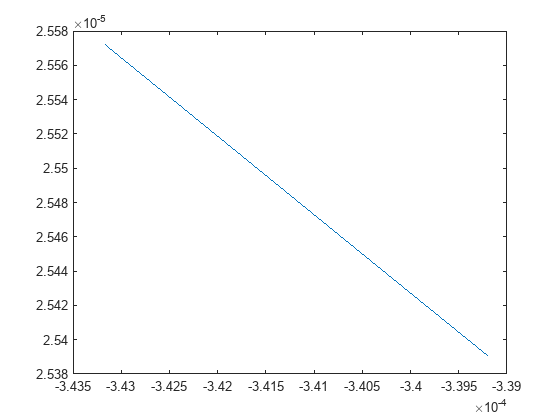
Plot the coordinates for the messages in the ROS 2 bag log file.
To run the example again, remove the myRos2bag file and the ros2_netwrk_bag file from memory.
plot(cellfun(@(msg) msg.pose.pose.position.x,msgs),cellfun(@(msg) msg.twist.twist.angular.z,msgs))
Create a ros2bagwriter object and a ROS 2 bag file in the specified folder.
bagWriter = ros2bagwriter("myRos2bag");Write a single log to the ROS 2 bag file.
topic = "/odom";
message = ros2message("nav_msgs/Odometry");
timestamp = ros2time(1.6170e+09);
write(bagWriter,topic,timestamp,message)
Close the bag file, remove the ros2bagwriter object from memory, and clear the associated object.
delete(bagWriter)
clear bagWriter
Create a ros2bagwriter object and a ROS 2 bag file in the specified folder. Specify the cache size for each message.
bagWriter = ros2bagwriter("bag_files/my_bag_file",CacheSize=1500);Write multiple logs to the ROS 2 bag file.
message1 = ros2message("nav_msgs/Odometry");
message2 = ros2message("geometry_msgs/Twist");
message3 = ros2message("sensor_msgs/Image");
write(bagWriter, ...
      ["/odom","cmd_vel","/camera/rgb/image_raw"], ...
      {ros2time(1.6160e+09),ros2time(1.6170e+09),ros2time(1.6180e+09)}, ...
      {message1,message2,message3})
Close the bag file, remove the ros2bagwriter object from memory, and clear the associated object.
delete(bagWriter)
clear bagWriter
Create a ros2bagwriter object and a ROS 2 bag file in the specified folder.
bagWriter = ros2bagwriter("myBag");Write multiple logs for the same topic to the ROS 2 bag file.
pointMsg1 = ros2message("geometry_msgs/Point");
pointMsg2 = pointMsg1;
pointMsg3 = pointMsg1;
pointMsg1.x = 1;
pointMsg2.x = 2;
pointMsg3.x = 3;
write(bagWriter, ...
      "/point", ...
      {1.6190e+09,1.6200e+09,1.6210e+09}, ...
      {pointMsg1,pointMsg2,pointMsg3})
Close the bag file, remove the ros2bagwriter object from memory, and clear the associated object.
delete(bagWriter)
clear bagWriterCreate a ros2bagwriter object and multiple ROS 2 bag files in the specified folder. Specify the size for each bag file as 100 kB as a threshold for splitting using the SplitSize property. This will split the bag file into chunks of 100 kB each.
bagWriter1 = ros2bagwriter("new_bag_files/bag_split_size",SplitSize=100);Create another ros2bagwriter object and specify a duration of 60 seconds using the SplitDuration property, before the bag splits. This will split the bag file into 60-second chunks each.
bagWriter2 = ros2bagwriter("new_bag_files/bag_split_duration",SplitDuration=60);Write multiple logs to the ROS 2 bag files.
msg1 = ros2message("nav_msgs/Odometry");
msg2 = ros2message("geometry_msgs/Twist");
msg3 = ros2message("sensor_msgs/Image");
msgTime1 = ros2time(1.6160e+09);
msgTime2 = ros2time(1.6170e+09);
msgTime3 = ros2time(1.6180e+09);
for i=1:100
   msgTime1.sec = msgTime1.sec+1;
   msgTime2.sec = msgTime1.sec+1;
   msgTime3.sec = msgTime2.sec+1;
   write(bagWriter1, ...
         ["/odom","cmd_vel","/camera/rgb/image_raw"], ...
         {msgTime1,msgTime2,msgTime3}, ...
         {msg1,msg2,msg3})
   write(bagWriter2, ...
         ["/odom","/camera/rgb/image_raw"], ...
         {msgTime1,msgTime2}, ...
         {msg1,msg2})
end
Close the bag files, remove the ros2bagwriter objects from memory, and clear the associated objects.
delete(bagWriter1)
delete(bagWriter2)
clear bagWriter1
clear bagWriter2
Create a ros2bagwriter object and a ROS 2 bag file in the specified folder. Specify the compression format as zstd and compression mode as file.
bagWriter1 = ros2bagwriter("new_bag_files/bag_file_compressed", ...
                           CompressionFormat="zstd",CompressionMode="file");
Create another ros2bagwriter object and a ROS 2 bag file in the specified folder. Specify the compression format as zstd and compression mode as message.
bagWriter2 = ros2bagwriter("new_bag_files/bag_message_compressed", ...
                           CompressionFormat="zstd",CompressionMode="message");
Write multiple logs to the ROS 2 bag files.
msg1 = ros2message("nav_msgs/Odometry");
msg2 = ros2message("geometry_msgs/Twist");
msg3 = ros2message("sensor_msgs/Image");
msgTime1 = ros2time(1.6160e+09);
msgTime2 = ros2time(1.6170e+09);
msgTime3 = ros2time(1.6180e+09);
for i=1:100
   msgTime1.sec = msgTime1.sec+1;
   msgTime2.sec = msgTime1.sec+1;
   msgTime3.sec = msgTime2.sec+1;
   write(bagWriter1, ...
         ["/odom","cmd_vel","/camera/rgb/image_raw"], ...
         {msgTime1,msgTime2,msgTime3}, ...
         {msg1,msg2,msg3})
   write(bagWriter2, ...
         ["/odom","/camera/rgb/image_raw"], ...
         {msgTime1,msgTime2}, ...
         {msg1,msg2})
end
Close the bag files, remove the ros2bagwriter objects from memory, and clear the associated objects.
delete(bagWriter1)
delete(bagWriter2)
clear bagWriter1
clear bagWriter2
Create a ros2bagwriter object by configuring MCAP storage format.
bagWriter = ros2bagwriter("myRos2MCAPbag","StorageFormat","mcap", ...
                          "StorageConfigurationProfile","fastwrite");
Write a single log to the ROS 2 bag file.
topic = "/odom";
msg = ros2message("nav_msgs/Odometry");
timeStamp = ros2time(1.6170e+09);
write(bagWriter,topic,timeStamp,msg);
Close the bag files, remove the ros2bagwriter object from memory, and clear the associated objects.
delete(bagWriter)
clear bagWriterCreate a ros2bagwriter object using custom MCAP storage configuration profile. Set the path to the .yaml file in by using StorageConfigurationFile name-value argument to customize the settings to configure the MCAP writer.
bagWriter = ros2bagwriter("myRos2MCAPbag","StorageFormat","mcap", ...
                          "StorageConfigurationProfile","custom", ...
                          "StorageConfigurationFile","test_storage_config_file.yaml");
Write a single log to the ROS 2 bag file.
topic = "/odom";
msg = ros2message("nav_msgs/Odometry");
timeStamp = ros2time(1.6170e+09);
write(bagWriter,topic,timeStamp,msg);
Close the bag files, remove the ros2bagwriter object from memory, and clear the associated objects.
delete(bagWriter)
clear bagWriter
