mlreportgen.dom.TemplateText Class
R2026bNamespace: mlreportgen.dom
Markup text from a document template
Description
Use an object of the mlreportgen.dom.TemplateText class to create a Document Object Model (DOM) representation of the XML markup read from
the template of the document on opening. The object contains one of these segments of
template text occurring between:
the beginning of the template and the first hole in the template
subsequent holes in the template
the last hole and the end of the template
Moving from hole to hole causes these segments of text to be embedded in
TemplateText objects and appended to the document's list of children. This
guarantees that the template text will be included in the output document in the same order in
which it occurs in the template interspersed with the content appended at each hole.
The mlreportgen.dom.TemplateText class is a handle class.
Properties
Methods
Examples
Replace the browser title bar text in an HTML report.
import mlreportgen.dom.*;
d = Document("test");
d.TitleBarText = "My Report";
open(d);
% Display browser title bar text that the DOM template parser inserts into
% the markup read from the beginning of the template.
disp(d.Children(2).HTMLText);
My Report
close(d);
rptview(d);
To add additional content or holes, or to change the styling in an existing template, create a new TemplateDocumentPart object to replace the existing TemplateDocumentPart object. You can replace the relevant document part while the rest of the source template content remains unchanged.
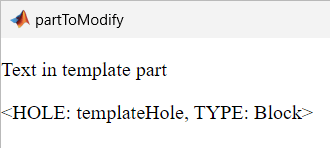
Use tmplview to display the template document part,"partToModify", in the source template. This document part currently contains the static text "Text in template document part" followed by a template hole, "templateHole". In this example, you add additional text before and after the template hole by finding the part to modify, copying the original text and template hole, and appending your additional text.
tmplview("existingTemplate","html",OpenDocument="partToModify");
Import the DOM API namespace so you do not have to use fully qualified class names.
import mlreportgen.dom.*Create a template by copying the existing template.
t = Template("updatedTemplate","html","existingTemplate");
open(t);
Find the part to modify in the document parts.
toModifyIdx = strcmp({t.TemplateDocumentParts.Name},"partToModify");
toModifyPart = t.TemplateDocumentParts(toModifyIdx);
Define a new template document part based on the document part.
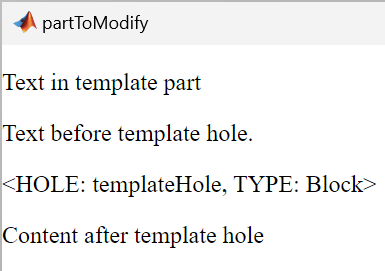
newTemplateDocPart = TemplateDocumentPart("partToModify");Copy the children of the original template document part into the new document part before and after the template hole. When your for loop reaches the template hole, add the first line of new text, copy the template hole, and then add the second line of new text.
for child = toModifyPart.Children
    % If the child is a template hole
    if isa(child,"mlreportgen.dom.TemplateHole")
        switch child.HoleId
            case "templateHole"
                append(newTemplateDocPart,...
                    Text("Text before template hole."));
                append(newTemplateDocPart,TemplateHole(child.HoleId));
                append(newTemplateDocPart,...
                    Text("Content after template hole"));
            otherwise
                append(newTemplateDocPart,TemplateHole(child.HoleId))
        end
        % If the child is not the template hole, copy the child to
        % the new document part
    else
        append(newTemplateDocPart,clone(child));
    end
end
Replace the part to modify with the new template document part.
t.TemplateDocumentParts(toModifyIdx) = newTemplateDocPart;
Close the template.
close(t);
Confirm the changes to the template document part by using tmplview.
tmplview("updatedTemplate.htmtx",OpenDocument="partToModify");
To learn how to examine the source or updated template file directly, see Open Template Files.
Tips
To learn how to examine the source or updated template file directly, see Open Template Files.
Version History
Introduced in R2014b

