findpeaks
R2026bFind local maxima
Syntax
Description
pks = findpeaks(y)y. A local peak is a data sample
that is either larger than its two neighboring samples or is equal to an
Inf value. The function outputs the peaks in order of
occurrence and excludes non-Inf signal endpoints. If a peak
is flat, the function returns only the point with the lowest index.
[___] = findpeaks(___,
specifies options using name-value arguments in addition to any of the input
arguments in previous syntaxes.Name=Value)
findpeaks(___) without output
arguments plots the signal and overlays the peak values.
Examples
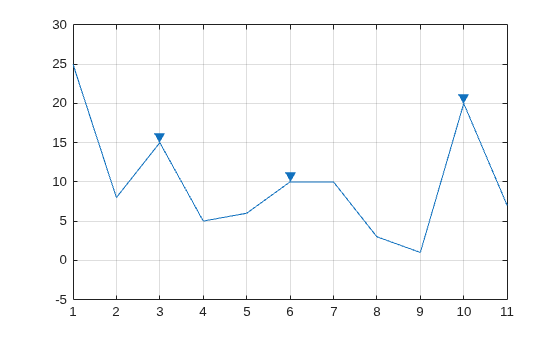
Define a vector with three peaks.
data = [25 8 15 5 6 10 10 3 1 20 7];
Find the local maxima. The findpeaks function returns peaks in order of occurrence. The function does not include the endpoints of data in the peak finding because there is no left or right neighbor to compare the endpoints with.
pks = findpeaks(data)
pks = 1×3

    15    10    20
Use findpeaks without output arguments to display the peaks. For the flat peak, the function highlights only the point with the lowest index.
findpeaks(data)
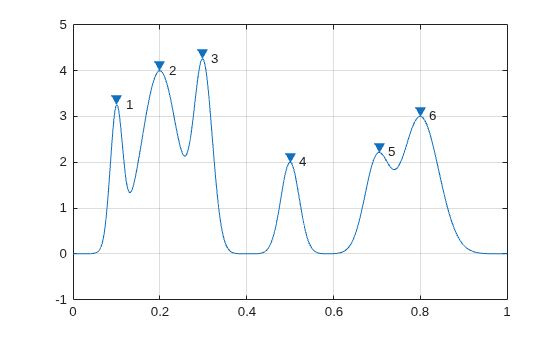
Create a signal that consists of a sum of Gaussian curves. Specify the position, height, and width of each curve.
x = linspace(0,1,1000);

Pos = [1 2 3 5 7 8]'/10;
Hgt = [3 4 4 2 2 3]';
Wdt = [2 6 3 3 4 6]'/100;

y = sum(Hgt.*(exp(-((x-Pos)./Wdt).^2)),1);
Use findpeaks with default settings to find the peaks of the signal and their locations.
[pks,locs] = findpeaks(y,x);
Plot the peaks using findpeaks. Label each peak.
findpeaks(y,x)
text(locs+.02,pks,num2str((1:numel(pks))'))
Sort the peaks from tallest to shortest.
[psor,lsor] = findpeaks(y,x,SortStr="descend");
findpeaks(y,x)
text(lsor+.02,psor,num2str((1:numel(psor))'))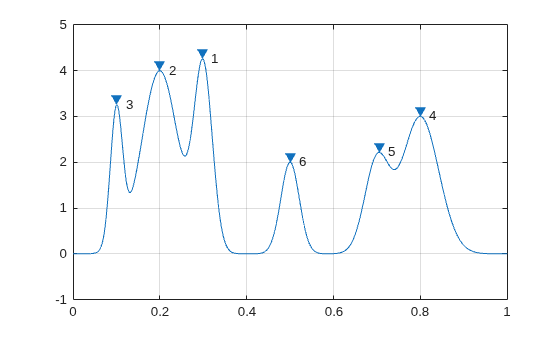
Create a signal that consists of a sum of Gaussian curves riding on a full period of a cosine. Specify the location, height, and width of each curve.
x = linspace(0,1,1000);

base = 4*cos(2*pi*x);

Pos = [1 2 3 5 7 8]'/10;
Hgt = [3 7 5 5 4 5]';
Wdt = [1 3 3 4 2 3]'/100;

y = sum(Hgt.*(exp(-((x-Pos)./Wdt).^2)),1) + base;
Use findpeaks to locate and plot the peaks that have a prominence of at least 4. Only the highest and lowest peaks satisfy the minimum prominence condition.
[~,locs4,~,proms4] = findpeaks(y,x,MinPeakProminence=4)
locs4 = 1×2

    0.1982    0.4995
proms4 = 1×2

    5.5773    4.4171
findpeaks(y,x,MinPeakProminence=4,Annotate="extents")
Display the location, prominence, and peak width at half prominence of all the peaks. The second and fourth peaks are the ones with prominence greater than or equal to 4.
[~,locs,widths,proms] = findpeaks(y,x)
locs = 1×6

    0.1001    0.1982    0.2983    0.4995    0.7017    0.8018
widths = 1×6

    0.0154    0.0431    0.0377    0.0625    0.0274    0.0409
proms = 1×6

    2.6816    5.5773    3.1448    4.4171    2.9191    3.6363
Extract peaks from sunspot average count data and estimate the average sunspot cycle.
Load the file sunspot.dat, which contains the average number of sunspots observed every year from 1700 to 1987. Plot the number of sunspots by year and overlay the maxima. Zoom into the time period between 1855 and 1920.
load sunspot.dat

year = sunspot(:,1);
avSpots = sunspot(:,2);

findpeaks(avSpots,year)
xlabel("Year")
xlim([1855 1920])
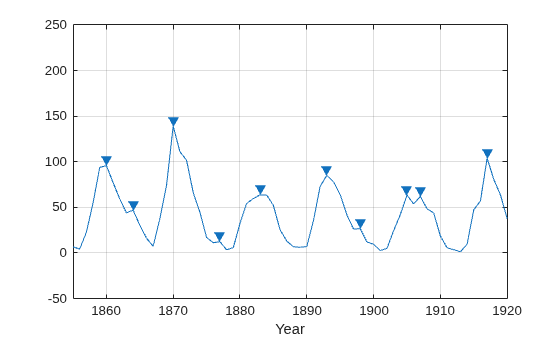
Sunspots are a cyclic phenomenon. Their number is known to peak roughly every 11 years.
Estimate the cycle duration by finding the average separation between peaks. Start by ignoring peaks that are not maxima. Restrict the acceptable peak-to-peak separations to periods greater than 6 years.
findpeaks(avSpots,year,MinPeakDistance=6)
xlabel("Year")
xlim([1855 1920])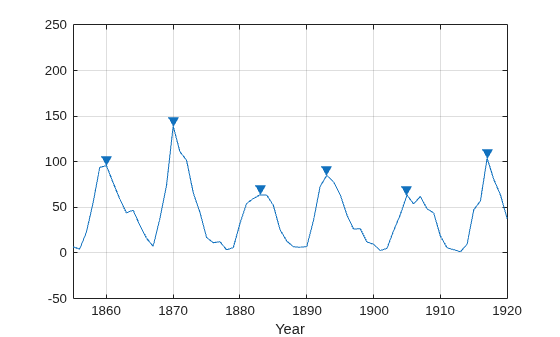
Create a datetime array using the yearly data. Assume the sunspots were counted every year on March 20th, close to the vernal equinox. Find the peak sunspot years. Use the years function to specify the minimum peak separation as a duration.
ty = datetime(year,3,20);
[pk,lk] = findpeaks(avSpots,ty,MinPeakDistance=years(6));
plot(ty,avSpots,lk,pk,"o")
xlabel("Year")
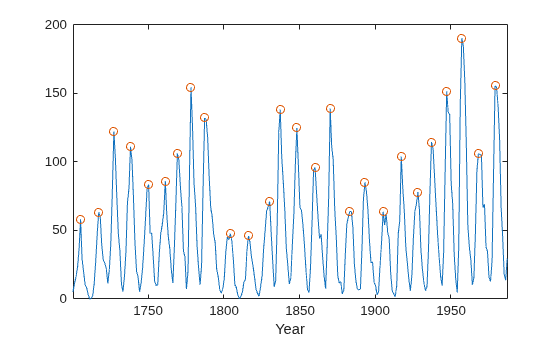
Compute the average sunspot cycle. The estimated average sunspot cycle closely agrees with the known 11-year period.
dttmCycle = years(mean(diff(lk)))
dttmCycle =
10.9600
You can find peaks that meet certain feature criteria, among them, minimum or maximum peak distance or height, prominence, and threshold of peak difference with its neighbors. Use findpeaks to constrain single or multiple peak features.
Constrain Peaks by Feature from Audio Signal
Load an audio signal sampled at 7418 Hz. Select 200 samples.
load mtlb
select = mtlb(1001:1200);
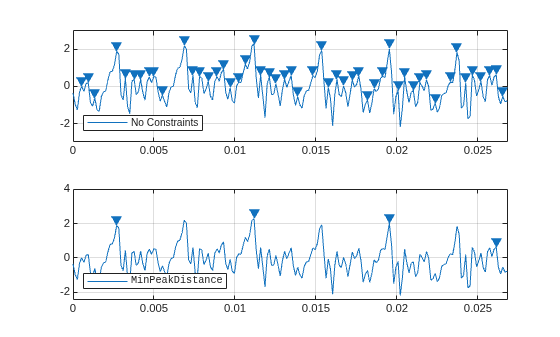
Find and highlight all the peaks from the audio signal. Then, find and highlight the peaks that are separated by at least 5 ms. To apply the minimum separation constraint, findpeaks chooses the tallest peak in the signal and eliminates all peaks within 5 ms of it. The function then repeats the procedure for the tallest remaining peak and iterates until it runs out of peaks to consider.
figure
tiledlayout("vertical")
nexttile
findpeaks(select,Fs)
legend("No Constraints",Location="southwest")
nexttile
lgn = @(txt) legend(txt,FontName="FixedWidth",Location="southwest");
findpeaks(select,Fs,MinPeakDistance=0.005)
lgn("MinPeakDistance")
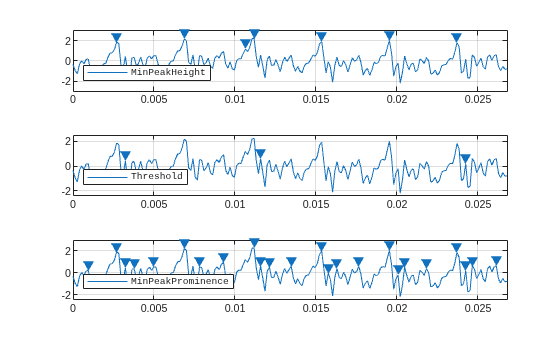
Find and plot the peaks that individually meet each of these constraints:
Find the peaks with an amplitude of at least 1 V.
Find the peaks that are at least 1 V higher than their neighboring samples.
Find the peaks that drop at least 1 V on either side before the signal attains a higher value.
figure
tiledlayout("vertical")
nexttile
findpeaks(select,Fs,MinPeakHeight=1)
lgn("MinPeakHeight")
nexttile
findpeaks(select,Fs,Threshold=1)
lgn("Threshold")
nexttile
findpeaks(select,Fs,MinPeakProminence=1)
lgn("MinPeakProminence")
Constrain Multiple Peak Features from Chirp Signal
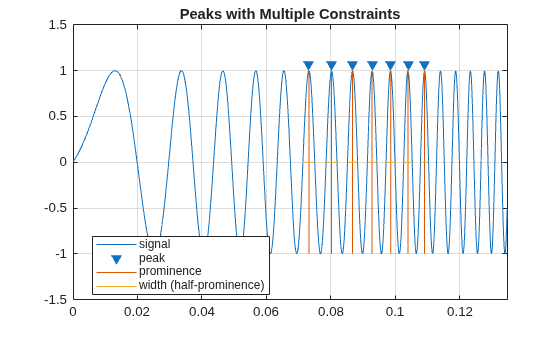
Find and highlight all peaks of a 1000-sample chirp signal whose widths are between 2.5 and 4 ms.
N = 1000;
x = sin(2*pi*(1:N)/N + (10*(1:N)/N).^2);
figure
findpeaks(x,Fs,Annotate="extents", ...
    MinPeakWidth=2.5e-3,MaxPeakWidth=4e-3)
title("Peaks with Multiple Constraints")
Sensors can return clipped readings if the data are larger than a given saturation point. You can choose to disregard these extrema as meaningless or incorporate them to your analysis.
Generate a signal that consists of a product of trigonometric functions of frequencies 5 Hz and 3 Hz embedded in white Gaussian noise of variance 0.1². Sample the signal for one second at a rate of 100 Hz. Reset the random number generator for reproducible results.
rng("default")

Fs = 100;
t = 0:1/Fs:1;

s = sin(2*pi*5*t).*sin(2*pi*3*t) + randn(size(t))/10;
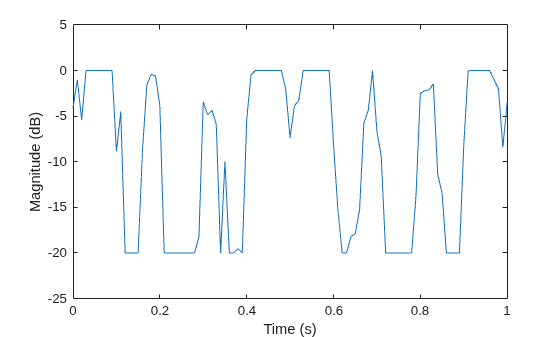
Synthesize a saturated measurement by truncating every reading where the absolute value is greater than the specified bound of 0.32. Then, normalize the signal and make it range between 0.1 and 1. Convert the normalized magnitude to decibels and plot the result.
bnd = 0.32;
s(s>bnd) = bnd;
s(s<-bnd) = -bnd;
sNorm = 0.1+0.9*(s-min(s))/(max(s)-min(s));
sig = mag2db(sNorm);

plot(t,sig)
xlabel("Time (s)")
ylabel("Magnitude (dB)")
ylim([-25 5])
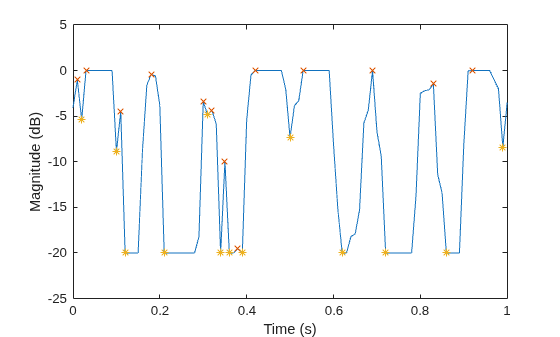
Locate the peaks and valleys of the signal. findpeaks identifies only the rising edge of each flat peak.
[pk,lcp] = findpeaks(sig,t);  % Peaks
[vl,lcv] = findpeaks(-sig,t); % Valleys

hold on
plot(lcp,pk,"x",lcv,-vl,"*")
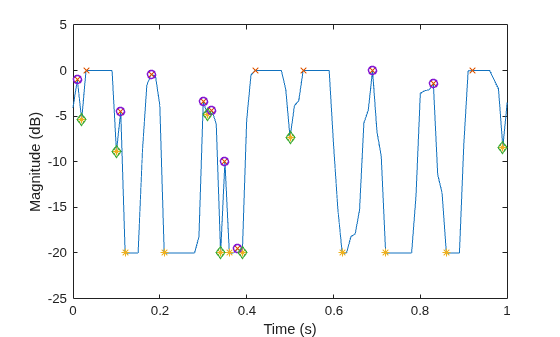
Use the Threshold name-value argument to exclude the flat peaks and valleys. Require a minimum magnitude difference of 0.1 dB between a peak or valley and its neighbors.
[pkt,lctp] = findpeaks(sig,t,Threshold=0.1);
[vlt,lctv] = findpeaks(-sig,t,Threshold=0.1);
plot(lctp,pkt,"o",LineWidth=1.2)
plot(lctv,-vlt,"d",LineWidth=1.2)
Create a signal that consists of a sum of Gaussian curves. Specify the location, height, and width of each curve.
x = linspace(0,1,1000);

Pos = [1 1.5 3 5 7 8]'/10;
Hgt = [7 6.2 3 2 2 3]';
Wdt = [3 2.5 4 3 4 6]'/100;

y = sum(Hgt.*(exp(-((x-Pos)./Wdt).^2)),1);
Measure the widths of the peaks using half prominence and half height as reference.
tiledlayout("flow")
ax11 = nexttile;
findpeaks(y,x,Annotate="extents")
title("Half-Prominence Peak Widths")
ax12 = nexttile;
findpeaks(y,x,Annotate="extents",WidthReference="halfheight")
title("Half-Height Peak Widths")
ylim([ax11 ax12],[0 9])
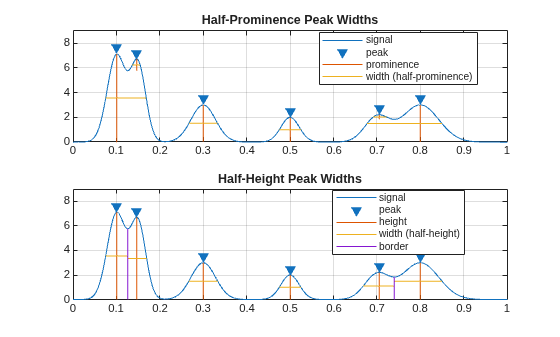
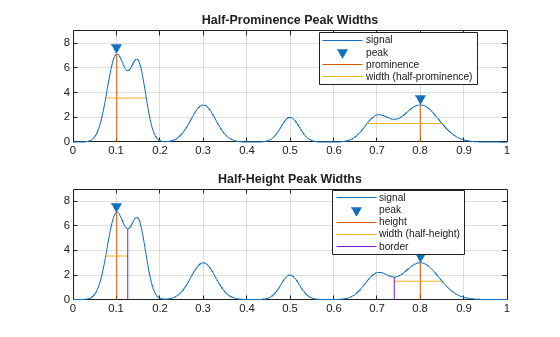
Set MinPeakDistance to 0.5 to select the tallest peaks separated by at least 0.5 units on the x-axis. Measure the widths of the peaks using half prominence and half height as reference. Only the first and last peaks satisfy the minimum separation condition, so the widths displayed in the plot correspond to these two peaks.
Note that each peak retains its width regardless of the specified conditions or whether it is selected as a consequence of these conditions.
figure
tiledlayout("flow")
ax21 = nexttile;
findpeaks(y,x,Annotate="extents",MinPeakDistance=0.5)
title("Half-Prominence Peak Widths")
ax22 = nexttile;
findpeaks(y,x,Annotate="extents",MinPeakDistance=0.5, ...
    WidthReference="halfheight")
title("Half-Height Peak Widths")
ylim([ax21 ax22],[0 9])
Obtain a refined peak location estimate for the main two peaks in a signal using the nonlinear least squares method with a sinc function kernel.
Generate Signal
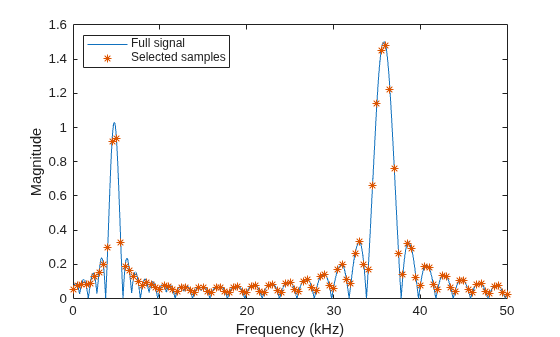
Radar pulse compression of a linear FM waveform produces a sinc-shaped spectrum, where the frequency locations of the peaks are proportional to the distance between the radar and the detected object. You can first estimate the peak locations and amplitudes with findpeaks and then enhance your estimates with refinepeaks. This example finds the peak amplitudes and locations of a synthetic noiseless pulse compression signal and uses refinepeaks to improve the estimates.
Generate a signal composed of two sinc-shaped waveforms with peaks of 1 and 1.5 at 4.76 kHz and 35.8 kHz, respectively. Set the frequency spacing to 2.5 Hz.
aTg = [1 1.5];
fTg = 1e3*[4.76 35.8];
freqkHzFull = (0:0.0025:50)';
waveFull = abs(sinc([1 0.5].*(freqkHzFull-fTg/1e3)))*aTg';
Downsample the signal by a factor of 200 so the frequency spacing between samples is 0.5 kHz. This example refines the amplitude and location estimates of the downsampled signal peaks and compares the improved estimates to the values in the original signals.
freq = downsample(freqkHzFull,200);
wave = downsample(waveFull,200);

plot(freqkHzFull,waveFull,freq,wave,"*")
legend(["Full signal" "Selected samples"],Location="northwest")
xlabel("Frequency (kHz)")
ylabel("Magnitude")
Refine Peaks Using Nonlinear Least Squares
Use findpeaks to make initial estimates of the amplitudes, locations, and half-height widths of the two highest peaks of the signal.
[PV,PL,PW] = findpeaks(wave,NPeaks=2, ...
    SortStr="descend",WidthReference="halfheight");
table(PV,freq(PL), RowNames="Peak estimate "+(1:numel(PV)), ...
    VariableNames=["Amplitude" "Frequency (kHz)"])
ans = 2×2 table
                       Amplitude    Frequency (kHz)
                       _________    _______________

    Peak estimate 1     1.4824            36
    Peak estimate 2     0.9374             5
Use refinepeaks to enhance the peak estimation using the nonlinear least squares (NLS) method. Specify the frequency points of the signal and the peak widths. The peak values are significantly closer to the expected values of 1.5 and 1, while the frequency locations approximate well to 35.8 kHz and 4.76 kHz, respectively.
LW = max(PW,2);
[Ypk,Xpk] = refinepeaks(wave,PL,freq,Method="NLS",LobeWidth=LW);
table(Ypk,Xpk, RowNames="Refined peak "+(1:numel(Ypk)), ...
    VariableNames=["Amplitude" "Frequency (kHz)"])
ans = 2×2 table
                      Amplitude    Frequency (kHz)
                      _________    _______________

    Refined peak 1     1.5063            35.8
    Refined peak 2     1.0163          4.7628
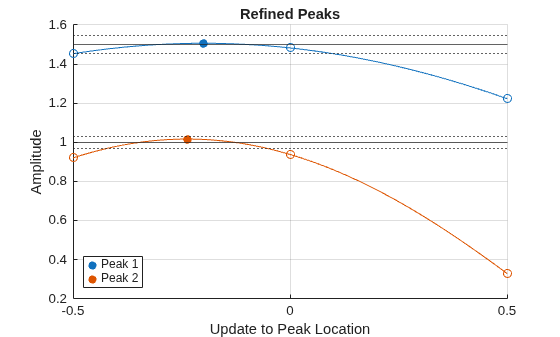
Plot the amplitudes of the refined peaks on the y-axis and the updated peak locations compared with the initial peak estimates on the x-axis. The two initially estimated peaks and their two surrounding samples are each separated by 0.5 kHz. The refined peaks, indicated by filled circles, show the actual peak locations compared to the initially estimated peak locations as well as the corrected amplitudes.
refinepeaks(wave,PL,freq,Method="NLS",LobeWidth=LW)
yline(aTg) % Theoretical peak amplitudes
errorBounds = aTg.*(1+0.03*[-1;1]);
yline(errorBounds(:),":") % ±3% error bounds
legend("Peak "+[1 2])
Input Arguments
Name-Value Arguments
Output Arguments
More About
Tips
You can initially estimate signal peaks with findpeaks, and
then enhance their amplitudes and locations with refinepeaks.
Assume you have a signal with amplitudes y and locations
x. This code snippet shows how you can estimate and refine
peaks from y and x.
[yPeaks,xPeaksIdx] = findpeaks(y);
[yRPeaks,xRPeaks] = refinepeaks(y,xPeaksIdx,x)
Extended Capabilities
Version History
Introduced in R2007bSee Also
fminbnd | fminsearch | fzero | islocalmax | islocalmin | max | refinepeaks

