addevent
Add event to model
Syntax
eventObj =
addevent(modelObj, 'TriggerValue',
'EventFcnsValue')


eventObj = addevent(...'PropertyName', PropertyValue...)
Arguments
modelObj | Model object. |
TriggerValue | Required property to specify a trigger condition. Must be a
MATLAB® expression that evaluates to a logical value. Use the
keyword 'time' to specify that an event occurs at a
specific time during the simulation. For more information, see Trigger. |
EventFcnsValue | Character vector or a cell array of character vectors, each of which
specifies an assignment of the form
', where
EventFcns. |
PropertyName | Property name for an event object from Property Summary. |
PropertyValue | Property value. For more information on property values, see the property reference for each property listed in Property Summary. |
Description
eventObj =
addevent(modelObj, 'TriggerValue',
'EventFcnsValue')Event object (eventObjmodelObjTriggerValueTriggerCondition, assigns a value
(EventFcnsValueEventFcns, and assigns the model object
(modelObjParent. In the model object, this method appends the event object
to the property Events.
When the trigger expression in the property Trigger changes from
false to true, the assignments in EventFcns are executed during
simulation.
For details on how events are handled during a simulation, see Events in SimBiology Models.
eventObj = addevent(...'
defines optional properties. The property name and property value pairs can be any
format supported by the function PropertyName', PropertyValue...)set.
Examples
Create a simple model with a mass action reaction A -> B, where A and B are species. Also add the reaction rate parameter, p1, with a parameter value of 0.5.
model       = sbiomodel('example');
r1          = addreaction(model,'A -> B');
kl          = addkineticlaw(r1,'MassAction');
p1          = addparameter(model,'p1',0.5);
kl.ParameterVariableNames = 'p1';
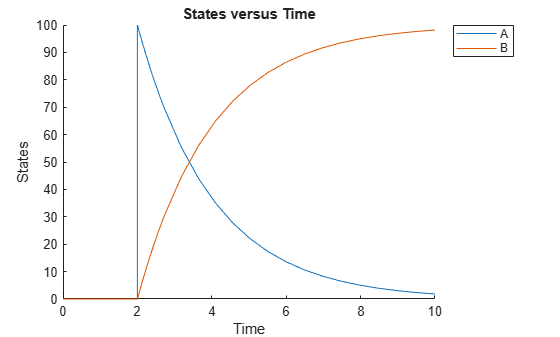
Increase the amount of species A to 100 at time = 2. You can do this by adding an event object to the model. You must specify the event trigger (time >= 2), and also the event function, which defines what happens when the event is triggered. In this example, the event function is A = 100.
e1 = addevent(model,'time>=2','A = 100');
Simulate the model, and plot the result.
sd = sbiosimulate(model);
sbioplot(sd);