Absolute Reference (MA)
R2026b(Not recommended) Reference point at zero absolute temperature and pressure
Using this block is no longer recommended. Instead, make
absolute measurements by setting the Measurement reference
parameter of the Pressure & Temperature Sensor
(MA) block to Absolute.
(since R2023a)
Absolute Reference (MA) block

To add a block to a model, double-click the canvas and start typing the block name. Then, select the block from the list.
Libraries:
Simscape /
Foundation Library /
Moist Air /
Elements
Description
The Absolute Reference (MA) block represents an absolute reference for the pressure and temperature in a moist air network. At port A, the pressure and temperature are equal to absolute zero. Specific humidity and trace gas mass fraction are also equal to zero.
Unlike other domains, where each topologically distinct circuit within a domain must contain at least one reference block, moist air networks do not have this requirement. For more information, see Reference Node and Grounding Rules.
The purpose of the Absolute Reference (MA) block is to provide a reference for the Pressure & Temperature Sensor (MA). For example, to measure the absolute pressure and absolute temperature of a node, connect that node to the A port of a Pressure & Temperature Sensor (MA) block. Connect the B port of the Pressure & Temperature Sensor (MA) block to an Absolute Reference (MA) block.
If you use the Absolute Reference (MA) block elsewhere in a moist air network, it triggers a simulation assertion because air mixture pressure and temperature cannot be at absolute zero.
Examples
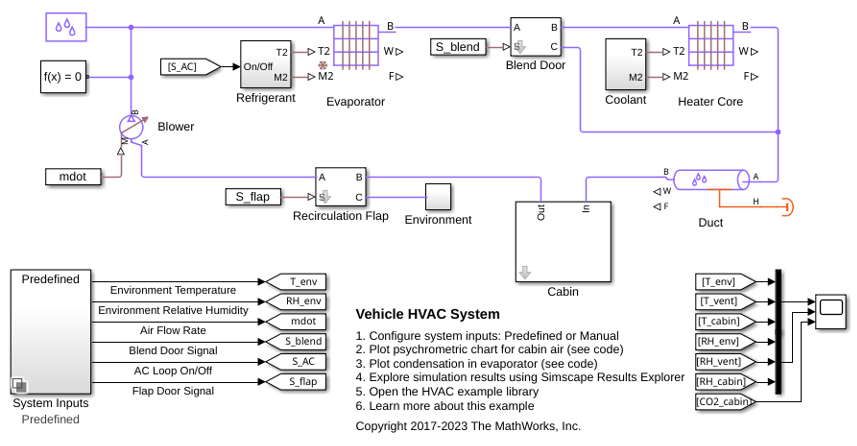
Vehicle HVAC System
Models moist air flow in a vehicle heating, ventilation, and air conditioning (HVAC) system. The vehicle cabin is represented as a volume of moist air exchanging heat with the external environment. The moist air flows through a recirculation flap, a blower, an evaporator, a blend door, and a heater before returning to the cabin. The recirculation flap selects flow intake from the cabin or from the external environment. The blender door diverts flow around the heater to control the temperature.
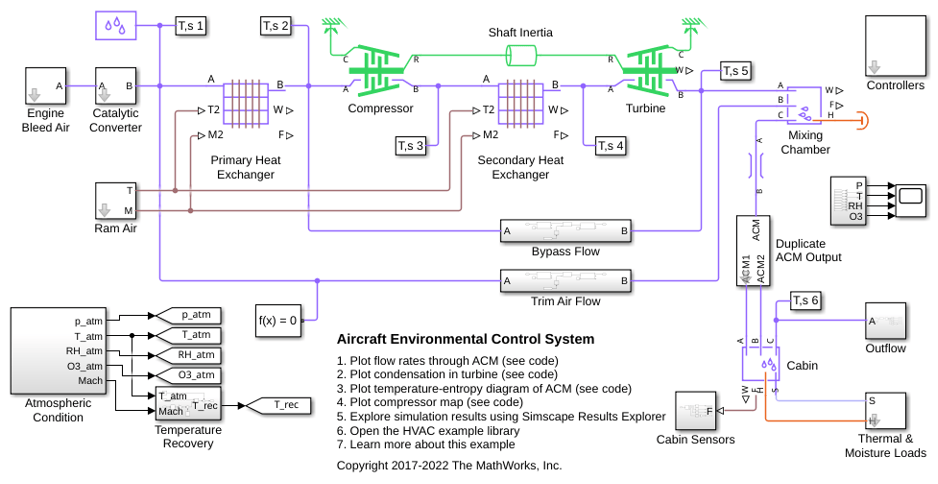
Aircraft Environmental Control System
Models an aircraft environmental control system (ECS) that regulates pressure, temperature, humidity, and ozone (O3) to maintain a comfortable and safe cabin environment. Cooling and dehumidification are provided by the air cycle machine (ACM), which operates as an inverse Brayton cycle to remove heat from pressurized hot engine bleed air. Some hot bleed air is mixed directly with the output of the ACM to adjust the temperature. Pressurization is maintained by the outflow valve in the cabin. This model simulates the ECS operating from a hot ground condition to a cold cruise condition and back to a cold ground condition.
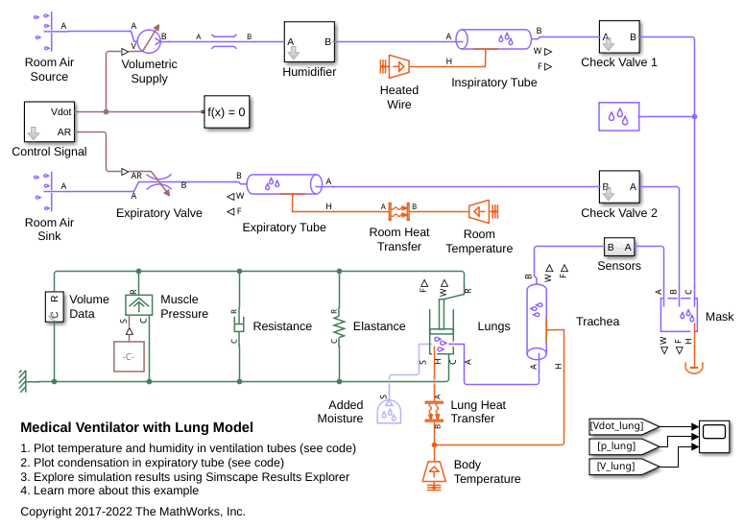
Medical Ventilator with Lung Model
Models a positive-pressure medical ventilator system. A preset flow rate is supplied to the patient. The lungs are modeled with the Translational Mechanical Converter (MA), which converts moist air pressure into translational motion. By setting the Interface cross-sectional area to unity, displacement in the mechanical translational network becomes a proxy for volume, force becomes a proxy for pressure, spring constant becomes a proxy for respiratory elastance, and damping coefficient becomes a proxy for respiratory resistance.
Ports
Conserving
Programmatic Use: Add Block
To add the block programmatically, use the add_block function with one of these library block paths as the source.
"fl_lib/Moist Air/Elements/Absolute Reference (MA)"
Example: add_block("fl_lib/Moist Air/Elements/Absolute Reference (MA)","myModel/myBlock",MakeNameUnique="on")
For information about programmatic access to individual block parameters, see the Programmatic Use section of parameter descriptions on this page.

