simulink.event.InputWriteTimeout
R2026bTrigger schedule event when input port value does not update within specified time
Since R2022b
Description
Use a simulink.event.InputWrite object to configure a root-level
input port in a rate-based model to create a schedule event each time the input port value
does not update within a specified amount of time. You can model and simulate quality of
service effects by using event triggers, such as the InputWriteTimeout
object, to execute partitions in response to the flow of data into a model.
Event triggers create schedule events based on the runtime activity at a particular location in the model. The schedule for the model determines which partitions execute in response to the schedule event as well as the event priority. To execute one or more partitions in response to the flow of data into a model, configure event triggers on one or more root-level input ports in the model. To configure the schedule for your model, use the Schedule Editor.
The Events parameter of an Inport or In Bus Element block stores the event triggers associated with the port. Each event trigger maps an input event related to the flow of data into the port to the name of the schedule event to trigger. The table summarizes the event triggers you can configure on root-level input ports. You can configure an input port with one event trigger for each input event.
| Input Event | Input Event Description | Event Trigger Object |
|---|---|---|
| Input write | Value for input port updates. | simulink.event.InputWrite |
| Input write timeout | Input port value does not update within a specified amount of time. | simulink.event.InputWriteTimeout |
| Input write lost | Input port value update overwrites unprocessed data. | simulink.event.InputWriteLost |
To configure the schedule for your model, use the Schedule Editor.
Creation
You can configure the event triggers for an input port programmatically or interactively.
When you configure an event trigger programmatically, create and configure the event trigger object yourself using the
simulink.event.InputWriteTimeoutfunction.When you configure an event trigger interactively by using the Block Parameters dialog box or the Property Inspector, the software creates and configures the event trigger object.
Description
writeTimeout = simulink.event.InputWriteTimeoutwriteTimeout that you can use to configure an
input port to trigger a specified schedule event each time the input port value does not
update within the specified amount of time.
Properties
Examples
Configure a model to execute a partition when the input value does not update within ten seconds.
Open the model InputTimeout. The model contains an input port that loads external data into two subsystems.
mdl = "InputTimeout";
open_system(mdl);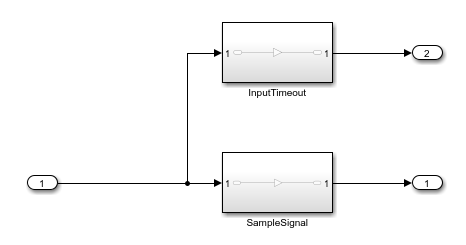
Configure the model to allow multiple partitions to access the model inputs and outputs. Both subsystems need to use the input port value, and each subsystem will execute at its own rate.
On the Modeling tab, under Setup, click Model Settings.
In the Configuration Parameters dialog box, on the Solver pane, expand Solver details.
Under Tasking and sample time options, select Allow multiple tasks to access inputs and outputs.
Alternatively, use the set_param function to configure the AllowMultiTaskInputOutput parameter.
set_param(mdl,"AllowMultiTaskInputOutput","on")
Configure the subsystem SampleSignal as a periodic partition that samples the input signal every second.
In the Block Parameters dialog box or the Property Inspector, select Treat as atomic unit.
From the Schedule as list, select
Periodic partition.Specify the partition name as
SampleSignal.Specify the sample time as
1.
Alternatively, use the set_param function to configure the TreatAsAtomicUnit, ScheduleAs, PartitionName, and SystemSampleTime parameters.
set_param("InputTimeout/SampleSignal","TreatAsAtomicUnit","on",...
    "ScheduleAs","Periodic partition",...
    "PartitionName","SampleSignal",...
    "SystemSampleTime","1")
Configure the subsystem InputTimeout as an aperiodic partition.
In the Block Parameters dialog box or the Property Inspector, select Treat as atomic unit.
From the Schedule as list, select
Aperiodic partition.Specify the partition name as
InputTimeout.
Alternatively, use the set_param function to configure the TreatAsAtomicUnit, ScheduleAs, and PartitionName parameters.
set_param("InputTimeout/InputTimeout","TreatAsAtomicUnit","on",...
    "ScheduleAs","Aperiodic partition",...
    "PartitionName","InputTimeout")
Configure the input port with an input write timeout event trigger.
In the Block Parameters dialog box, on the Execution tab, click Add event trigger.
From the list, select
Input Write Timeout.In the Timeout column of the table, specify the timeout as
10.
Alternatively, create and configure a simulink.event.InputWriteTimeout object. Then, configure the EventTriggers parameter of the input port using the set_param function.
inTimeout = simulink.event.InputWriteTimeout;
inTimeout.Timeout = "10";
set_param("InputTimeout/Inport","EventTriggers",{inTimeout})
Update the block diagram by pressing Ctrl+D or by using the set_param function. By default, the event trigger is configured to trigger the Auto event. When you update the block diagram or compile the model, the software creates the event Inport.InputWriteTimeout that is scoped to the Inport block.
set_param(mdl,"SimulationCommand","update")
Configure the model schedule such that the Inport.InputWriteTimeout event triggers the InputTimeout partition.
Open the Schedule Editor. In the model, click the badge on one of the partitioned subsystems
 . Alternatively, from the Block Parameters dialog box for the Inport block, on the Execution tab, click Open Schedule Editor
  .
.To expand the Events pane, click Expand Side
 .
.Select the
Inport.InputWriteTimeoutevent. Then, drag it into the Schedule Editor canvas and release it on theInputTimeoutpartition.
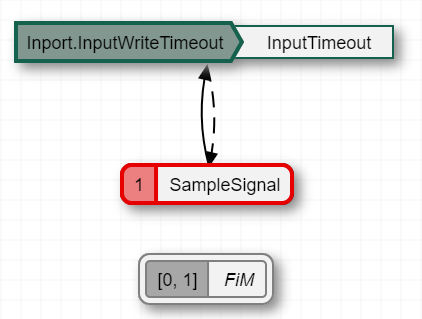
In the Schedule Editor, click Update Diagram. The block diagram updates to reflect the binding of the Inport.InputWriteTimeout event to the InputTimeout partition.
Alternatively, use the get_param function to get the schedule for the model. Then, using the Order property of the schedule, specify the trigger for the InputTimeout partition and use the set_param function to specify the modified schedule as the schedule for the model.
sched = get_param(mdl,"Schedule");
sched.Order.Trigger("InputTimeout") = "Inport.InputWriteTimeout";
set_param(mdl,"Schedule",sched)
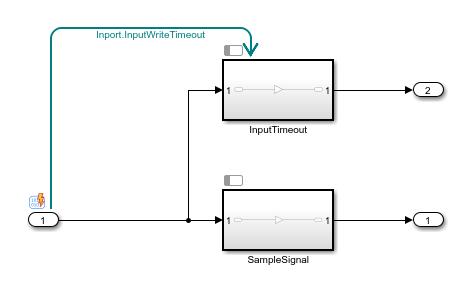
Create a timeseries object that contains input data with sample values separated by an increasing time interval.
time = [0 1 3 5 8 13 21 34 55 89 144];
data = (0:10)';
inp = timeseries(data,time);
Configure the model to load the input data.
set_param(mdl,"LoadExternalInput","on",...
    "ExternalInput","inp")
Simulate the model.
out = sim(mdl);
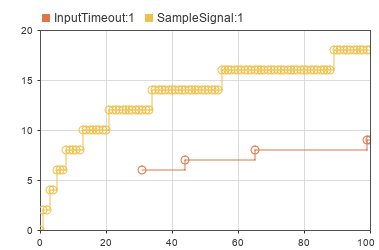
The InputTimeout partition executes only when the input value does not update for at least ten seconds.
Version History
Introduced in R2022b

