Simulink.VariantExpression
R2026bSpecify conditions that control variant selection
Description
In a model that contains variant blocks, you must associate each variant choice
with a variant control. During simulation, Simulink® evaluates the variant controls of all variant choices and activates the choice
that corresponds to the variant control that evaluates to true.
You can specify the variant control in the form of a Boolean condition expression, such as
A == 1 or A==1 && B == 2. In these
expressions, the variant control variables A and B can
be MATLAB® variables, Simulink.Parameter objects, or Simulink.VariantControl objects. Create a
Simulink.VariantExpression object to represent a Boolean variant condition
expression. You can define the object in the base workspace or in a data dictionary and use it
as part of variant control expression. These Simulink.VariantExpression
objects improve the readability of variant condition expressions.
Simulink.VariantExpression objects enable you to reuse complex variant
condition expressions across multiple variant blocks and variant parameters, improving the
readability of variant conditions. For more information, see Switch Between Choices Using Condition Expressions in Variant Blocks and Use Simulink.VariantExpression Objects for Variant Condition Reuse of Variant Blocks.
Note
Use Simulink.VariantExpression objects in AUTOSAR code generation
workflows to configure variants for AUTOSAR elements such as ports and runnables, and to
support AUTOSAR variant import and export workflows. For more information, see Configure Variants for AUTOSAR Elements (AUTOSAR Blockset). For
workflows other than AUTOSAR, using direct Boolean expressions with variant controls is
preferable.
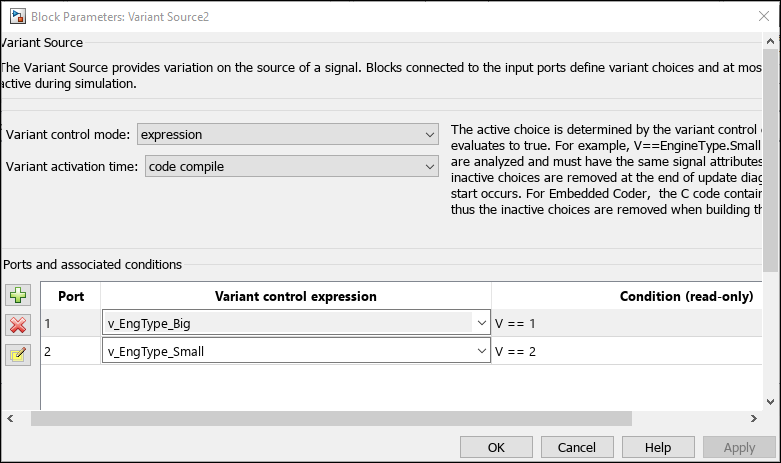
For example, you can use Simulink.VariantExpression objects as variant
controls in a Variant Source
block.
v_EngType_Big = Simulink.VariantExpression("V == 1");
v_EngType_Small = Simulink.VariantExpression("V == 2");
Note
Defining variant controls using
Simulink.VariantExpressionobjects in a mask workspace or the model workspace is not supported. For more information on storage locations for variant control variables, see Types of Variant Control Variables (Operands) in Variant Blocks.Using
Simulink.VariantExpressionobjects within structures is not supported.
Creation
Description
variantControl = Simulink.VariantExpression(conditionExpression)Condition property to
conditionExpression.
Properties
Examples
Use MATLAB variables for variant controls when you want to simulate the model but are not considering code generation.
Create MATLAB variables with scalar literal values.
Fuel = 3;
Emission = 2;
Ratio = 3;
Define conditional expressions using the variables and create variant controls.
Variant1 = Simulink.VariantExpression('Fuel==3 && Emission==2');
Variant2 = Simulink.VariantExpression('(Fuel==2 || Emission==1) && Ratio==2');
Variant3 = Simulink.VariantExpression('Fuel==3 || Ratio==4');
To generate preprocessor conditionals for code generation, use
Simulink.Parameter objects.
Create variant Simulink.Parameter objects with scalar literal
values.
Fuel = Simulink.Parameter(3);
Emission = Simulink.Parameter(2);
Ratio = Simulink.Parameter(3);
Specify the custom storage class for these objects as
ImportedDefine so that the values are specified by an external
header file. Other valid values for the custom storage class are
Define and CompilerFlag.
Note
If you generate code with variant activation time set to
startup, specify the supported custom storage class for the
objects. For more information on built-in and custom storage classes supported with
startup activation time see Storage Classes for Different Variant Activation Times.
Fuel.CoderInfo.StorageClass = 'Custom';
Fuel.CoderInfo.CustomStorageClass = 'ImportedDefine';

Emission.CoderInfo.StorageClass = 'Custom';
Emission.CoderInfo.CustomStorageClass = 'ImportedDefine';

Ratio.CoderInfo.StorageClass = 'Custom';
Ratio.CoderInfo.CustomStorageClass = 'ImportedDefine';
Define conditional expressions using the variables and create variant controls.
Variant1 = Simulink.VariantExpression('Fuel==3 && Emission==2');
Variant2 = Simulink.VariantExpression('(Fuel==2 || Emission==1) && Ratio==2');
Variant3 = Simulink.VariantExpression('Fuel==3 || Ratio==4');
You can associate a variant control variable of type Simulink.VariantControl with a variant activation time. For an example, see
Use Simulink.VariantControl Variables for Coherent Switching of Choices in Variant Blocks.
Create Simulink.VariantControl objects with scalar literal
values.
Fuel = Simulink.VariantControl(Value=3,ActivationTime="update diagram");
Emission = Simulink.VariantControl(Value=2,ActivationTime="update diagram");
Ratio = Simulink.VariantControl(Value=3,ActivationTime="update diagram");
Define conditional expressions using the variables and create variant controls.
Variant1 = Simulink.VariantExpression('Fuel==3 && Emission==2');
Variant2 = Simulink.VariantExpression('(Fuel==2 || Emission==1) && Ratio==2');
Variant3 = Simulink.VariantExpression('Fuel==3 || Ratio==4');
After identifying the variant values that your model requires, you can construct complex variant conditions to control the activation of your variant blocks by defining variant conditions as Simulink.VariantExpression objects. Simulink.VariantExpression objects enable you to reuse common variant conditions across models and help you encapsulate complex variant condition expressions.
You can specify the whole of a variant condition expression or only the variant control variable inside the Condition property of the Simulink.VariantExpression object.
Note:
You can define a variant control variable of type
Simulink.VariantExpressiononly in the base workspace or in a data dictionary. Defining variant controls usingSimulink.VariantExpressionobjects in a mask workspace or the model workspace is not supported. For more information on storage locations for variant control variables, see Types of Variant Control Variables (Operands) in Variant Blocks.Using
Simulink.VariantExpressionwithin structures is not supported.
Open the slexVariantSubsystems model.
open_system("slexVariantSubsystems");In the MATLAB® Command Window, define variant control expressions in Simulink.VariantExpression objects.
V_LinearController = Simulink.VariantExpression("V==1");
V_NonLinearController = Simulink.VariantExpression("V==2");
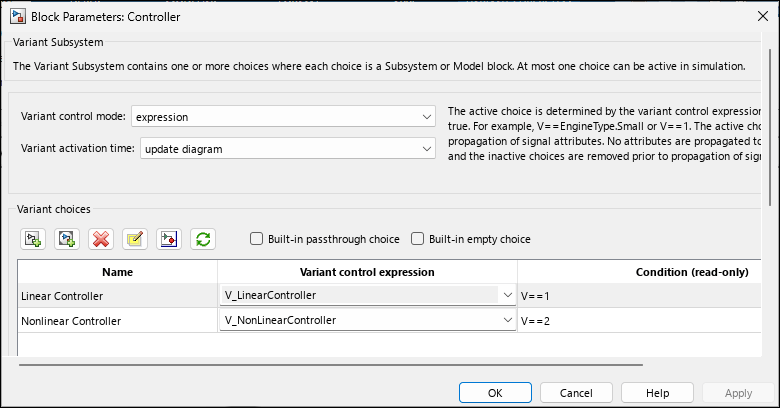
Specify the Simulink.VariantExpression objects as the variant control variables in the block parameters dialog box of the Controller block.
set_param("slexVariantSubsystems/Controller/Linear Controller", ...
   "VariantControl", "V_LinearController");
set_param("slexVariantSubsystems/Controller/Nonlinear Controller", ...
   "VariantControl", "V_NonLinearController");
Open the Block Parameters dialog box for the Controller block in the model. The Condition column of the Variant Choices table automatically shows the Boolean conditions that the Simulink.VariantExpression objects represent.
Set the value of variant control variable V as 1 and simulate the model.
V = 1;
sim("slexVariantSubsystems");
During simulation, the Linear Controller block becomes active. Double-click the Controller block to see the active choice. Using this approach, you can develop complex variant condition expressions that are reusable.

