Create Hierarchical List in Mask Dialog Box
R2026bYou can use the Tree Control option available in the Display section of the Mask Editor to create the hierarchical list of data in mask dialog box.
Consider a scenario in which you want to create a parent-child hierarchy on a mask dialog box as shown here:
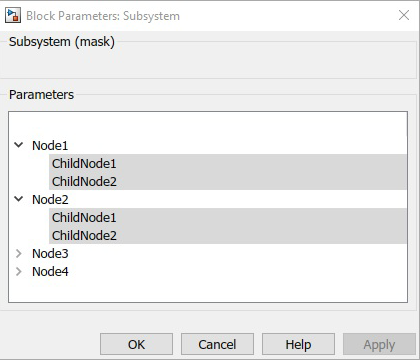
To do so,
Right-click a block and select Create Mask Edit Mask.
In the Parameters & Dialog pane, click Tree Control from the Display section.
In the Property editor section, specify these in the Tree Items field:
{ 'Node1', {'ChildNode1', 'ChildNode2'}, 'Node2', {'ChildNode1',
              'ChildNode2'}, 'Node3', {'ChildNode1', 'ChildNode2'}, 'Node4', {'ChildNode1',
              'ChildNode2'}}
Click Apply.

