Initialize Persistent Variables in MATLAB Functions
R2026bA persistent variable is a local variable in a MATLAB® function that retains its value in memory between calls to the function. See
persistent. You can initialize persistent
variables in MATLAB Function blocks and MATLAB functions in Stateflow® charts. However, some coding practices can produce errors when you use
persistent variables.
Avoid Using coder.opaque with Persistent Variables
If you use a variable declared by the coder.opaque (MATLAB Coder) function as a persistent variable, simulating the model
generates an error. For example, this function uses a persistent variable,
pp, that is first declared by using
coder.opaque. When you simulate the function in a model, this
code produces an error.
function y = fcn(u)
%#codegen
persistent pp;
if isempty(pp)
    pp = eml.opaque("int","0");
end
q = 0;
q = eml.ceval("(int)",pp);
q = q + 1;

pp = eml.ceval("(int)",q);
y = 0;
y = eml.ceval("(int)",pp);
Use Best Practices to Avoid Errors
To avoid initialization errors caused by persistent variables, follow these best practices:
Initialize persistent variables in functions only by accessing constants.
Ensure the control flow of the function does not depend on whether the initialization occurs.
If you do not follow these guidelines, these conditions produce an initialization error:
MATLAB Function blocks with persistent variables where the Allow direct feedthrough property is cleared
MATLAB Function blocks with persistent variables in models that contain State Control blocks where State control is set to
SynchronousStateflow charts that implement Moore machine semantics and that use MATLAB functions with persistent variables
For example, this version of fcn uses a persistent
variable, n. The initial value of n depends on the
input u, and the return statement interrupts the
normal control flow of the function. This code produces an error when used in a model
that has one of the conditions described above.
function y = fcn(u)
    persistent n

    if isempty(n)
        n = u;
        y = 1;
        return
    end

    y = n;
    n = n + u;
end
MATLAB Function Block with No Direct Feedthrough
This example model contains a MATLAB Function block that does not follow the best practices for using persistent variables in MATLAB functions. The MATLAB Function block input is a square wave, which is provided by a Sign and Sine Wave block. The MATLAB Function block adds the value of u to the persistent variable n at each time step.
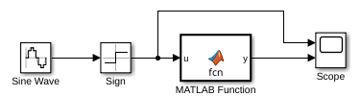
Simulate the model. The simulation returns an error because:
The initial value of the persistent variable
ndepends on the inputu.The
returnstatement interrupts the normal control flow of the function.The Allow direct feedthrough property of the MATLAB Function block is cleared.
In the MATLAB Function block, initialize the persistent variable by setting it to a constant value and removing the return statement. Redefine the function by using this code.
function y = fcn(u)
    persistent n
     if isempty(n)
         n = 1;
     end
y = n;
n = n + u;
endSimulate the model again.
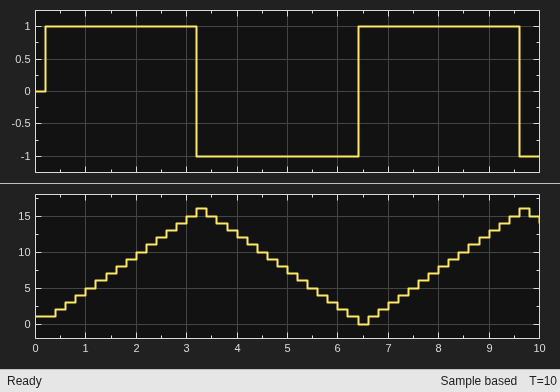
State Control Block in Synchronous Mode
This example model contains a MATLAB Function block that does not follow the best practices for using persistent variables in MATLAB functions. The MATLAB Function block input is a square wave, which is provided by a Sign and Sine Wave block. The MATLAB Function block adds the value of u to the persistent variable n at each time step. The model contains a State Control block where State control is set to Synchronous.
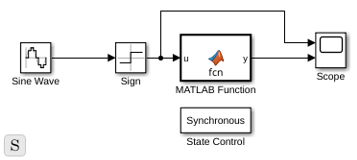
Simulate the model. The simulation returns an error because:
The initial value of the persistent variable
ndepends on the inputu.The
returnstatement interrupts the normal control flow of the function.The model contains a State Control block where State control is set to
Synchronous.
In the MATLAB Function block, initialize the persistent variable by setting it to a constant value and removing the return statement. Redefine the function by using this code.
function y = fcn(u)
    persistent n
     if isempty(n)
         n = 1;
     end
y = n;
n = n + u;
endSimulate the model again.
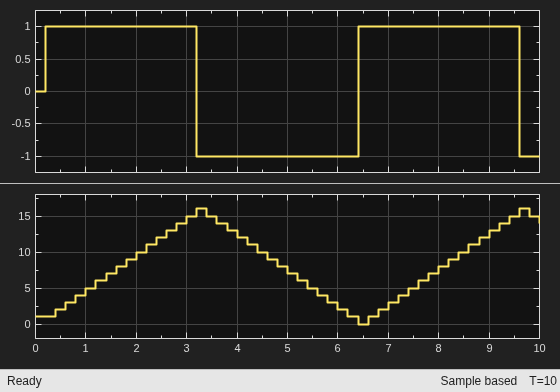
Stateflow Chart That Implements Moore Semantics
This example model contains a Stateflow chart with a MATLAB function that does not follow the best practices for using persistent variables.
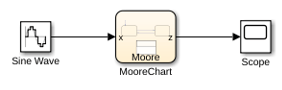
The MATLAB function adds 1 or -1 depending on the active state, to the persistent variable, n.
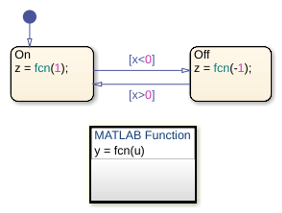
Simulate the model. The simulation returns an error because:
The initial value of the persistent variable
ndepends on the inputu.The
returnstatement interrupts the normal control flow of the function.The chart implements Moore semantics.
In the MATLAB function, initialize the persistent variable by setting it to a constant value and removing the return statement. Redefine the function by using this code.
function y = fcn(u)
    persistent n
     if isempty(n)
         n = 1;
     end
y = n;
n = n + u;
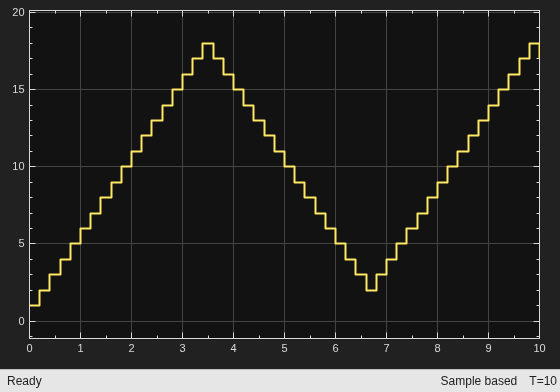
endSimulate the model again.
See Also
Blocks
- MATLAB Function | State Control (HDL Coder) | Chart (Stateflow)

