Limitations of Simulink Design Verifier with Stateflow Features
R2026bSimulink® Design Verifier™ does not support the following Stateflow® software features. Avoid using these unsupported features in models that you analyze.
ml Namespace Operator, ml Function, ml Expressions
The software does not support calls to MATLAB® functions or access to MATLAB workspace variables, which the Stateflow software allows. See Access MATLAB Functions and Workspace Data in C Charts (Stateflow).
C or C++ Operators
The software supports the sizeof operator in custom code, which the
Stateflow software allows.
C Math Functions
The software supports calls to the following C math functions:
absceilfabsfloorfmodlabsldexppow(only for integer exponents)
The software does not support calls to other C math functions, which the Stateflow software allows. If automatic stubbing is enabled, which it is by default, the software eliminates these unsupported functions during the analysis.
For information about C math functions in Stateflow, see Call C Library Functions (Stateflow).
For details about automatic stubbing, see Handle Model Complexities with Automatic Stubbing.
Atomic Subcharts That Call Exported Graphical Functions Outside a Subchart
In test generation analysis, the software supports atomic subcharts calling graphical function but does not support extraction and analysis of atomic subchart when there are other dependencies.
For information about exported functions, see Export Stateflow Functions for Reuse (Stateflow).
Recursion and Cyclic Behavior
The software does not support recursive functions, which occur when a function calls itself directly or indirectly through another function call. Stateflow software allows you to implement recursion using graphical functions.
In addition, the software does not support recursion that the Stateflow software allows you to implement using a combination of event broadcasts and function calls. For information about avoiding recursion in Stateflow charts, see Resolve Unintended Recursive Behavior (Stateflow).
Stateflow software also allows you to create cyclic behavior, where a sequence of steps is repeated indefinitely. If your model has a chart with cyclic behavior, the software cannot analyze it. For information about cyclic behavior in Stateflow charts, see Detect Cyclic Behavior (Stateflow).
However, you can modify a chart with cyclic behavior so that it is compatible, as in the following example.
The following chart creates cyclic behavior. State A calls state
A1, which broadcasts a Clear event to state B,
which calls state B2, which broadcasts a Set event
back to state A, causing the cyclic behavior.
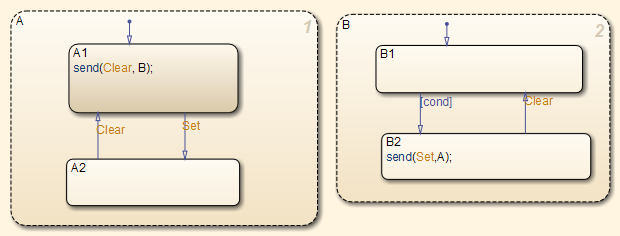
If you change the send function calls to
use directed event broadcasts so that the Set and Clear events are
broadcast directly to the states B1 and A1, respectively, the cyclic
behavior disappears and the software can analyze the model.
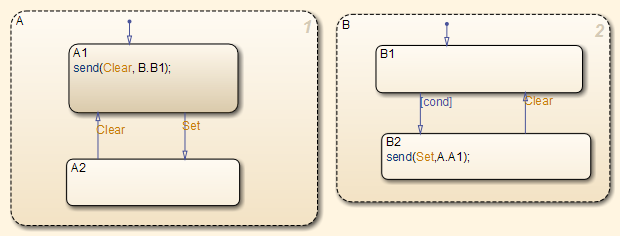
For information about the benefits of directed event broadcasts, see Broadcast Local Events to Synchronize Parallel States (Stateflow).
Custom C/C++ Code
If your model consists of custom C/C++ code, Simulink Design Verifier supports analysis based on these settings:
If you enable the custom code analysis option: Model is compatible for analysis.
If you enable import custom code and custom code analysis options: If the import custom code option is set to
Off, the custom code is not supported and the model is incompatible for analysis. For more information, see Import custom code and Enable custom code analysis.If you enable import custom code option and the custom code analysis option is set to
Off: The model is compatible for analysis, but calls to the custom code are stubbed during analysis.
Textual Functions with Literal String Arguments
The software does not support literal string arguments to textual functions in a Stateflow chart.
Stateflow Charts Containing Ports
The software does not support export function and subsystem build for Stateflow charts that contain entry or exit ports.
See Also
Simulink Design Verifier Limitations for MATLAB for Code Generation | Limitations of Simulink Design Verifier for Simulink Software Features

