Perform Analysis Using Block Replacement
R2026bBlock replacements allows you to define your own libraries of replacement blocks and custom block replacement rules. Using block replacements, you can
Work around an incompatibility, such as the presence of unsupported blocks in your model.
Customize a block for analysis, such as:
Adding constraints to its input signals
Adding objectives to its output signals
Eliminating the contents of a subsystem or Model block to simplify your analysis
When performing block replacements, the software makes a copy of your model and replaces blocks in the copy, without altering your original model. This way, you can easily customize a model for analysis.
The Simulink® Design Verifier™ software replaces blocks automatically in a model using:
Libraries of replacement blocks
Rules that define which blocks to replace and under what conditions
You replace any block with any built-in block, library block, or subsystem.
Built-In Block Replacements
The Simulink Design Verifier software provides a set of block replacement rules and a corresponding library of replacement blocks. Use these built-in block replacements when analyzing models. They serve as examples that you can examine to learn how to create your own block replacements.
The library of replacement blocks that corresponds to the factory default rules is
matlabroot/toolbox/sldv/sldv/sldvblockreplacementlib
The following table lists the factory default block replacement rules, available in
the matlabroot\toolbox\sldv\sldv\private_normal.m replace blocks with
Subsystem blocks. For more information, see Design Verifier Pane: Block Replacements.
File Name | Description |
|---|---|
| A rule that replaces 1-D Lookup Table blocks with an implementation that includes test objectives for each breakpoint and interval specified by the Breakpoints parameter. |
| A rule that adds Test Condition/Proof Assumption blocks to the input ports of 2-D Lookup Table blocks. Each Test Condition/Proof Assumption block constrains signal values to the interval specified by the corresponding breakpoint vector. |
| A rule that adds a Test Condition/Proof Assumption block to the
control input port of Multiport Switch blocks
whose Number of data ports parameter is
|
| A rule that adds a Test Condition/Proof Assumption block to the
control input port of Multiport Switch blocks
whose Number of data ports parameter is
|
| A rule that adds a Test Condition/Proof Assumption block to the
control input port of Multiport Switch blocks
whose Number of data ports parameter is
|
| A rule that adds a Test Condition/Proof Assumption block to the
control input port of Multiport Switch blocks
whose Number of data ports parameter is
|
| A rule that replaces Switch blocks with an implementation that includes test objectives, requiring that each switch position be exercised when the values of the first and third input ports are different. |
| A rule that replaces Switch blocks having non-virtual bus inputs with an implementation that converts non-virtual bus inputs to virtual bus inputs. This implementation includes test objectives and requires that each switch position be exercised when the values of the first and third input ports are different. |
| A rule that adds a Test Condition/Proof Assumption block to the
index port of Selector blocks whose
Index Option parameter is |
| A rule that adds a Test Condition/Proof Assumption block to the
index port of Selector blocks whose
Index Option parameter is |
Template for Block Replacement Rules
To help you create block replacement rules, Simulink Design Verifier provides an annotated template that contains a skeleton implementation of the requisite callbacks:
matlabroot/toolbox/sldv/sldv/sldvblockreplacetemplate.m
To create a block replacement rule, make a copy of the template and edit the copy to implement the desired behavior for the rule you are creating. The comments in the template provide hints about how to use each section.
Block replacement rules have the following restrictions:
The function that represents a block replacement rule must include particular callbacks. Use the block replacement rule template as a starting point for writing a custom rule. (See Replace Unsupported Blocks Using Block Replacements.)
The function that represents a block replacement rule must be on the MATLAB® search path.
Block Replacement Effects on Test Generation
Replacing blocks can affect test case generation if the replaced blocks share functionality with other parts of your model. Before you replace blocks, understand functional dependencies on those blocks or on shared signals. For more information, see Highlight Functional Dependencies. Replacement blocks can also affect other analysis workflows such as property proving.
For example, you can customize a block for analysis using a replacement block that adds objectives to an input signal. If another subsystem depends on that signal, the replacement block effectively adds an objective for the subsystem.
In this example, the breakpoint range of u1 in the 2-D Lookup
Table is 5–7. The switch threshold 8 falls outside
the u1 lookup table range.
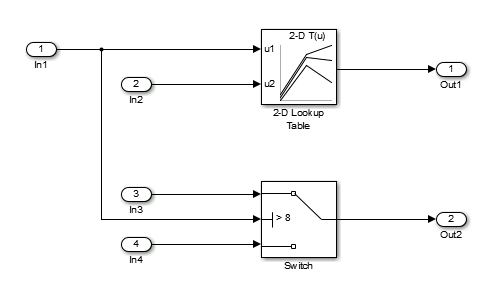
Tests generated without replacing the 2-D Lookup Table satisfy two objectives: that
the trigger is not greater than the Switch block threshold
8, and that the trigger is greater than the Switch
block threshold 8.
Objectives Satisfied

The blkrep_rule_lookup2D_normal.m block replacement rule replaces
the 2-D Lookup Table with a masked subsystem containing the 2-D Lookup Table and a
MATLAB Function block.

The MATLAB Function block constrains the analysis within the breakpoint bounds of the table.
See Also
Design Verifier Pane: Block Replacements

