Flexible Body Model Builder
R2026bDescription
The Flexible Body Model Builder app generates the reduced-order model (ROM) data for flexible bodies by using the Craig-Bampton method [1]. You can use the app to specify the geometry, material properties, and interface frames of the flexible body. To control the accuracy of the reduced-order model, you can specify the meshing parameters and model order reduction settings.
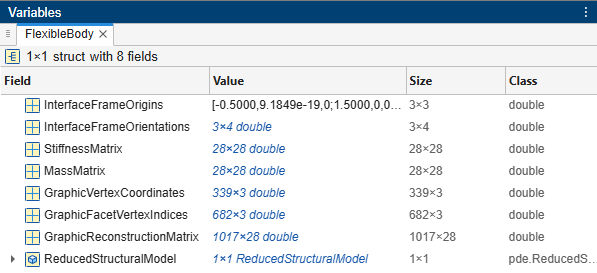
The app saves the ROM data as a structure called FlexibleBody in a MAT
file. The ROM data contains the stiffness and mass matrices, the origins and orientations of
the interface frames, and graphical information for displaying the deformed shape of the
flexible body. You can use the fields of the structure to specify the corresponding parameters
of the Reduced Order Flexible
Solid block to model a flexible body.
The app provides the Partial Differential Equation Toolbox and
Integro-Differential Modeling Frameworks options to generate ROM
data. If you use the Partial Differential Equation Toolbox option,
the FlexibleBody structure also includes a
ReducedStructuralModel object. You can use this object with the reconstructSolution (Partial Differential Equation Toolbox)
function to recover full‑model results for further analysis, such as evaluating stress and
strain. The Partial Differential Equation Toolbox option requires
Partial Differential Equation Toolbox™. The Integro-Differential Modeling Frameworks (IDMF) option requires the
Integro-Differential Modeling Framework for MATLAB® add-on that supports Linux® and Windows®.
On Linux, the IDMF add-on runs without any additional requirement. On Windows, the IDMF option requires additional setup, including the Windows Subsystem for Linux (WSL). For setup details, see IDMF Setup on Windows.
Open the Flexible Body Model Builder App
MATLAB Toolstrip: On the Apps tab, under Simscape, click Flexible Body Model Builder.
MATLAB command prompt: Enter
flexibleBodyModelBuilder.
Examples
This example shows how to generate the reduced order model (ROM) data by using the Flexible Body Model Builder app. The example uses a dipper arm part with predefined geometry, material properties, and frames.
Open the example and add the geometry files to the search path for the current MATLAB® session:
addpath(fullfile("ReducedOrderFlexibleSolidSupport","Geometries"));
Launch the App
To launch the Flexible Body Model Builder app, enter the command at the MATLAB command line:
flexibleBodyModelBuilder
Specify the Geometry and Material Properties
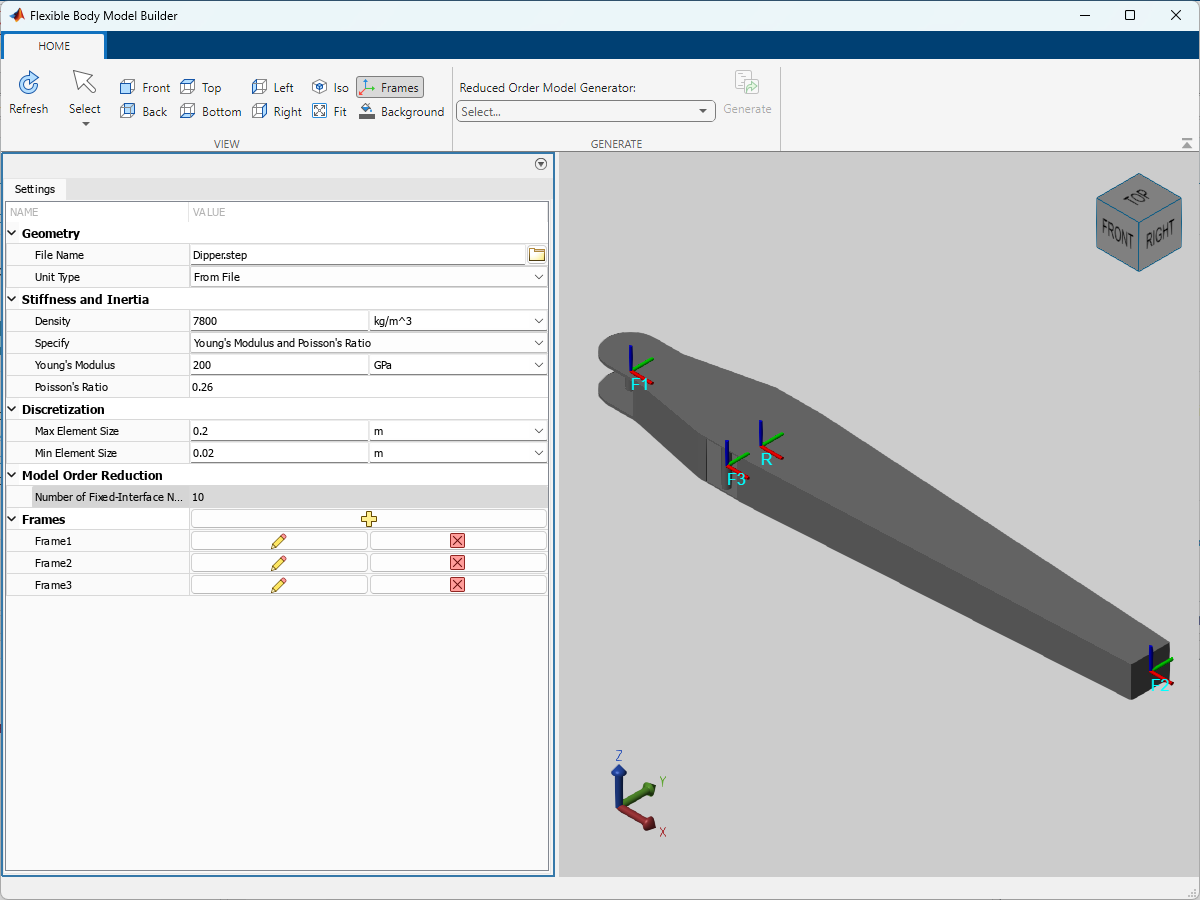
To specify the geometry, under Geometry, enter Dipper.step for the File Name parameter. To view the dipper arm, under GENERATE tab, click the Refresh button  .
.
The dipper arm is constructed from steel. To represent the material properties, in the Stiffness and Inertia section, specify Density, Young's Modulus, and Poisson's Ratio as shown in the image.
Add the Interface Frames
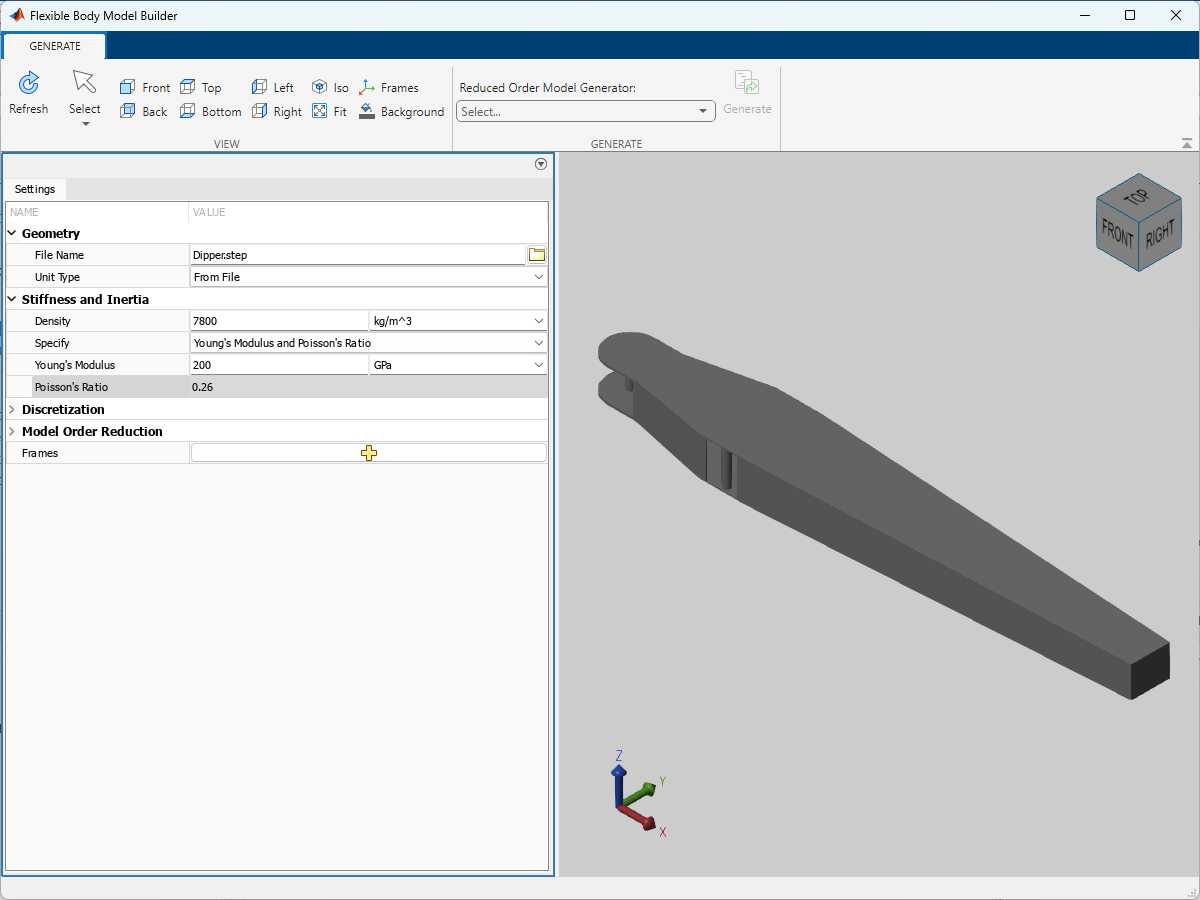
A flexible body uses the interface frames to connect other Simscape™ Multibody™ elements, such as joints, constraints, forces, and sensors. In this example, add three interface frames on the dipper arm. Use the Frames parameter to specify the locations and orientations of the interface frames. As shown in the image, set the locations of the F1, F2, and F3 frames at the centers of cylindrical surface 4, planar surface 11, and cylindrical surface 1, respectively. Use the default settings for the orientations of the interface frames.
Specify Mesh and Generate the ROM Data
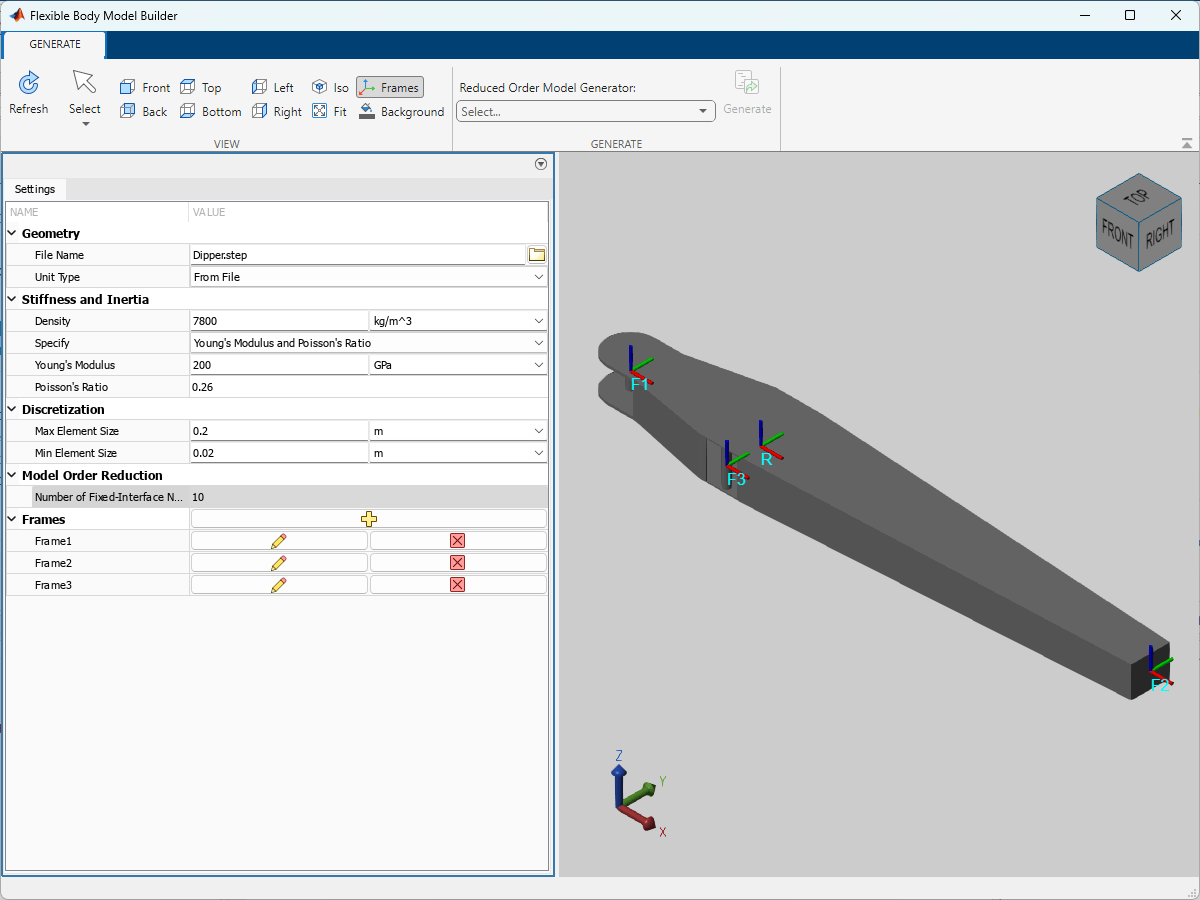
To control the accuracy of the reduced order model, you can specify the meshing parameters and model order reduction settings. To produce a coarse mesh for body, specify 0.2 m for the Max Element Size and 0.02 m for the Min Element Size. You can adjust these parameters to refine the mesh for more accurate results. To specify model order reduction settings, under Model Order Reduction, specify Number of Fixed-Interface Normal Modes. This example retains 10 dynamic Craig-Bampton modes.
To generate the ROM data, you can select one of the Reduced Order Model Generator options. In this example, select Partial Differential Equation Toolbox option and click Generate. The app saves all the ROM data in a MAT file. In this example, name the MAT file as DipperROM.mat.
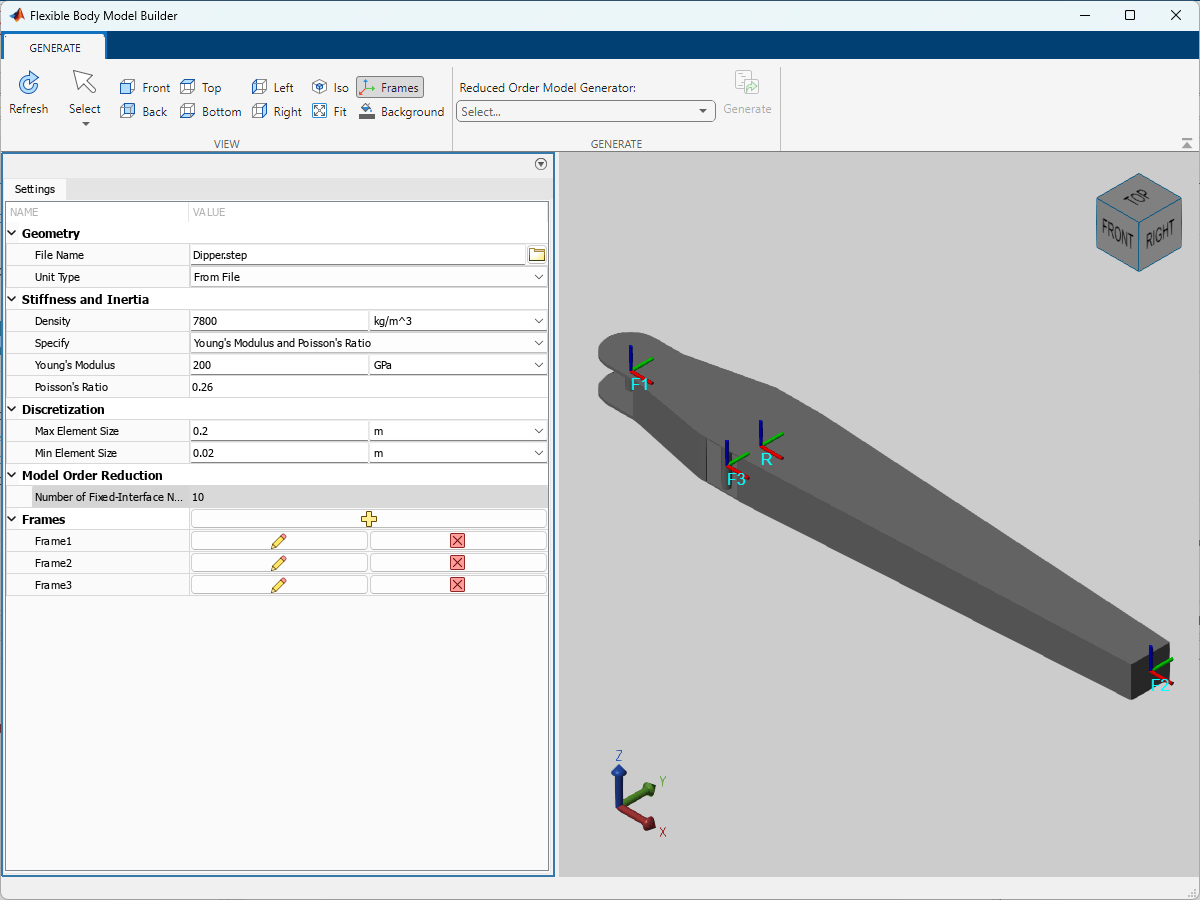
Note that the output ROM data does not save any of the inputs that were provided to the app for generating the ROM data. In other words, if you close the app after generating the ROM data, you cannot access the specifications from the app anymore. It is recommended to record all the inputs before closing the app.
This example shows how to use the ROM data generated by the Flexible Body Model Builder app to specify a Reduced Order Flexible Solid block.
Load the ROM Data
This example uses the ROM data generated in the Generate ROM Data example. Find and load the DipperROM.mat file that stores the ROM data. In the MATLAB® workspace, double-click the FlexibleBody structure array to see the ROM data categorized in different fields.
Specify the Reduced Order Flexible Solid block
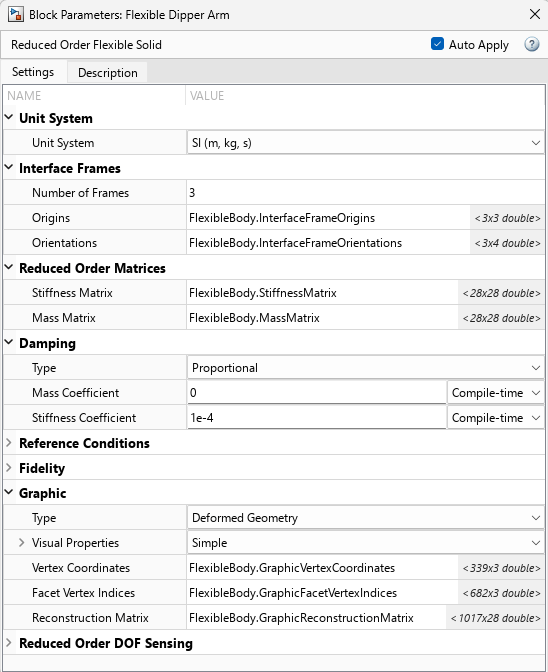
This section uses the Using the Reduced Order Flexible Solid Block - Flexible Dipper Arm model to show how to specify a Reduced Order Flexible Solid block with the loaded ROM data. This example uses the ROM data to specify the interface frames, stiffness and mass matrices, and graphic properties of the flexible body.
In the ReducedOrderFlexibleSolid.slx model, open the Flexible Dipper Arm block. Use the dot notation of the form FlexibleBody.fieldName to set these parameters to the corresponding ROM data.
Interface Frames
Number of Frames
Origins
Orientations
Reduced Order Matrices
Stiffness Matrix
Mass Matrix
Graphic
Vertex Coordinates
Facet Vertex Indices
Reconstruction Matrix
For damping properties, use the default settings of the proportional damping. Because the ROM data generated by the Flexible Body Model Builder app is in SI units, you must set the Unit System to SI (m, kg, s).
Parameters
Geometry
CAD file name or path to CAD file, specified as a character vector. If the file name or path does not include a file extension, the app assumes the file type is STEP. The app supports various formats of CAD files. For a list of supported CAD file formats, see Supported Software and File Formats.
Depending on the location of the CAD file, use one of these methods to specify File Name.
| Location | Methods |
|---|---|
| File is in the current working folder or on the MATLAB path | Enter the file name in the text box. Example:
|
| File is in a folder that is neither the current folder nor on the MATLAB path |
|

Tip
When using the app across multiple platforms or sharing the model with others, consider using either the file name or relative path.
A forward slash (/) is a valid separator on any platform. A backward slash (\) is valid only on Microsoft® Windows platforms.
Source of the solid geometry unit, specified as the From
File or Custom. Select From
File to use the unit specified in the imported file. Select
Custom to specify your own unit.
Length unit in which to interpret the geometry. Changing the unit changes the scale of the imported geometry.
Dependencies
To enable this parameter, set Unit Type to
Custom.
Stiffness and Inertia
Mass per unit volume of material. The default value corresponds to aluminum.
Elastic properties used to parameterize the plate. You can specify either
Young's Modulus and Poisson's Ratio or Young's and Shear
Modulus. These properties are commonly available in materials
databases.
Ratio of normal stress to normal strain, specified as a positive scalar. The default value corresponds to aluminum.
The app performs a cross-parameter check between the Young's and shear moduli to ensure the resulting Poisson's ratio is in the range [0, 0.5).
Poisson's ratio of the plate. The value specified must be greater than or equal to 0 and smaller than 0.5. The default value corresponds to aluminum.
Dependencies
To enable this parameter, set Specify to Young's
Modulus and Poisson's Ratio.
Ratio of shear stress to engineering shear strain, specified as a positive scalar. The default value corresponds to aluminum.
The app performs a cross-parameter check between the Young's and shear moduli to ensure the resulting Poisson's ratio is in the range [0, 0.5).
Dependencies
To enable this parameter, set Specify to
Young's and Shear
                Modulus
.
Discretization
The app creates meshes based on the specified maximum and minimum element sizes. The app provides quadratic tetrahedral meshes whose edge lengths are roughly within the specified element sizes. The values of the Max Element Size and Min Element Size parameters do not impose strict constraints on the created mesh, but provide soft lower and upper bound targets. Occasionally, the edge length of some elements may be beyond the specified limits.
Target maximum mesh edge length, specified as a positive scalar.
The Max Element Size parameter is an approximate upper bound on the mesh edge lengths. The value must be larger than the value of the Min Element Size parameter. This parameter controls the overall refinement of the mesh. Small values create finer meshes, but the mesh generation and ROM computation take a longer time.
Target minimum mesh edge length, specified as a positive scalar.
The Min Element Size parameter is an approximate lower bound on the mesh edge lengths and controls the mesh refinement in a localized manner, such as at curved edges or on small features. The value must be less than the value of the Max Element Size parameter. Small values may better capture details and improve the accuracy of the ROM, but the mesh generation and ROM computation take a longer time.
Model Order Reduction
Retained dynamic Craig-Bampton modes, specified as an integer in range [0, n].
,
where:
nn is the number of all the nodes in the mesh.
nnf is the number of nodes on the surfaces to which the interface frames are attached.
For most analyses, it is not necessary to retain high-frequency modes for these reasons:
High-frequency modes do not contribute much to simulation results.
Simulations with high-frequency modes are computationally expensive.
Frames
Click the Create Frame button  to open a pane for creating a new interface frame on
the body. In this pane, you can specify the origin and orientation for the
frame.
to open a pane for creating a new interface frame on
the body. In this pane, you can specify the origin and orientation for the
frame.
To define the origin of the frame, under Frame Origin, use Based on Geometric Feature to make the new frame origin coincident with the canonical point of the selected undeformed feature. Surfaces are the only valid feature. Select a surface from the visualization pane, then click Select Feature to confirm the location of the origin. The name of the origin location appears in the field below this option.
After you select a surface to define the origin of the frame, the app rigidly constrains that surface in the flexible body and rigidly attaches the frame to that rigid region. The selected surfaces for the interface frames must not connect to or overlap each other.
To define the orientation of the frame, under the Frame Axes section, select the Primary Axis and Secondary Axis of the frame and then specify their directions.
Use the following methods to select a vector for specifying the directions of the primary and secondary axes. The primary axis is parallel to the selected vector and constrains the remaining two axes to its normal plane. The secondary axis is parallel to the projection of the selected vector onto the normal plane.
Along Reference Frame Axis: Selects an axis of the reference frame of the undeformed geometry.
Based on Geometric Feature: Selects the vector associated with the chosen undeformed geometry feature. Valid features include surfaces and lines. The corresponding vector is indicated by an arrow in the visualization pane. You can select a feature from the visualization pane and then click Select Feature to confirm the selection. The name of the selected feature appears in the field below this option.
Edit or delete the frames you created. N is a unique
identifying number for each custom frame.
Click the Edit button
 to edit the interface frame, such as the origin
and axes.
to edit the interface frame, such as the origin
and axes.Click the Delete button
 to delete the interface frame.
Dependencies
To enable this parameter, create a frame by clicking the Create Frame button .
Tips
On Windows, to run the IDMF add-on, you must install the Windows Subsystem for Linux (WSL). To install WSL, see Install Linux on Windows with WSL.
On Windows, the first time you use IDMF to generate a ROM data set, the app imports a
Linux distribution to WSL. The distribution is named
idmf_hub_<MATLABrelease>, such as idmf_hub_2023b,
where <MATLABrelease> is the release number of the currently running
MATLAB. To query the presence of the idmf_hub_<MATLABrelease>
distribution, in the Windows command prompt, type wsl -l -v. To remove the
idmf_hub_<MATLABrelease> distribution, type
idmf_container_teardown() at the MATLAB command line.
When you use IDMF on Windows with WSL, the available memory and swap space may be limited due to default
settings. For details, see Main
WSL settings. To increase the amount of memory available to IDMF, you can configure
global settings for WSL 2 by using the .wslconfig file. For detailed
instructions, see .wslconfig. Set the memory and
swap entries based on the specifications of the computer and your memory
requirements. For example, to assign 48GB of memory to WSL 2 and add 8GB of swap space, add
the following lines to the .wslconfig
file.
[wsl2]
memory=48GB
swap=8GB
On Windows, the Flexible Body Model Builder app cannot generate a ROM data set
by using the IDMF option if the Windows Defender Firewall blocks the PostgreSQL server. By default, the firewall blocks
the server on all public and private networks. To resolve this issue, you can allow the server
to communicate on desired networks if the firewall prompts when using the app. Alternatively,
you can manually add the executable file of the PostgreSQL server to the list of allowed apps.
For more information, see Allowing apps through Windows Defender Firewall. You can find the executable file in
the installation folder of the currently running MATLAB,
<matlabroot>\sys\postgresql\win64\PostgreSQL\bin\postgres.exe. It is
recommended that you go through these steps with your IT team or a system
administrator.
References
[1] Craig Jr, Roy R., and Andrew J. Kurdila. Fundamentals of Structural Dynamics. 2nd ed. Hoboken, N.J: John Wiley, 2006.

