Call C Library Functions
You can add mathematical operations, trigonometric calculations, and exponential
computations, or call C functions in your Stateflow® charts by calling C library functions. Charts that use C as the action language
can call C library functions without using any special prefixs or function wrappers. To call C
functions in charts that use MATLAB® as the action language, use the coder.ceval (Simulink) function. For more information, see Integrate C Code by Using the MATLAB Function Block (Simulink).
To update the action language that your chart uses, see Modify the Action Language for a Chart.
Calling C Library Functions
In charts that use C as the action language, you can call these C math library functions:
abssincostansinhtanhacosatanatan2coshceilfloorexpfabsfmodlabsldexploglog10powrandsqrt
When you call these functions, you must use double-precision values unless all the input arguments are explicitly single precision. When the input arguments do not match, the chart casts the input arguments to the expected data type. For example, if youc all the sin function with an integer as an input argument, the chart casts the input argument to a floating-point number of type double.
To call other C library functions, open the Configuration Parameters dialog box and, in
the Simulation Target pane, enter the appropriate
#include statements, as described in Configure Custom Code.
Note
When a chart casts the input arguments to the C library functions to floating-point
numbers, function calls with arguments of type int64 or
uint64 can result in loss of precision.
Calling the abs Function
Stateflow charts interpret the abs function differently than the
standard C version of abs by processing integer and floating-point
arguments as follows:
If
xis an integer of typeint32orint64, the standard C functionabsapplies tox, orabs(x).If
xis an integer of typeint16orint8, the standard Cabsfunction applies to a cast ofxas an integer of typeint32, orabs((int32)x).If
xis a floating-point number of typedouble, the standard C functionfabsapplies tox, orfabs(x).If
xis a floating-point number of typesingle, the standard C functionfabsapplies to a cast ofxas adouble, orfabs((double)x).If
xis a fixed-point number, the standard C functionfabsapplies to a cast of the fixed-point number as adouble, orfabs((double) Vx), where Vxis the real-world value ofx.
If you want to use the abs function as it works in the standard C
versionof the function, cast its argument or return values to integer types. For more
information, see Type Cast Operations.
Note
If you declare a variable in custom code, the standard C abs
function applies in all cases. For instructions on inserting custom code into charts, see
Use Custom C or C++ Code in Stateflow Charts.
Calling min and max Functions
You can call min and max by emitting these macros
at the top of generated code.
#define min(x1,x2) ((x1) > (x2) ? (x2):(x1))
#define max(x1,x2) ((x1) > (x2) ? (x1):(x2))
To allow compatibility with user-created graphical functions named
min() or max(), the functions in the generated code
use the name <prefix>_min. However, if you export
min() or max() graphical functions to other charts
in your model, the generated code cannot use the modified name for the functions, and and
conflict occurs. To avoid this conflict, rename the min() and
max() graphical functions.
Replacing Math Library Functions with Application Implementations
With the exception of labs and rand, you can
change how the code generator implements math library functions in the final generated code.
To do this, you configure the code generator to apply a code replacement library (CRL)
during code generation. Additionally, you can develop custom CRLs if you have an Embedded Coder® license.
For more information about replacing code using the CRLs that MathWorks® provides, see What Is Code Replacement? (Simulink Coder) and Code Replacement Libraries (Simulink Coder). For information about developing custom code replacement libraries, see What Is Code Replacement Customization? (Embedded Coder) and Code You Can Replace From Simulink Models (Embedded Coder).
Calling Custom C Code Functions
You can create custom C functions in Stateflow charts and use them for simulation and code generation. When calling custom functions:
Write the function name, followed by the arguments in parentheses.
End the function call with an optional semicolon.
Pass parameters to user-written functions using single quotation marks.
Use double quotation marks for text strings.
C functions can return any data type. For more information, see Configure Custom Code. When you write C functions that access input vectors:
Use the
sizeoffunction to determine the length of an input vector.For example, your custom function can include a
for-loop that usessizeof, enter:for(i=0; i < sizeof(input); i++) { ...... }If your custom function uses the value of the input vector length multiple times, include an input to your function that specifies the input vector length.
For example, you can use
input_lengthas the second input to asumfunction as follows:int sum(double *input, double input_length)
To include a
for-loop in thesumfunction that iterates over all elements of the input vector, enter:for(i=0; i < input_length; i++) { ...... }
Using Function Calls in Transition Actions
This chart uses C function calls in the transition actions.
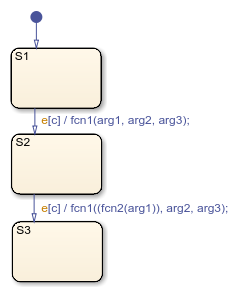
A function call to fcn1 occurs with arg1,
arg2, and arg3 if these conditions are true:
S1is active.Event
eoccurs.Condition
cis true.The transition destination
S2is valid.
Additionally, the transition action in the transition from S2 to
S3 shows an example of a function call nested in another function
call.
Using Function Calls in State Actions
This chart uses function calls in the state actions.
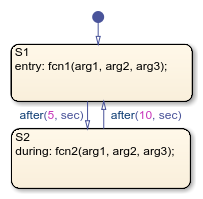
When the chart executes:
The default transition to
S1occurs, andS1becomes active.The
entryaction, which is a function call tofcn1with the specified arguments, executes.After five seconds of simulation time,
S1becomes inactive andS2becomes active.The
duringaction, which is a function call tofcn2with the specified arguments, executes.After 10 seconds of simulation time,
S2becomes inactive andS1becomes active again.Steps 2 through 5 repeat until the simulation ends.
Passing Arguments by Reference
A chart action can pass arguments to a user-written function by reference rather than by value. For example, an action can contain the function call:
f(&x);
where f is a custom-code C function that expects a pointer to
x as an argument.
If x is the name of a data item in the Stateflow hierarchy, these rules apply:
Do not use pointers to pass data items input from a Simulink® model.
If you need to pass an input item by reference, such as an array, assign the item to a local data item and pass the local item by reference.
If the data type of
xisboolean, you must turn off the model configuration parameter Use bitsets for storing state configuration.If
xis an array and the first index property is 0, you must call the function by usingf(&(x[0]));. This syntax passes a pointer to the first element ofxto the function. See Set Data Properties.If
xis an array and the first index property is a nonzero number, you must call the function by usingf(&(x[1])). This syntax passes a pointer to the first element ofxto the function.

