scatteringSpectra
R2026bSyntax
Description
returns the wavelet scattering spectra of scatspectra = scatteringSpectra(tsn,x)x using the wavelet time
scattering network tsn with two filter banks and
FilterDownsampling property equal to
"bandlimited".
specifies options using one or more name-value arguments. For example,
scatspectra = scatteringSpectra(tsn,x,Name=Value) specifies that each
channel and batch signal in InputNormalization="std"x is normalized by the biased standard
deviation.
[
returns scattering spectra metadata in a table.scatspectra,spectable] = scatteringSpectra(___)
Examples
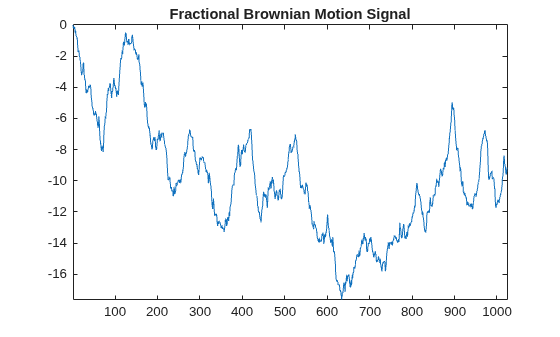
Use the wfbm function to generate a fractional Brownian motion signal with the Hurst parameter set to 0.7. The signal has 1024 samples and is single precision. For reproducibility, set the random seed to the default value.
rng("default") h = 0.7; len = 1024; sig = single(wfbm(h,len)); plot(sig) axis tight title("Fractional Brownian Motion Signal")
Create a wavelet time scattering network appropriate for the signal. The network has two filter banks, each with a quality factor of 1. To compute the scattering spectra, the network must use bandlimited filter downsampling.
tsn = waveletScattering(SignalLength=len, ... Precision="single", ... QualityFactors=[1 1], ... FilterDownsampling="bandlimited");
Use the filterbank object function to obtain the parameters for each filter in the network filter banks. Use those parameters to determine the number of wavelet filters in the first and second filter banks.
[~,~,fparams] = filterbank(tsn);
numFB1 = length(fparams{2}.omegapsi);
numFB2 = length(fparams{3}.omegapsi);
disp("Number of wavelet filters in first filter bank: " + num2str(numFB1))Number of wavelet filters in first filter bank: 7
disp("Number of wavelet filters in second filter bank: " + num2str(numFB2))Number of wavelet filters in second filter bank: 7
Obtain the scattering spectra of the signal, including the scattering spectra metadata. Use the scatteringSpectra function with default settings.
[scatspectra,spectable] = scatteringSpectra(tsn,sig);
The function returns the metadata as a table. The table variable type contains the coefficient type as a categorical value. The table variable real is a logical indicating whether the coefficient is real-valued. Extract those two variables from the table. By default, scatteringSpectra returns scattering spectra coefficients of type sp (sparsity factors), var (variance), pm (phase-modulus cross spectrum), and mm (modulus-modulus correlations). For a complete description of the metadata, see the output argument spectable.
tableExtract = spectable(:,["type" "real"]);
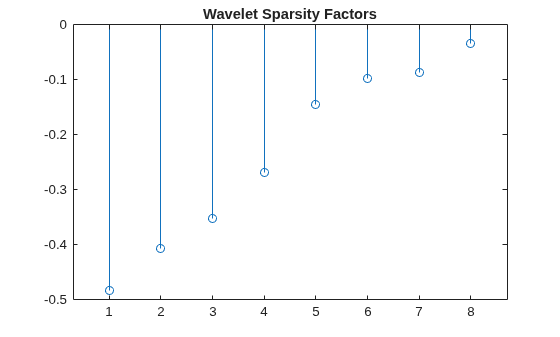
The type sp coefficients are real-valued. Use the metadata table to identify and plot the logarithm of those coefficients.
stem(log(scatspectra(tableExtract.type=="sp"))) title("Wavelet Sparsity Factors")
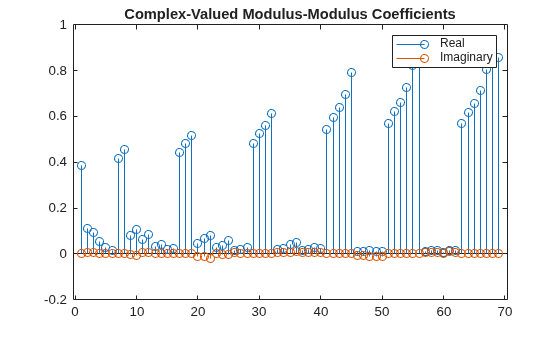
The type mm coefficients can be real- or complex-valued. Use the metadata table to identify the complex-valued type mm coefficients. Plot their real and imaginary parts.
cfs = scatspectra((tableExtract.type=="mm") & (tableExtract.real==false)); stem(real(cfs)) hold on stem(imag(cfs)) hold off title("Complex-Valued Modulus-Modulus Coefficients") legend("Real","Imaginary")
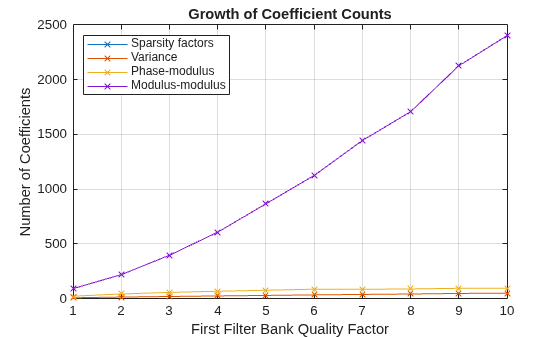
The number of modulus-modulus coefficients increases with the number of second-order scattering paths. Large quality factors can significantly increase the number of these coefficients. Compare coefficient counts for different quality factors and methods.
Create a signal with 1024 sample points in single precision.
len = 1024; sig = single(randn(1,len));
Create a for loop that runs for 10 iterations. Within the loop body, create a wavelet time scattering network appropriate for the signal. Set the quality factor of the second filter bank to 1. The quality factor of the first filter bank equals the loop index. In each iteration, use the scatteringSpectra function to obtain the scattering spectra metadata. Save the number of coefficients of each type.
numItr = 10; types = ["sp","var","pm","mm"]; typeNames = ["Sparsity factors","Variance","Phase-modulus","Modulus-modulus"]; numCoeffs = zeros(numItr,4); for k=1:numItr clear tsn tsn = waveletScattering(SignalLength=len, ... Precision="single", ... QualityFactors=[k 1], ... FilterDownsampling="bandlimited"); [~,sm] = scatteringSpectra(tsn,sig); for j=1:4 numCF = sum(ismember(sm.type,types(j))); numCoeffs(k,j) = numCF; end end
Plot the number of coefficients as a function of the quality factor. The number of modulus-modulus (type mm) coefficients increases significantly more rapidly as a function of quality factor than the other coefficients. When the quality factor equals 6, the number of type mm coefficients exceeds the signal length.
plot(numCoeffs,"x-") title("Growth of Coefficient Counts") xlabel("First Filter Bank Quality Factor") ylabel("Number of Coefficients") legend(typeNames,Location="northwest") grid on
Run the for loop a second time. However, this time, specify the "phaseharmonic" transform method. When Method="phaseharmonic", the scatteringSpectra function replaces the modulus-modulus coefficients with the wavelet phase harmonics (type ph).
numItr = 10; types = ["sp","var","pm","ph"]; numCoeffsPh = zeros(numItr,4); for k=1:numItr clear tsn tsn = waveletScattering(SignalLength=len, ... Precision="single", ... QualityFactors=[k 1], ... FilterDownsampling="bandlimited"); [~,sm] = scatteringSpectra(tsn,sig, ... Method="phaseharmonic"); for j=1:4 numCF = sum(ismember(sm.type,types(j))); numCoeffsPh(k,j) = numCF; end end
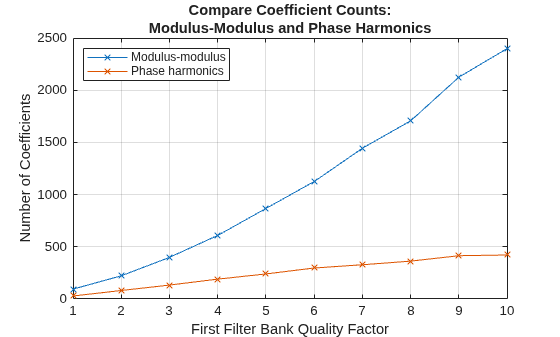
Compare the number of ph coefficients with the number of type mm coefficients. The number of type ph coefficients is significantly less than the number of type mm coefficients.
plot([numCoeffs(:,4) numCoeffsPh(:,4)],"x-") title({"Compare Coefficient Counts:", ... "Modulus-Modulus and Phase Harmonics"}) xlabel("First Filter Bank Quality Factor") ylabel("Number of Coefficients") legend("Modulus-modulus","Phase harmonics",Location="northwest") grid on
Create a 3-D array that consists of three batches of a five-channel signal. The signal is in single precision and has 256 samples. For 3-D array inputs, scatteringSpectra assumes the input is in time-by-channel-by-batch format.
len = 256; sig = single(randn(len,5,3));
Create a wavelet time scattering network appropriate for the signal. The network has two filter banks, each with a quality factor of 1. The network uses bandlimited filter downsampling.
tsn = waveletScattering(SignalLength=len, ... QualityFactors=[1 1], ... FilterDownsampling="bandlimited", ... Precision="single");
Obtain the scattering spectra and associated metadata of the signal using the default scatteringSpectra function values. By default, the output mode is "complex". The format of the output coefficients is path-by-channel-by-batch.
[ssc,smc] = scatteringSpectra(tsn,sig);
Obtain the scattering spectra again, but this time set the output mode to "realimag".
[ssr,smr] = scatteringSpectra(tsn,sig,OutputMode="realimag");The wavelet sparsity factors are strictly real-valued. Confirm that specifying the "realimag" output mode has no effect on the number of such coefficients.
ty = "sp";
indA = ismember(smc.type,ty);
ssComplex = ssc(indA,:,:);
indB = contains(smr.type,ty);
ssRealImag = ssr(indB,:,:);
[size(ssComplex,1) size(ssRealImag,1)]ans = 1×2
6 6
Confirm that the number of variance (wavelet spectrum) coefficients, which are real-valued, is also unchanged.
ty = "var";
indA = ismember(smc.type,ty);
ssComplex = ssc(indA,:,:);
indB = contains(smr.type,ty);
ssRealImag = ssr(indB,:,:);
[size(ssComplex,1) size(ssRealImag,1)]ans = 1×2
6 6
The phase-modulus coefficients are complex-valued. Confirm that specifying the "realimag" output mode doubles the size of the coefficient output along the path dimension.
ty = "pm";
indA = ismember(smc.type,ty);
ssComplex = ssc(indA,:,:);
indB = contains(smr.type,ty);
ssRealImag = ssr(indB,:,:);
[size(ssComplex,1) size(ssRealImag,1)]ans = 1×2
11 22
The modulus-modulus coefficients can be real- or complex-valued. Confirm that specifying the "realimag" output mode increases, but does not double, the size of the coefficient output along the path dimension.
ty = "mm";
indA = ismember(smc.type,ty);
ssComplex = ssc(indA,:,:);
indB = contains(smr.type,ty);
ssRealImag = ssr(indB,:,:);
[size(ssComplex,1) size(ssRealImag,1)]ans = 1×2
40 69
You can use the filterbank object function to obtain the wavelet filter metadata associated with a scattering spectra coefficient.
Load the wecg data. Create a wavelet scattering network that you can use to obtain the scattering spectra of the data.
load wecg sig = single(wecg); len = numel(sig); tsn = waveletScattering(SignalLength=len, ... Precision="single", ... QualityFactors=[1 1], ... OptimizePath=true, ... FilterDownsampling="bandlimited");
Obtain the metadata associated with the scattering spectra of the signal.
[~,sm] = scatteringSpectra(tsn,sig);
Create a table that contains the metadata associated with the modulus-modulus coefficients. Select the table variables jl1, jl2, jr1, and jr2. The variables jl1 and jr1 are indices for filters in the first filter bank. The variables jl2 and jr2 are indices for filters in the second filter bank. To learn the relationship between the table variables and the definitions of the coefficients, see the description of the output argument spectable.
ind = ismember(sm.type,"mm"); mmTable = sm(ind,["jl1" "jl2" "jr1" "jr2"])
mmTable = 128×4 table
jl1 jl2 jr1 jr2
___ ___ ___ ___
1 2 1 2
1 3 1 3
1 4 1 4
1 5 1 5
1 6 1 6
1 7 1 7
1 8 1 8
1 9 1 9
2 3 1 3
2 3 2 3
2 4 1 4
2 4 2 4
2 5 1 5
2 5 2 5
2 6 1 6
2 6 2 6
⋮
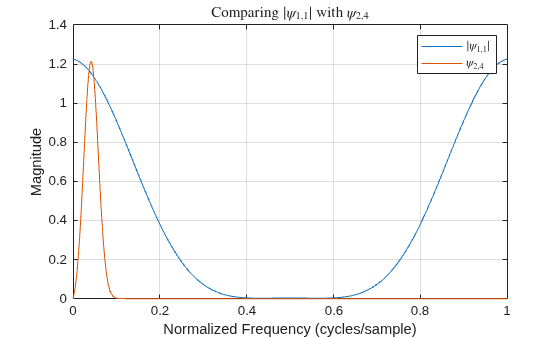
The overlap condition between jl1 and jl2 is computed based on the overlap between and . Choose a pair (jl1, jl2) from a table row.
filteridx = 3; k = mmTable.jl1(filteridx); l = mmTable.jl2(filteridx);
Use the filterbank function to obtain the scattering network filters.
[filters,f] = filterbank(tsn);
Extract the wavelet filters and from filters.
psi1f = filters{2}.psift(:,k);
psi2f = filters{2}.psift(:,l);Compare the Fourier transform of the modulus of overlaps .
psi1abs = abs(ifftshift(ifft(psi1f))); psi1absf = fft(psi1abs); plot(f,abs(psi1absf)) hold on plot(f,psi2f) hold off grid on str1 = sprintf("$|\\psi_{1,%d}|$",k); str2 = sprintf("$\\psi_{2,%d}$",l); legend(str1,str2, ... Interpreter="latex") title({"Comparing "+str1+ " with "+str2}, ... Interpreter="latex") xlabel("Normalized Frequency (cycles/sample)") ylabel("Magnitude")
Input Arguments
Wavelet time scattering network, specified as a waveletScattering
object. The network must have exactly two filter banks and its
FilterDownsampling property must be set to
"bandlimited".
Note
The modulus-modulus coefficients, one of the types of coefficients that make up the scattering spectra, depend on wavelet filters in the first and second filter banks. If the second quality factor is 1, the number of modulus-modulus coefficients increases significantly as a function of the first quality factor. Depending on the first quality factor, the number of scattering spectra coefficients may exceed the size of the data. To avoid this situation, you can either use a smaller quality factor or you can choose to compute the wavelet phase harmonics instead of the modulus-modulus coefficients. For more information, see Compare Coefficient Counts for Different Quality Factors and Methods.
Input signal, specified as a vector, matrix, or 3-D array.
If
xis a vector, the signal length must equal theSignalLengthproperty oftsn. The functionscatteringSpectratreats the input as a single-channel signal with a batch size of 1.If
xis a matrix or 3-D array, the size of the first dimension must equal theSignalLengthproperty oftsn.If
xis a matrix, the function assumes the first dimension ofxcorresponds to the time dimension and the second dimension corresponds to the channel dimension.If
xis a 3-D array, the function assumes the third dimension corresponds to the batch dimension.
Data Types: single | double
Name-Value Arguments
Specify optional pairs of arguments as
Name1=Value1,...,NameN=ValueN, where Name is
the argument name and Value is the corresponding value.
Name-value arguments must appear after other arguments, but the order of the
pairs does not matter.
Example: scatspectra =
scatteringSpectra(tsn,x,OutputMode="realimag",Method="phaseharmonic")
Scattering spectra method to use to compute the scattering spectra, specified as one of these values:
"scatteringspectra""phaseharmonic"
By default, scatteringSpectra returns these four types of
scattering spectra coefficients: wavelet sparsity factors, variance (wavelet
spectrum), phase-modulus cross spectrum, and modulus-modulus correlations (scattering
cross-spectrum). When you specify "phaseharmonic", the function
replaces the modulus-modulus correlations with the wavelet phase harmonics. For more
information, see Phase Harmonics and the example
Compare Coefficient Counts for Different Quality Factors and Methods.
Scattering spectra output mode, specified as "complex" or
"realimag".
If you set OutputMode to "realimag",
scatteringSpectra interleaves the real and imaginary parts of the
complex-valued scattering spectra coefficients along the time dimension so that
scatspectra is strictly real-valued. For those coefficients
which are inherently real-valued, the scatteringSpectra function does
not add a zero imaginary part. For example, consider the 4-element vector [2
1-1i 3.2 2.1+1i*3.7]. Setting
produces the 6-element
vector OutputMode="realimag"[2 1 -1 3.2 2.1 3.7].
Input normalization prior to computing the scattering spectra coefficients, specified as one of these values:
"none"— ThescatteringSpectrafunction does not normalize the input."std"— The function normalizes each channel and batch signal by the biased standard deviation.
For signals with high variance, setting the input normalization to
"std" might be useful.
Output normalization, specified as one of these values:
"mean"— ThescatteringSpectrafunction normalizes the scattering spectra inner products by 1/Nc, where Nc is the number of coefficients."none"— The function does not normalize the inner products.
Option to include the lowpass (scaling) filter in the scattering spectra
computations, specified as a numeric or logical 1
(true) or 0 (false).
This option does not impact the phase-modulus coefficients or the phase harmonics.
As implemented, scatteringSpectra never uses the lowpass filter to
compute those coefficients.
Output Arguments
Scattering spectra, returned as a column vector, matrix, or 3-D array. The
dimensions of scatspectra are
Np-by-Nchan-by-Nbatch, where
Np is the number of paths in the scattering spectra computation,
and Nchan and Nbatch are the number of channels
and batches, respectively, in the input signal.
By default, scatspectra is complex-valued and consists of these coefficients:
Wavelet sparsity factors — These coefficients measure signal sparsity and are real-valued.
Variance (wavelet spectrum) — These coefficients capture long-range dependencies and are real-valued.
Phase-modulus cross spectrum — These coefficients quantify skewness and time asymmetry and are complex-valued.
Modulus-modulus correlations (scattering cross-spectrum) — These coefficients measure envelope dependencies across scales and can be real- or complex-valued.
If Method is "phaseharmonic", the
scatteringSpectra function replaces the modulus-modulus correlations
with the wavelet phase harmonics. The phase harmonics are complex-valued. For more
information, see Wavelet Scattering Spectra.
If the output mode is "realimag",
scatspectra is a real-valued tensor.
Note
The paths in the scattering spectra computation are not the same paths used in the scattering transform computation.
Scattering spectra metadata describing scatspectra, returned as
a MATLAB® table with these variables:
type— Coefficient type as a categorical value. The type is one of these values:"sp"— Wavelet sparsity factors."var"— Variance (wavelet spectrum)."pm"— Phase-modulus cross spectrum. The type"pm"occurs only if the output mode is"complex". If the output mode is"realimag", the types associated with these coefficients are"pm_re"and"pm_im", corresponding to the real and imaginary parts of the phase-modulus cross spectrum, respectively."mm"— Modulus-modulus correlations (scattering cross-spectrum). The type"mm"occurs only if the spectra method is"scatteringspectra"and the output mode is"complex". If the output mode is"realimag", the types associated with these coefficients are"mm_re"and"mm_im", corresponding to the real and imaginary parts, respectively, of the modulus-modulus correlations."ph"— Wavelet phase harmonics. The type"ph"occurs only if the spectra method is"phaseharmonic"and the output mode is"complex". If the output mode is"realimag", the types associated with these coefficients are"ph_re"and"ph_im", corresponding to the real and imaginary parts, respectively, of the phase harmonics.
jl1— Index of the wavelet in the first filter bank in the left argument in the inner product computation. Increasing values correspond to decreasing center frequencies. An index that is one greater than the number of wavelet filters in the first filter bank corresponds to the scaling filter.jl2— Index of the wavelet in the second filter bank in the left argument in the inner product computation. Ifjl2is not applicable, the value isNaN. An index that is one greater than the number of wavelet filters in the second filter bank corresponds to the scaling filter.jr1— Index of the wavelet in the first filter bank in the right argument in the inner product computation. Ifjr1is not applicable, the value isNaN.jr2— Index of the wavelet in the second filter bank in the right argument in the inner product computation. Ifjr2is not applicable, the value isNaN. An index that is one greater than the number of wavelet filters in the second filter bank corresponds to the scaling filter.real— Logical indicating whether the value is real-valued. If, the real and imaginary parts are separated in different rows, each withOutputMode="realimag"real=true.lowpass— Logical indicating whether the lowpass filter was used to compute the coefficient.harmonic— Order of the phase harmonic. If harmonic order is not applicable, the value isNaN.
You can use this table to find the correspondence between the expression that
defines the coefficient type and the metadata table variables jl1,
jl2, jr1, and jr2.
| Type | Expression | jl1 | jl2 | jr1 | jr2 | Notes |
|---|---|---|---|---|---|---|
Wavelet sparsity factor ("sp") | k | NaN | NaN | NaN | ||
Variance ("var") | k | NaN | NaN | NaN | ||
Phase-modulus cross spectrum ("pm") | k | NaN | l | NaN | The filter indices satisfy l > k. | |
Modulus-modulus correlations ("mm") | k | l | k' | l | The filter indices k and k' can be different. The indices k and l may not be equal. | |
Wavelet phase harmonics ("ph") | k | NaN | l | NaN | The filter indices satisfy k > l. The p superscript corresponds to the
harmonic table variable. |
For the coefficients defined by the expectation of complex-valued quantities, the second member is conjugated. For the wavelet phase harmonics, the expression denotes the phase harmonic operator. For a complex number z, , where k is an integer and is the phase angle of z. For a wavelet and dilation parameter λ > 0, we define
where the bar denotes the complex conjugate.
More About
For a complex number z, the phase harmonics are computed as , where is the phase angle of z and k is a positive integer. The wavelet phase harmonics are defined as
where x is the signal, p is the order of the harmonic, and and are the root mean squares of the wavelet coefficients at scales k and l, respectively.
When you specify the method "phaseharmonic", for each wavelet filter , the scatteringSpectra function finds all other wavelets
such that the p phase harmonic overlaps in frequency. The function does
this for phase harmonics p = 2, …, J, where J is essentially the number of octaves that
matches the scattering network invariance scale. In general, the result is a significant
data reduction over the scattering spectra, particularly when the quality factor of the
first filter bank is greater than 1. For more information, see Wavelet Scattering Spectra.
The phase-modulus cross spectrum is the correlation between the wavelet coefficients and their modulus:
where and are filters in the first filter bank.
To reduce the total number of phase-modulus coefficients,
scatteringSpectra applies a bandwidth criterion to the wavelets in the
inner product. The function requires that 1/2 the 3-dB bandwidth of the modulus of overlaps the center frequency of minus 1/2 its 3-dB bandwidth. For more information, see Wavelet Scattering Spectra.
The modulus-modulus correlations, or scattering cross-spectrum, are defined as
where k ≥ k', l−k ≠ 0, and l−k' ≠ 0. The scattering cross spectrum depends on the wavelet filters in the first and second filter banks.
The scatteringSpectra function applies a bandwidth criterion similar to
the one used for the phase-modulus cross spectrum. However, in this case, the criterion
involves filters in the first and second filter banks. For a filter in the first filter bank, the function chooses those filters in the second filter bank such that 1/2 the 3-dB bandwidth of overlaps the center frequency of minus 1/2 its 3-dB bandwidth.
The wavelet filter indices must satisfy l > k and l > k' when adjusted for the possibility of different quality factors. For example, suppose both filter banks in the wavelet time scattering network have the same Q factor. Then
is valid but scatteringSpectra does not return its
conjugate (Hermitian adjoint term). Also, the function only pairs lowpass filters with
lowpass filters: For more information, see Wavelet Scattering Spectra.
The number of modulus-modulus coefficients depends on the number of second-order scattering paths. The remaining scattering spectra coefficients depend only on the first-order scattering paths. If you use a scattering network with large quality factors to obtain the scattering spectra, the number of modulus-modulus coefficients might exceed the size of the input data.
To reduce the number of coefficients, you can either use a network with smaller quality
factors or you can specify the "phaseharmonic" method. When you specify
that method, the function replaces the modulus-modulus coefficients with the wavelet phase
harmonics. In general, for scattering spectra, you do not need to set the quality factors as
high as you would for the scattering transform. For more information, see Compare Coefficient Counts for Different Quality Factors and Methods.
References
[1] Allys, E., T. Marchand, J. F. Cardoso, F. Villaescusa-Navarro, S. Ho, and S. Mallat. “New Interpretable Statistics for Large-Scale Structure Analysis and Generation.” Physical Review D 102, no. 10 (2020): 103506. https://doi.org/10.1103/PhysRevD.102.103506.
[2] Cheng, Sihao, Rudy Morel, Erwan Allys, Brice Ménard, and Stéphane Mallat. “Scattering Spectra Models for Physics.” PNAS Nexus 3, no. 4 (2024): pgae103. https://doi.org/10.1093/pnasnexus/pgae103.
[3] Mallat, Stéphane, Sixin Zhang, and Gaspar Rochette. “Phase Harmonic Correlations and Convolutional Neural Networks.” Information and Inference: A Journal of the IMA 9, no. 3 (2020): 721–47. https://doi.org/10.1093/imaiai/iaz019.
[4] Morel, Rudy, Gaspar Rochette, Roberto Leonarduzzi, Jean-Philippe Bouchaud, and Stéphane Mallat. “Scale Dependencies and Self-Similar Models with Wavelet Scattering Spectra.” Applied and Computational Harmonic Analysis 75 (February 2025): 101724. https://doi.org/10.1016/j.acha.2024.101724.
Extended Capabilities
Usage notes and limitations:
The name-value arguments
MethodandOutputModemust be specified as compile-time constants.
Refer to the usage notes and limitations in the C/C++ Code Generation section. The same usage notes and limitations apply to GPU code generation.
The scatteringSpectra
function fully supports thread-based environments. For more information, see Run MATLAB Functions in Thread-Based Environment.
The
scatteringSpectra function fully supports GPU arrays.
To run the function on a GPU, specify the input data as a gpuArray (Parallel Computing Toolbox). For more
information, see Run MATLAB Functions on a GPU (Parallel Computing Toolbox).
Version History
Introduced in R2026b
MATLAB Command
You clicked a link that corresponds to this MATLAB command:
Run the command by entering it in the MATLAB Command Window. Web browsers do not support MATLAB commands.
Select a Web Site
Choose a web site to get translated content where available and see local events and offers. Based on your location, we recommend that you select: .
You can also select a web site from the following list
How to Get Best Site Performance
Select the China site (in Chinese or English) for best site performance. Other MathWorks country sites are not optimized for visits from your location.
Americas
- América Latina (Español)
- Canada (English)
- United States (English)
Europe
- Belgium (English)
- Denmark (English)
- Deutschland (Deutsch)
- España (Español)
- Finland (English)
- France (Français)
- Ireland (English)
- Italia (Italiano)
- Luxembourg (English)
- Netherlands (English)
- Norway (English)
- Österreich (Deutsch)
- Portugal (English)
- Sweden (English)
- Switzerland
- United Kingdom (English)