RF Toolbox provides functions and apps for designing, modeling, analyzing, and visualizing radio frequency (RF) networks used in wireless communications, radar, and signal integrity applications.
You can model RF networks—including filters, transmission lines, amplifiers, and mixers—using measurement data, network parameters, RF system parameters, or physical properties. Idealized baseband models enable you to perform high-level simulation of RF components for integration with system-level testbenches and DSP algorithm development. The RF Budget Analyzer app lets you analyze gain, noise, and power budget of transceiver chains and generate RF Blockset models.
You can analyze and convert S, Y, Z, and T network parameters, and visualize the results using Cartesian plots, polar plots, or Smith charts. You can also de-embed, check, and enforce passivity, and compute group and phase delay. Rational function fitting lets you model interconnects and export them to Simulink, SPICE, or Verilog®-A.

S-Parameters
Read and write N-port Touchstone® files. Visualize S-parameter data on Cartesian, polar, or Smith charts. Convert to Y, Z, T, ABCD, single-ended, differential, and other formats. De-embed measurements to remove the effects of test fixtures and access structures.

RF Budget Analysis
Determine system-level specifications of RF transceivers for wireless communications and radar systems. Analyze noise, power, gain, and nonlinearity budgets for a cascade of RF components. Use harmonic balance to accurately analyze nonlinear effects.

System Simulation
Simulate RF components such as amplifiers, mixers, and filters in MATLAB with idealized baseband models that include thermal and phase noise specifications, nonlinearity parameters such as IP3 and saturation, measured data such as S-parameters, and AM-PM characteristics.

Rational Fitting
Fit S-parameters and other frequency-domain data, and extract equivalent poles and zeros. Check and enforce passivity and causality. Use the resulting rational object to perform time-domain simulation with RF Blockset or SerDes Toolbox, or export it as an equivalent SPICE netlist or Verilog-A module.

RF Network Design
Design RF circuits such as filters and matching networks using lumped RLC elements, transmission lines characterized by physical properties, or measured S-parameters. Select RLC components by vendor and specifications from substrate-scalable Modelithics® libraries.
Product Resources:
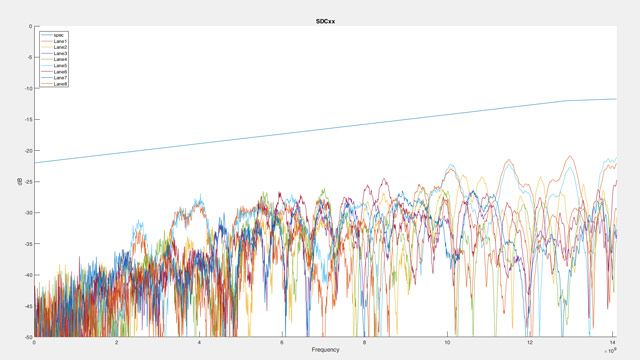
“High-throughput, low-latency passive copper cables and active optical cables play a vital role in high-performance computing, providing interconnections between the tens, hundreds, or even thousands of nodes in a high-performance computing cluster. … The S-Parameter Compliance Tool automates many manual processing steps, calculates decibel loss and other performance metrics, and generates a comprehensive report in Microsoft® Excel® format with detailed results and graphs. I estimate that development time would have been five to 10 times longer without the built-in functionality provided by MATLAB and RF Toolbox.”
Try RF Toolbox for free
Discover the possibilities today.
Ready to Buy?
Get pricing information and explore related products.
Are You a Student?
Your school may already provide access to MATLAB, Simulink, and add-on products through a campus-wide license.


