delaunay - Delaunay triangulation

Syntax

TRI = delaunay(x,y)
TRI = delaunay(x,y,options)

Definition

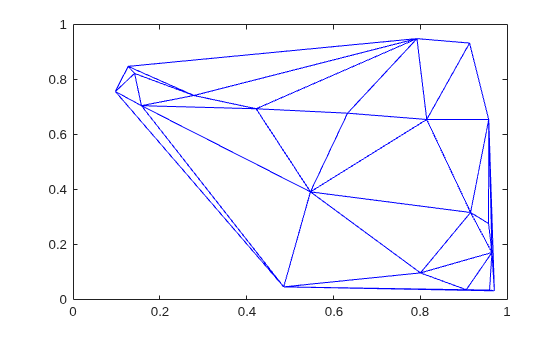
Given a set of data points, the Delaunay triangulation is a set of lines connecting each point to its natural neighbors. The Delaunay triangulation is related to the Voronoi diagram — the circle circumscribed about a Delaunay triangle has its center at the vertex of a Voronoi polygon.

Description

TRI = delaunay(x,y) for the data points defined by vectors x and y, returns a set of triangles such that no data points are contained in any triangle's circumscribed circle. Each row of the m-by-3 matrix TRI defines one such triangle and contains indices into x and y. If the original data points are collinear or x is empty, the triangles cannot be computed and delaunay returns an empty matrix.

delaunay uses Qhull.

TRI = delaunay(x,y,options) specifies a cell array of strings options to be used in Qhull via delaunayn. The default options are {'Qt','Qbb','Qc'}.

If options is [], the default options are used. If options is {''}, no options are used, not even the default. For more information on Qhull and its options, see http://www.qhull.org.

Remarks

The Delaunay triangulation is used by: griddata (to interpolate scattered data), voronoi (to compute the voronoi diagram), and is useful by itself to create a triangular grid for scattered data points.

The functions dsearch and tsearch search the triangulation to find nearest neighbor points or enclosing triangles, respectively.

Visualization

Use one of these functions to plot the output of delaunay:

triplot

Displays the triangles defined in the m-by-3 matrix TRI. See Example 1.

trisurf

Displays each triangle defined in the m-by-3 matrix TRI as a surface in 3-D space. To see a 2-D surface, you can supply a vector of some constant value for the third dimension. For example

trisurf(TRI,x,y,zeros(size(x)))

See Example 2.

trimesh

Displays each triangle defined in the m-by-3 matrix TRI as a mesh in 3-D space. To see a 2-D surface, you can supply a vector of some constant value for the third dimension. For example,

trimesh(TRI,x,y,zeros(size(x)))

produces almost the same result as triplot, except in 3-D space. See Example 2.

Examples

Example 1

Plot the Delaunay triangulation for 10 randomly generated points.

rand('state',0);
x = rand(1,10);
y = rand(1,10);
TRI = delaunay(x,y);
subplot(1,2,1),...
triplot(TRI,x,y)
axis([0 1 0 1]);
hold on;
plot(x,y,'or');
hold off

Compare the Voronoi diagram of the same points:

[vx, vy] = voronoi(x,y,TRI);
subplot(1,2,2),...
plot(x,y,'r+',vx,vy,'b-'),...
axis([0 1 0 1])

Example 2

Create a 2-D grid then use trisurf to plot its Delaunay triangulation in 3-D space by using 0s for the third dimension.

[x,y] = meshgrid(1:15,1:15);
tri = delaunay(x,y);
trisurf(tri,x,y,zeros(size(x)))

Next, generate peaks data as a 15-by-15 matrix, and use that data with the Delaunay triangulation to produce a surface in 3-D space.

z = peaks(15);
trisurf(tri,x,y,z)

You can use the same data with trimesh to produce a mesh in 3-D space.

trimesh(tri,x,y,z)

Example 3

The following example illustrates the options input for delaunay.

x = [-0.5 -0.5 0.5 0.5];
       y = [-0.5 0.5 0.5 -0.5];

The command

T = delaunay(X);

returns the following error message.

??? qhull input error: can not scale last coordinate. Input is 
cocircular
   or cospherical. Use option 'Qz' to add a point at infinity.

The error message indicates that you should add 'Qz' to the default Qhull options.

tri = delaunay(x,y,{'Qt','Qbb','Qc','Qz'})

tri =

     3     2     1
     3     4     1

Algorithm

delaunay is based on Qhull [1]. For information about Qhull, see http://www.qhull.org/. For copyright information, see http://www.qhull.org/COPYING.txt.

See Also

delaunay3, delaunay, dsearch, griddata, plot, triplot, trimesh, trisurf, tsearch, voronoi

References

[1] Barber, C. B., D.P. Dobkin, and H.T. Huhdanpaa, "The Quickhull Algorithm for Convex Hulls," ACM Transactions on Mathematical Software, Vol. 22, No. 4, Dec. 1996, p. 469-483.


 © 1984-2008- The MathWorks, Inc.    -   Site Help   -   Patents   -   Trademarks   -   Privacy Policy   -   Preventing Piracy   -   RSS