trisurf
R2026bTriangular surface plot
Description
trisurf(___, also specifies the
surface color for either of the previous syntaxes.c)
trisurf(___, specifies
one or more properties of the surface plot using name-value arguments. For example,
Name=Value)FaceColor="y" sets the face color to yellow.
h = trisurf(___) returns a patch object used to create the surface plot. Use h to
query and modify properties of the plot. For more information, see Patch Properties.
Examples
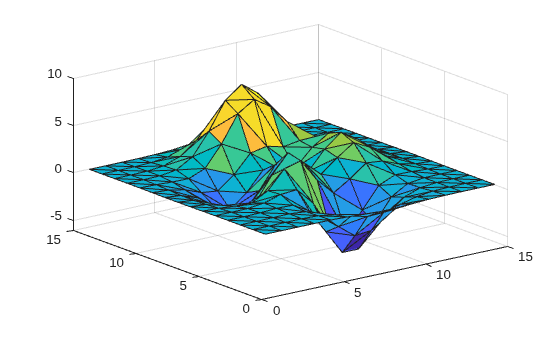
Create a set of 3-D points and compute the Delaunay triangulation using the delaunay function. Plot the surface defined by the triangulation.
[x,y] = meshgrid(1:15,1:15);
z = peaks(15);
T = delaunay(x,y);
trisurf(T,x,y,z)
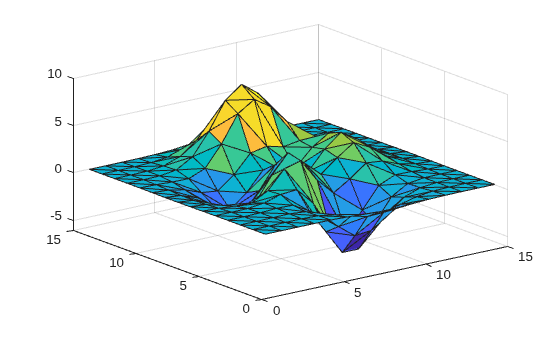
Alternatively, you can create and plot a triangulation object.
TO = triangulation(T,x(:),y(:),z(:));
trisurf(TO)
Input Arguments
Name-Value Arguments
Specify optional pairs of arguments as
Name1=Value1,...,NameN=ValueN, where Name is
the argument name and Value is the corresponding value.
Name-value arguments must appear after other arguments, but the order of the
pairs does not matter.
Example: trisurf(TO,FaceColor="r")
The properties listed here are only a subset. For a complete list, see Patch Properties.
Face color, specified as a color name, an RGB triplet, or
"none".
An RGB triplet is a three-element row vector
whose elements specify the intensities of the red, green, and blue components of the
color. The intensities must be in the range [0,1]; for example,
[0.4 0.6
                0.7]
. This table lists the long and short color name
options and the equivalent RGB triplet values.
| Long Name | Short Name | RGB Triplet |
|---|---|---|
"yellow" | "y" | [1 1 0] |
"magenta" | "m" | [1 0 1] |
"cyan" | "c" | [0 1 1] |
"red" | "r" | [1 0 0] |
"green" | "g" | [0 1 0] |
"blue" | "b" | [0 0 1] |
"white" | "w" | [1 1 1] |
"black" | "k" | [0 0 0] |
Face transparency, specified as a scalar in the range [0,1]. A
value of 1 is opaque and 0 is completely transparent. Values between 0 and 1 are
semitransparent.
Edge color, specified as a color name, an RGB triplet, or
"none". The default color of [0 0 0]
corresponds to black boundaries.
An RGB triplet is a three-element row vector whose elements specify the
intensities of the red, green, and blue components of the color. The intensities must
be in the range [0,1]; for example, [0.4 0.6
0.7]. This table lists the long and short color name options and the
equivalent RGB triplet values.
| Long Name | Short Name | RGB Triplet |
|---|---|---|
"yellow" | "y" | [1 1 0] |
"magenta" | "m" | [1 0 1] |
"cyan" | "c" | [0 1 1] |
"red" | "r" | [1 0 0] |
"green" | "g" | [0 1 0] |
"blue" | "b" | [0 0 1] |
"white" | "w" | [1 1 1] |
"black" | "k" | [0 0 0] |
Line width, specified as a positive numeric value in points.
Line style, specified as one of the options listed in this table.
| Line Style | Description | Resulting Line |
|---|---|---|
"-" | Solid line |
|
"--" | Dashed line |
|
":" | Dotted line |
|
"-." | Dash-dotted line |
|
"none" | No line | No line |


Extended Capabilities
Version History
Introduced before R2006a
See Also
patch | surf | tetramesh | trimesh | triplot | delaunay | triangulation | delaunayTriangulation

