tetramesh
R2026bTetrahedron mesh plot
Description
tetramesh( plots the
3-D tetrahedron mesh defined by the tetrahedron connectivity matrix T,X)T and
the points X.
T is an m-by-4 matrix that
specifies the vertices of m tetrahedra. X is an
n-by-3 matrix that specifies the Cartesian
coordinates of n points. Each row of T contains
indices into X that specify the 4 vertices of a tetrahedron.
tetramesh(___, also specifies
the face color of each tetrahedron using a vector of colormap indices.c)
tetramesh(___,
specifies one or more properties of the mesh plot using name-value arguments. For example,
Name=Value)LineWidth=2 sets the edge width to 2 points.
h = tetramesh(___) returns a vector of tetrahedron
handles. Each handle of h is a patch object used to create the mesh plot of each tetrahedron. Use
h(i) to query and modify properties of the plot of each tetrahedron.
For more information, see Patch Properties.
Examples
Create 8 points that represent the corners of a cube in Cartesian coordinates.
d = [-1 1];
[x,y,z] = meshgrid(d);
X = [x(:) y(:) z(:)]
X = 8×3

    -1    -1    -1
    -1     1    -1
     1    -1    -1
     1     1    -1
    -1    -1     1
    -1     1     1
     1    -1     1
     1     1     1
Specify a tetrahedron connectivity matrix where each row contains the indices into X that specify the 4 vertices of a tetrahedron. For instance, the first row describes a tetrahedron with vertices consisting of the first, third, fourth, and seventh points.
T = [1 3 4 7;
     4 6 7 8;
     1 5 6 7;
     1 2 4 6;
     1 4 6 7]
T = 5×4
1 3 4 7
4 6 7 8
1 5 6 7
1 2 4 6
1 4 6 7
Use tetramesh to plot the 5 tetrahedra that form the cube.
tetramesh(T,X);
view(-40,20)
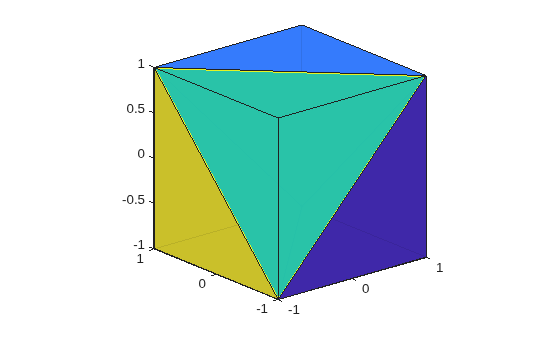
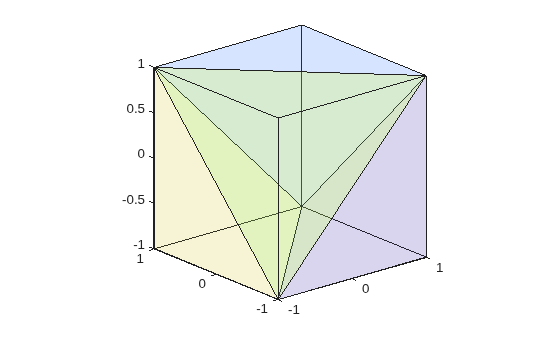
To see into the cube, plot it again with more transparent faces.
tetramesh(T,X,FaceAlpha=0.1);
view(-40,20)
Create a 3-D delaunayTriangulation object for 20 random points.
rng("default");
x = rand([20 1]);
y = rand([20 1]);
z = rand([20 1]);
DT = delaunayTriangulation(x,y,z)
DT =
delaunayTriangulation with properties:
Points: [20×3 double]
ConnectivityList: [53×4 double]
Constraints: []
Plot the tetrahedron mesh.
tetramesh(DT)
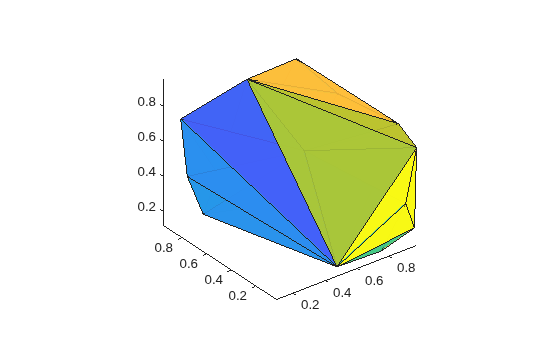
Change the color of the tetrahedra. Plot it again with the new colors and with more transparent faces.
tetramesh(DT,106:-2:1,FaceAlpha=0.1)
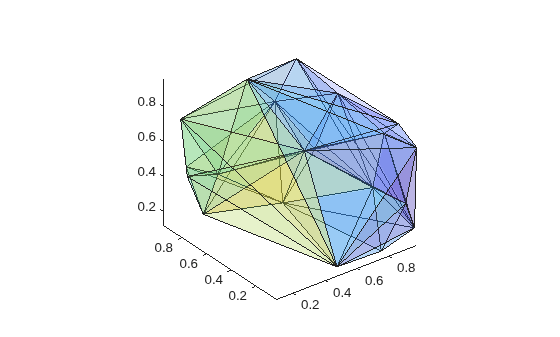
Input Arguments
Name-Value Arguments
Specify optional pairs of arguments as
Name1=Value1,...,NameN=ValueN, where Name is
the argument name and Value is the corresponding value.
Name-value arguments must appear after other arguments, but the order of the
pairs does not matter.
Example: tetramesh(TO,LineStyle=":")
The properties listed here are only a subset. For a complete list, see Patch Properties.
Face color, specified as the a color name, an RGB triplet, or
"none".
An RGB triplet is a three-element row vector
whose elements specify the intensities of the red, green, and blue components of the
color. The intensities must be in the range [0,1]; for example,
[0.4 0.6
                0.7]
. This table lists the long and short color name
options and the equivalent RGB triplet values.
| Long Name | Short Name | RGB Triplet |
|---|---|---|
"yellow" | "y" | [1 1 0] |
"magenta" | "m" | [1 0 1] |
"cyan" | "c" | [0 1 1] |
"red" | "r" | [1 0 0] |
"green" | "g" | [0 1 0] |
"blue" | "b" | [0 0 1] |
"white" | "w" | [1 1 1] |
"black" | "k" | [0 0 0] |
Face transparency, specified as a scalar in the range [0,1]. A
value of 1 is opaque and 0 is completely transparent. Values between 0 and 1 are
semitransparent.
Edge color, specified as a color name, an RGB triplet, or
"none". The default color of [0 0 0]
corresponds to black boundaries.
An RGB triplet is a three-element row vector whose elements specify the
intensities of the red, green, and blue components of the color. The intensities must
be in the range [0,1]; for example, [0.4 0.6
0.7]. This table lists the long and short color name options and the
equivalent RGB triplet values.
| Long Name | Short Name | RGB Triplet |
|---|---|---|
"yellow" | "y" | [1 1 0] |
"magenta" | "m" | [1 0 1] |
"cyan" | "c" | [0 1 1] |
"red" | "r" | [1 0 0] |
"green" | "g" | [0 1 0] |
"blue" | "b" | [0 0 1] |
"white" | "w" | [1 1 1] |
"black" | "k" | [0 0 0] |
Line width, specified as a positive numeric value in points.
Line style, specified as one of the options listed in this table.
| Line Style | Description | Resulting Line |
|---|---|---|
"-" | Solid line |
|
"--" | Dashed line |
|
":" | Dotted line |
|
"-." | Dash-dotted line |
|
"none" | No line | No line |


Version History
Introduced before R2006a
See Also
trimesh | trisurf | patch | delaunayn | triangulation | delaunayTriangulation | freeBoundary

