roomNoiseCriteria
R2026bEvaluate room background noise using room noise criteria (RNC) curves
Since R2026b
Syntax
Description
specifies options using one or more name-value arguments.RNC = roomNoiseCriteria(___,Name=Value)
[
also returns a structure detailing the likelihood of acoustically induced vibrations and
rattles.RNC,rattleRisk] = roomNoiseCriteria(___)
roomNoiseCriteria(___) without any output arguments plots the
octave band SPL measurements against RNC curves and displays the RNC level.
Examples
Load a recording of a room with background noise.
[audioIn, fs] = audioread("office_kitchen_44p1_20s.wav");If possible, enter the calibration factor for the microphone used to make the recording or calculate it using calibrateMicrophone. The microphone in this example has an associated reference recording at 1 kHz with an SPL meter reading of 64 dB.
[audioRef, fsRef] = audioread("1khz_64db_44p1.wav");
SPLreading = 64;
calibrationFactor = calibrateMicrophone(audioRef,fsRef,SPLreading)calibrationFactor = 2.0836
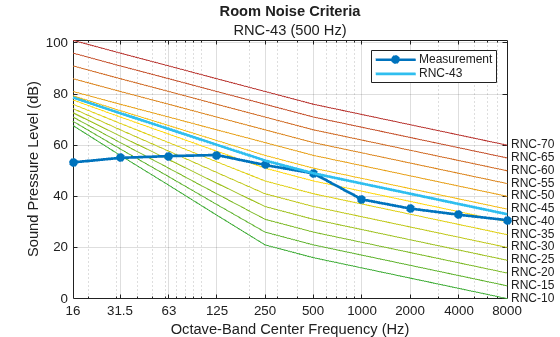
Plot the RNC level for the room recording.
roomNoiseCriteria(audioIn,fs,CalibrationFactor=calibrationFactor)
Collect equivalent continuous sound level (Leq) measurements and time-weighted sound level (Lt) measurements of a room using a sound pressure level (SPL) meter with octave band filters centered at 16, 31.5, 63, 125, 250, 500, 1000, 2000, 4000, and 8000 Hz.
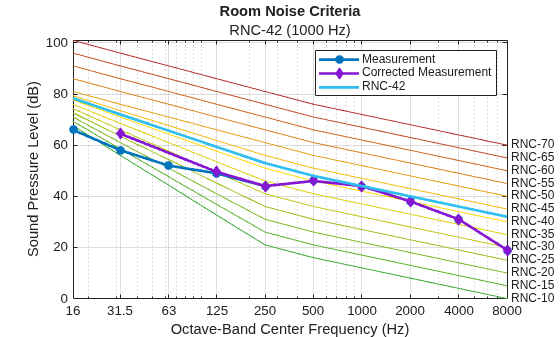
Simulate the measurements.
Leq = [66, 58, 52, 49, 44, 46, 44, 38, 31, 19]; Lt = zeros(1500,10) + Leq; % readings collected every 100 ms fmod = cos(2*pi*(0:1499)/100)'; Lt(:,1) = Lt(:,1) + 7*fmod; % 1 Hz, 14 dB surging in 16 Hz octave band Lt(:,2) = Lt(:,2) + 6*fmod; % 1 Hz, 16 dB surging in 31.5 Hz octave band Lt(:,3) = Lt(:,3) + 6*fmod; % 1 Hz, 12 dB surging in 63 Hz octave band Lt(:,4) = Lt(:,4) + 4*fmod; % 1 Hz, 8 dB surging in 125 Hz octave band
Use roomNoiseCriteria to calculate the room noise criteria (RNC) level using the readings from the SPL meter.
roomNoiseCriteria(Leq,Lt)
The ANSI/ASA S12.2-2019 standard requires the Room Noise Criteria (RNC) to be used instead of the Noise Criteria (NC) when surging or large random fluctuations occur in low-frequency octave bands. If the noiseCriteria function detects these conditions, it issues a warning recommending that you use roomNoiseCriteria instead.
Simulate a recording of a washing machine in a shoebox room using acousticRoomResponse.
[audioIn,fs] = audioread('WashingMachine-16-44p1-stereo-10secs.wav'); audioIn = mean(audioIn,2); roomDimensions = [10,8,5]; tx = [9,7,2]; % near back of room rx = roomDimensions / 2; % center of room rng(1); ir = acousticRoomResponse(roomDimensions,tx,rx,SampleRate=fs,ImageSourceOrder=6,... MaxNumRayReflections=50,NumStochasticRays=4000); x = fftfilt(ir',audioIn);
Calculate the NC from the recording.
NC = noiseCriteria(x,fs)
Warning: Large random fluctuations detected. To follow ANSI/ASA S12.2-2019, use roomNoiseCriteria instead.
NC = "NC-57 (1000 Hz)"
The warning states that you should use roomNoiseCriteria due to the presence of large random fluctuations. To evaluate the noise in this room, use the RNC metric instead.
RNC = roomNoiseCriteria(x,fs)
RNC = "RNC-56 (1000 Hz)"
Input Arguments
Audio input, specified as a column vector of real finite numbers. If
audioIn is not calibrated, you can determine the calibration
factor using calibrateMicrophone. When surging or large random fluctuations are
present, audioIn must contain enough samples to represent at least
15 seconds of audio at sample rate fs.
For guidance on taking compliant measurements, see Calibration Factor for Audio Recordings.
Data Types: single | double
Octave-band equivalent continuous sound level (Leq) measurements in decibels (dB), specified as a 10-element row vector. Each element must correspond to a measurement at nominal octave band center 16, 31.5, 63, 125, 250, 500, 1000, 2000, 4000, and 8000 Hz, respectively.
If the SPL for a given band is unknown, specify it as missing. An
RNC level calculated with missing Leq values
might not be compliant with ASA S12.2-2019.
Specify either audioIn and
fs or
Leq and Lt.
For guidance on taking compliant measurements, see Obtaining Standard-Compliant Sound Level Measurements.
Data Types: single | double
Octave-band time-weighted (Lt) measurements in decibels (dB), specified as an N-by-10-matrix where N is the number of samples from the SPL meter. Each column must correspond to a measurement at nominal octave band center 16, 31.5, 63, 125, 250, 500, 1000, 2000, 4000, and 8000 Hz, respectively.
For guidance on taking compliant measurements, see Obtaining Standard-Compliant Sound Level Measurements.
Specify either audioIn and
fs or
Leq and
Lt.
Data Types: single | double
Name-Value Arguments
Specify optional pairs of arguments as
Name1=Value1,...,NameN=ValueN, where Name is
the argument name and Value is the corresponding value.
Name-value arguments must appear after other arguments, but the order of the
pairs does not matter.
Example: roomNoiseCriteria(audioIn,fs,IsSurging=false)
Microphone calibration factor, specified as a positive scalar.
audioIn is multiplied by CalibrationFactor
before analysis. To compute the calibration factor specific to your system, use the
calibrateMicrophone function.
CalibrationFactor is valid only when you specify the first
argument as audioIn.
Data Types: single | double
Reference pressure for dB calculation in pascals, specified as a positive scalar. The default value, 20 micropascals, is the common value for air.
PressureReference is valid only when you specify the first
argument as audioIn.
Data Types: single | double
Option to specify or screen audio input for surging, specified as
"auto-detect", true, or
false. If you set IsSurging to
"auto-detect", roomNoiseCriteria uses a
nonstandard heuristic to detect whether surging is present. If
roomNoiseCriteria detects surging or if you set
IsSurging to true,
roomNoiseCriteria adjusts SPL measurements in low-frequency octave
bands according to the standard.
For more information on surging and low-frequency band adjustments, see Screening for Surging and Corrections to Low-Frequency Octave-Band Measurements.
IsSurging is valid only when you specify the first argument as
audioIn.
Data Types: string | logical
Option to specify or screen audio input for large random fluctuations, specified
as "auto-detect", true, or
false. If you set IsFluctuating to
true, roomNoiseCriteria follows screening criteria
from ASA S12.2-2019 to determine if large random fluctuations are present. If
roomNoiseCriteria detects large random fluctuations or if you set
IsFluctuating to true,
roomNoiseCriteria adjusts SPL measurements in low-frequency octave
bands according to the standard.
For more information on screening for large random fluctuations and low-frequency band adjustments, see Screening for Large Random Fluctuations and Corrections to Low-Frequency Octave-Band Measurements.
IsFluctuating is valid only when you specify the first
argument as audioIn.
Data Types: string | logical
Output Arguments
RNC level, returned as a string. RNC has the form RNC-CurveID
(TC), where CurveID is the RNC Curve tangent to the SPL measurements and TC is the
tangency frequency in Hz.
For more information on the RNC tangency method, see RNC Tangency Method.
Risk of acoustically induced vibrations and rattles, returned as a structure.
rattleRisk contains a summary of octave bands that can contain
perceptible rattle and the table of values used by the function to determine the
risk.
For more information on rattle risk, see Rattle Risk.
More About
Calibrating the input before calling
roomNoiseCriteria
using an audio file is recommended for more accurate results. Record a 1 kHz tone
using the reference microphone and note the SPL reading from a compliant SPL meter. Use the
calibrateMicrophone function to obtain the calibration factor.
The diagram shows a typical setup for microphone calibration. For room noise evaluation, use Z frequency-weighting (some meters use the label linear or flat).
The ANSI/ASA S12.2-2019 [1] standard provides the following guidance for collecting an accurate audio recording and SPL measurements collected in indoor spaces:
Measure near the average standing or seating height for the expected room occupants.
The microphone or meter must be at least 0.6 m from any acoustically reflective surface, 1.2 m from the intersection of any two surfaces, and 2.4 m from the intersection of any three surfaces.
Record Leq measurements using a standard-compliant integrating-averaging meter set to fast time weighting and flat (Z-weighted) frequency weighting. For more information, see
splMeter.Take measurements at a specific point of interest or using a slow sweep around the entire space. When sweeping around a space instead of from a fixed location, measure for at least 20 seconds.
For the RNC metric, if surging or large random fluctuations are present, the correction procedure requires at least 15 seconds of measurement data.
RNC curves [1] are used instead of NC curves in indoor spaces where surging or large random fluctuations occur at low frequencies, usually due to the presence of HVAC systems. To determine the RNC level for a given room, the Leq measurements in low-frequency octave bands are adjusted if surging or large fluctuations are present (see Corrections to Low-Frequency Octave-Band Measurements). Then, an RNC curve is selected for each octave band using the equation
where f is the center frequency of the octave band, Lf is the Leq measurement in the octave band, and Kf1 and Kf2 are constants given in Table 5 of the standard.
The RNC level of the room is selected as the highest RNC-Xf, and the tangency frequency is the associated frequency f.
When surging or large fluctuations are present in low-frequency octave-band measurements, the RNC method corrects SPL measurements at low frequencies to better match psychoacoustic perceptions of loudness [1].
The time-weighted SPL measurements Lt for octave bands 16, 31.5, and 63 Hz octave bands are combined into a single 3-band sum as
where LX is the SPL measured at the octave band centered at nominal frequency X Hz. The average power level and mean level in dB of LLF are calculated as
LLFm is used to calculate an offset KLFα that is added to continuous sound level measurement for the 31.5 Hz octave band. When surging is present, the offset is calculated as
When only random fluctuations are present, the offset is calculated as
where σLF is the standard deviation of LLF. The corrected Leq measurement for the 31.5 Hz octave band is then calculated as
When selecting an RNC curve using the tangency method, the corrected 31.5 Hz octave band is used, and the uncorrected 16, 31.5, and 63 Hz bands are disregarded.
The average power level and mean level in dB of the 125 Hz octave band are calculated as
L125m is used to calculate an offset KLFα that is added to continuous sound level measurement for the 125 Hz octave band. When surging is present, the offset is calculated as
When only random fluctuations are present, the offset is calculated as
where σ125 is the standard deviation of L125. The corrected Leq measurement for the 125 Hz octave band is then calculated as
When selecting an RNC curve using the tangency method, the corrected 125 Hz octave band is used, and the uncorrected 125 Hz band is disregarded.
According to the ANSI/ASA S12.2-2019 [1] standard, if Leq measurements in the low-frequency octave bands exceed the values in the table, acoustically induced vibrations and rattles are likely.
| Octave Band | 16 Hz | 31.5 Hz | 63 Hz |
|---|---|---|---|
| Clearly perceptible vibration and rattles likely | 75 dB | 75 dB | 80 dB |
| Moderately perceptible vibration and rattles likely | 65 dB | 65 dB | 70 dB |
ANSI/ASA S12.2-2019 [1] recommends aural or visual inspection of SPL measurements to determine if surging is present. Surging is primarily observed as periodic fluctuations in the 16, 31.5, and 63 Hz octave bands. When screening for surging, set the SPL meter to fast time-weighting and flat (Z-weighted) frequency weighting, with measurements reported every 100 ms.
Because ANSI/ASA S12.2-2019 does not define a method to determine if surging is present,
the roomNoiseCriteria function implements a heuristic method. SPL
measurements in the 16, 31.5, and 63 Hz octave bands are collected using the SPL meter
settings. Autocorrelation is calculated on the measurements for each band. If a significant
peak is found in the lag domain of any band corresponding to a modulation frequency less
than or equal to 4 Hz, surging is detected. For more information, see xcorr.
The standard recommends using the room noise criteria (RNC) instead of NC if surging is
present. By default, roomNoiseCriteria screens audio inputs and adjusts
low-frequency octave band readings if surging is detected. You can disable screening and
manually specify the presence of surging by setting IsSurging to
true or false.
Large random fluctuations are detected using the method defined in the ANSI/ASA S12.2-2019 [1] standard. The Leq measurements of the lowest three octave bands are combined as
where LX is the SPL measured at the octave band centered at nominal frequency X Hz.
Fluctuations are detected using the Leq, the maximum observed level (LMAX), and the 90th percentile level (L10) from Lc and L125 . If the differences exceed the values in the following table, large random fluctuations are present.
| Octave band | Lc | L125 |
|---|---|---|
| LMAX minus Leq | ≥ 7 dB | ≥ 6 dB |
| L10 minus Leq | ≥ 3.5 dB | ≥ 3 dB |
The standard recommends using the room noise criteria (RNC) instead of NC if large
random fluctuations are present. By default, roomNoiseCriteria screens audio
inputs and adjusts low-frequency octave band readings if large random fluctuations are
detected. You can disable screening and manually specify the presence of fluctuations by
setting IsFluctuating to
true or false.
References
[1] Acoustical Society of America. Criteria for Evaluating Room Noise. ANSI/ASA S12.2-2019 (R2023). Acoustical Society of America, 2019.
Version History
Introduced in R2026b
MATLAB Command
You clicked a link that corresponds to this MATLAB command:
Run the command by entering it in the MATLAB Command Window. Web browsers do not support MATLAB commands.
Select a Web Site
Choose a web site to get translated content where available and see local events and offers. Based on your location, we recommend that you select: .
You can also select a web site from the following list
How to Get Best Site Performance
Select the China site (in Chinese or English) for best site performance. Other MathWorks country sites are not optimized for visits from your location.
Americas
- América Latina (Español)
- Canada (English)
- United States (English)
Europe
- Belgium (English)
- Denmark (English)
- Deutschland (Deutsch)
- España (Español)
- Finland (English)
- France (Français)
- Ireland (English)
- Italia (Italiano)
- Luxembourg (English)
- Netherlands (English)
- Norway (English)
- Österreich (Deutsch)
- Portugal (English)
- Sweden (English)
- Switzerland
- United Kingdom (English)