genqamdemod
R2026bGeneral quadrature amplitude demodulation
Description
Examples
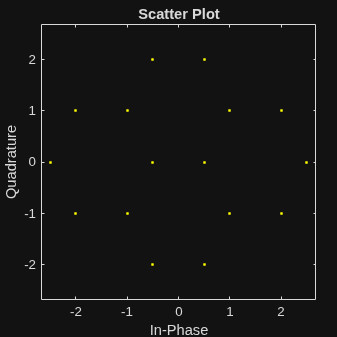
Create the points that describe a hexagonal constellation.
inphase = [1/2 1 1 1/2 1/2 2 2 5/2]; quadr = [0 1 -1 2 -2 1 -1 0]; inphase = [inphase;-inphase]; inphase = inphase(:); quadr = [quadr;quadr]; quadr = quadr(:); const = inphase + 1i*quadr;
Plot the constellation.
h = scatterplot(const);
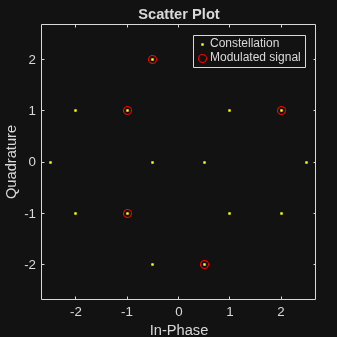
Generate input data symbols. Modulate the symbols using this constellation.
x = [3 8 5 10 7]; y = genqammod(x,const);
Demodulate the modulated signal, y.
z = genqamdemod(y,const);
Plot the modulated signal in same figure.
hold on; scatterplot(y,1,0,'ro',h); legend('Constellation','Modulated signal'); hold off;
Determine the number of symbol errors between the demodulated data to the original sequence.
numErrs = symerr(x,z)
numErrs = 0
Calculate bit-wise approximate LLRs for 16-APSK modulation using a DVB-S2X constellation.
Generate a random bit sequence of length 24.
x = randi([0 1],24,1);
Define the 16-APSK constellation points for modulation.
constellation = [ ... 0.4718 + 1j*0.2606; 0.2606 + 1j*0.4718; -0.4718 + 1j*0.2606; -0.2606 + 1j*0.4718; ... 0.4718 - 1j*0.2606; 0.2606 - 1j*0.4718; -0.4718 - 1j*0.2606; -0.2606 - 1j*0.4718; ... 1.2088 + 1j*0.4984; 0.4984 + 1j*1.2088; -1.2088 + 1j*0.4984; -0.4984 + 1j*1.2088; ... 1.2088 - 1j*0.4984; 0.4984 - 1j*1.2088; -1.2088 - 1j*0.4984; -0.4984 - 1j*1.2088 ... ];
Modulate the bit sequence using the given constellation.
y = genqammod(x,constellation,InputType="bit");Add Additive White Gaussian Noise (AWGN) to the modulated signal.
ynoisy =awgn(x,15);
Demodulate the modulated signal to compute approximate LLRs.
z = genqamdemod(ynoisy,constellation,OutputType="approxllr",NoiseVariance=0.0316);Input Arguments
Complex envelope, specified as a scalar, vector, matrix, 3-D array, 4-D array, or
gpuArray object. If Y is a matrix with
multiple rows, the function processes the rows independently.
Data Types: double | single
Complex Number Support: Yes
Signal mapping, specified as a complex vector, dlarray object, or
gpuArray object.
Data Types: double | single
Complex Number Support: Yes
Name-Value Arguments
Specify optional pairs of arguments as
Name1=Value1,...,NameN=ValueN, where Name is
the argument name and Value is the corresponding value.
Name-value arguments must appear after other arguments, but the order of the
pairs does not matter.
Example: OutputType="integer" sets the output format to
"integer".
Output format, specified as one of these options.
"integer"— The outputZconsists of integer symbol values."bit"— The outputZconsists of groups of bits."approxllr"— The outputZconsists of the bit-wise approximate log-likelihood ratio (LLR).
Data type of the output, specified as "double",
"single", "int8", "int16",
"int32", "int64", "uint8",
"uint16", "uint32", or
"uint64". This name-value argument determines the data type of
the final output. The data type of the output depends on the
OutputType value you select.
When you set
OutputTypeto"integer", the data type can be:"double""single""int8""int16""int32""int64""uint8""uint16""uint32""uint64"
When you set
OutputTypeto"bit", the data type can be"double","single", or"int8".When you set
OutputTypeto"approxllr", the function ignores this name-value argument and the output data type remains the same as the input data type.
The default value is the data type of input Y.
Noise variance, specified as a positive scalar or positive vector. When you specify as a scalar, the function uses the same noise variance value for LLR computations on all input elements. When you specify as a vector, the vector length must be equal to the number of elements in the last dimension of the input signal. Each element of the vector specifies the noise variance for all the elements of the input along the corresponding last dimension.
Dependencies
To enable this name-value argument, set OutputType to
"approxllr".
Output Arguments
Demodulated signal, returned as a scalar, vector, matrix, 3-D array, 4-D array, or
gpuArray object. The demodulated signal consists of binary values
or integers in the range [0, (M – 1)], where M is
the length of the signal mapping vector, const. The
data type of Z is the same as the data type of input
Y.
When you set OutputType to "bit" or
"approxllr", the number of rows in the output Z
is log2(M) times the number of rows in the input Y. The
function maps each demodulated symbol to a group of log2(M) bits, with the first bit representing the most significant bit (MSB)
and the last bit representing the least significant bit (LSB).
Z is a gpuArray object if either
Y or const is a gpuArray
object.
Data Types: double | single
Extended Capabilities
C/C++ Code Generation
Generate C and C++ code using MATLAB® Coder™.
GPU Code Generation
Generate CUDA® code for NVIDIA® GPUs using GPU Coder™.
Version History
Introduced before R2006aThe genqamdemod function now supports soft-decision demodulation in
addition to hard-decision demodulation. Use the OutputType to
specify the output format as hard-decision bit output or soft-decision output. Additionally,
you can specify the output data type and noise variance using the OutputDataType
and NoiseVariance
name-value arguments, respectively. The NoiseVariance
argument is applicable only for soft-decision demodulation.
MATLAB Command
You clicked a link that corresponds to this MATLAB command:
Run the command by entering it in the MATLAB Command Window. Web browsers do not support MATLAB commands.
Select a Web Site
Choose a web site to get translated content where available and see local events and offers. Based on your location, we recommend that you select: .
You can also select a web site from the following list
How to Get Best Site Performance
Select the China site (in Chinese or English) for best site performance. Other MathWorks country sites are not optimized for visits from your location.
Americas
- América Latina (Español)
- Canada (English)
- United States (English)
Europe
- Belgium (English)
- Denmark (English)
- Deutschland (Deutsch)
- España (Español)
- Finland (English)
- France (Français)
- Ireland (English)
- Italia (Italiano)
- Luxembourg (English)
- Netherlands (English)
- Norway (English)
- Österreich (Deutsch)
- Portugal (English)
- Sweden (English)
- Switzerland
- United Kingdom (English)