Main Content

asset3d.segmentMeshSDF

R2026b

Segment 3D mesh into parts

Since R2026b

Description

Add-On Required: This feature requires the 3D Asset Processing Library for MATLAB add-on.

[faceLabels,numSegments] = asset3d.segmentMeshSDF(meshInput) segments a triangular mesh meshInput into parts by using a thicknesses derived from its signed distance fields. The function assigns one integer label to each face, and returns the labels faceLabels.

example

[faceLabels,numSegments] = asset3d.segmentMeshSDF(meshInput,Name=Value) specifies one or more additional segmentation options using name-value arguments. For example, NumComponents=6 partitions the mesh into six thickness-based component groups in which spatially disconnected regions can become separate segments.

Examples

collapse all

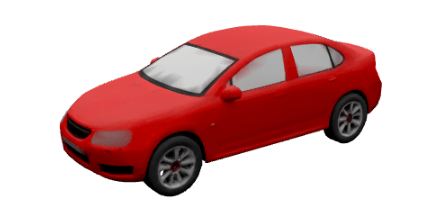
Read a car asset into the workspace as a single mesh.

meshObj = asset3d.read("Red_sedan_car.glb",ReadAs="mesh");

Display the mesh.

show(meshObj)
Segment the mesh into parts by using the asset3d.segmentMeshSDF function.

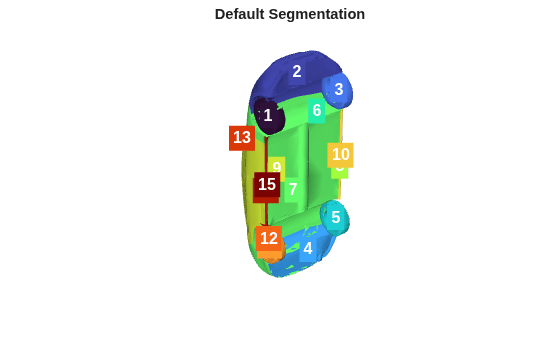
[faceLabels,numSegments] = asset3d.segmentMeshSDF(meshObj,Seed=42)
faceLabels = 9784×1

    1
    1
    1
    1
    1
    1
    1
    1
    1
    1
    2
    2
    2
    3
    3
      ⋮

numSegments = 
15

Display the segmented mesh using asset3d.showSegments function.

asset3d.showSegments(meshObj,faceLabels)
title("Default Segmentation")
Read a car asset as a single mesh.

meshObj = asset3d.read("Red_sedan_car.glb",ReadAs="mesh");

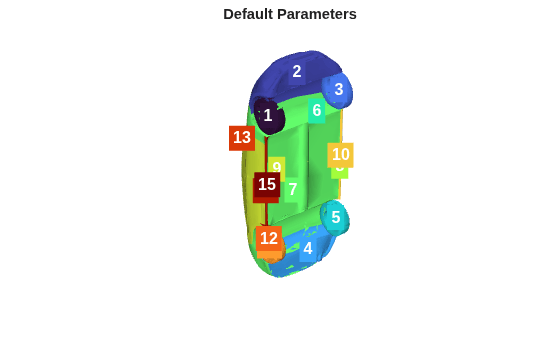
Segment the mesh into parts using default parameters.

[faceLabelsDefault,numSegmentsDefault] = asset3d.segmentMeshSDF(meshObj,Seed=42)
faceLabelsDefault = 9784×1

    1
    1
    1
    1
    1
    1
    1
    1
    1
    1
    2
    2
    2
    3
    3
      ⋮

numSegmentsDefault = 
15

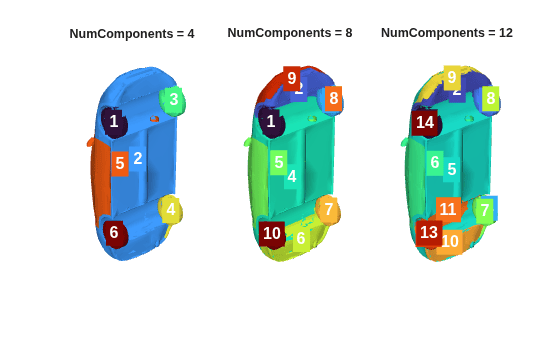
Segment the same mesh using different numbers of component groups.

[labels4,nSeg4] = asset3d.segmentMeshSDF(meshObj,NumComponents=4,BoundarySmoothness=8,SmoothingIterations=2,MinComponentSize=150,Seed=42);
[labels8,nSeg8] = asset3d.segmentMeshSDF(meshObj,NumComponents=8,BoundarySmoothness=8,SmoothingIterations=2,MinComponentSize=150,Seed=42);
[labels12,nSeg12] = asset3d.segmentMeshSDF(meshObj,NumComponents=12,BoundarySmoothness=8,SmoothingIterations=2,MinComponentSize=150,Seed=42);

Display the segmentation results obtained using the default parameters.

asset3d.showSegments(meshObj,faceLabelsDefault)
title("Default Parameters")
Display the segmentation results from using different numbers of component groups side by side.

figure

ax1 = subplot(1,3,1);
asset3d.showSegments(meshObj,labels4,Parent=ax1)
title("NumComponents = 4")

ax2 = subplot(1,3,2);
asset3d.showSegments(meshObj,labels8,Parent=ax2)
title("NumComponents = 8")

ax3 = subplot(1,3,3);
asset3d.showSegments(meshObj,labels12,Parent=ax3)
title("NumComponents = 12")
Input Arguments

collapse all

Mesh or scene to segment, specified as a Mesh or Scene object. When you provide a Scene object, the function automatically flattens it into a single concatenated mesh before segmentation. The function assigns one integer label per face of the resulting mesh.

Name-Value Arguments

collapse all

Specify optional pairs of arguments as Name1=Value1,...,NameN=ValueN, where Name is the argument name and Value is the corresponding value. Name-value arguments must appear after other arguments, but the order of the pairs does not matter.

Example: asset3d.segmentMeshSDF(mesh,NumComponents=6,BoundarySmoothness=10,Seed=42) segments the mesh into six thickness groups, uses smoother boundaries than the default setting, and fixes the random seed to 42.

Number of thickness-based component groups used to partition the mesh, specified as a positive integer. The function uses the signed distance field (SDF) of the mesh to measure local shape thickness, and groups faces with similar thickness values into components. Using a larger number of groups creates distinctions between subtler thickness variations and generally produces finer segmentation. Specifying a lower number of groups can instead group similar thicknesses together and generally produces coarser segmentation. The final number of output segments can exceed the value specified for this argument because the function returns spatially disconnected regions with similar thickness as separate segments. For example, the left and right wheels of a vehicle can have the same thickness but appear as two separate segments because they are not connected.

Smoothness of the segment boundaries, specified as a positive numeric scalar. Higher values produce smoother, more regular boundaries between segments. Lower values enable boundaries to more closely follow local geometry, which can produce more jagged transitions between segments.

Number of refinement passes over the segmentation, specified as a nonnegative integer. Each additional pass refines the segmentation by smoothing label assignments across neighboring faces. Increasing this value produces cleaner boundaries at the cost of additional computation resources.

Minimum number of faces per segment, specified as a nonnegative integer. The function merges segments smaller than this size into the largest neighboring segment. Specify MinComponentSize as 0 to disable merging and retain all segments regardless of size.

Random seed for generation, specified as a nonnegative integer. By default, the function uses a different random seed each time, which produces a different result for every call. Specify a fixed seed value to ensure repeatability each time you run the function with the same inputs and settings.

Output Arguments

collapse all

Segment label for each face, returned as an m-by-1 vector of positive integers, where m is the number of faces in the mesh. Each element identifies the segment assigned to the corresponding face in the segmented mesh.

Number of unique segments, returned as a scalar. This value reflects the actual number of segments after any small-segment merging controlled by MinComponentSize, and might differ from the value specified to NumComponents.

Version History

Introduced in R2026b