Main Content

asset3d.showSegments

R2026b

Display segment labels on 3D asset

Since R2026b

Description

Add-On Required: This feature requires the 3D Asset Processing Library for MATLAB add-on.

ax = asset3d.showSegments(meshInput,faceLabels) displays the segment labels faceLabels on the 3D asset meshInput. The function colors the faces of the asset by segment label and overlays each segment number on the segment centroid.

example

ax = asset3d.showSegments(meshInput,faceLabels,Name=Value) specifies one or more options using name-value arguments. For example, ColorSegments=false renders the mesh with its original appearance instead of coloring it by segment.

Examples

collapse all

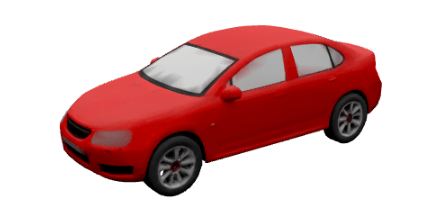
Read a car asset into the workspace as a single mesh.

meshObj = asset3d.read("Red_sedan_car.glb",ReadAs="mesh");

Display the mesh.

show(meshObj)
Segment the mesh into parts by using the asset3d.segmentMeshSDF function.

[faceLabels,numSegments] = asset3d.segmentMeshSDF(meshObj,Seed=42)
faceLabels = 9784×1

    1
    1
    1
    1
    1
    1
    1
    1
    1
    1
    2
    2
    2
    3
    3
      ⋮

numSegments = 
15

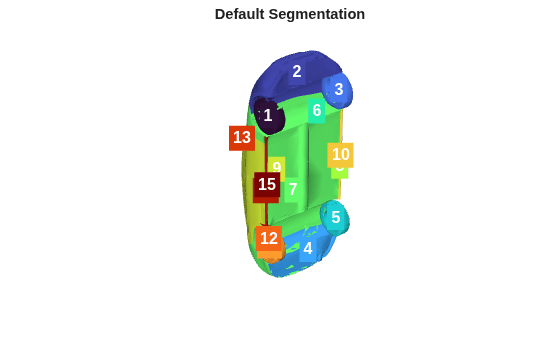
Display the segmented mesh using asset3d.showSegments function.

asset3d.showSegments(meshObj,faceLabels)
title("Default Segmentation")
Read a car asset into the workspace as a single mesh.

mesh = asset3d.read("Red_sedan_car.glb",ReadAs="mesh",UpAxis="Z");

Segment the mesh into parts.

[faceLabels,numSegments] = asset3d.segmentMeshSDF(mesh,Seed=42)
faceLabels = 9784×1

    1
    1
    1
    1
    1
    1
    1
    1
    1
    1
    2
    2
    2
    3
    3
      ⋮

numSegments = 
14

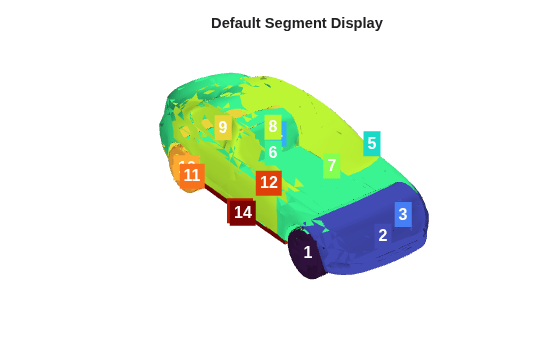
Display the segment labels using default options.

asset3d.showSegments(mesh,faceLabels)
title("Default Segment Display")
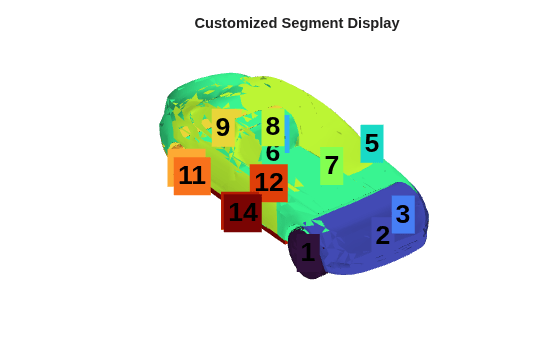
Display the segment labels with custom font sizes and colors.

asset3d.showSegments(mesh,faceLabels,ColorSegments=true,ShowLabels=true,EdgeColor="none",FontSize=20,FontColor="k")
title("Customized Segment Display")
Input Arguments

collapse all

Mesh or scene to display, specified as a Mesh or Scene object. When you specify a scene, the function flattens the scene into a single mesh before it displays the labels.

Segment labels for the mesh faces, specified as an m-by-1 vector of positive integers, where m is the number of faces in the mesh. Each element must contain a positive integer identifying the segment that the corresponding face belongs to. You can specify this argument using the faceLabels output of the asset3d.segmentMeshSDF function.

Name-Value Arguments

collapse all

Specify optional pairs of arguments as Name1=Value1,...,NameN=ValueN, where Name is the argument name and Value is the corresponding value. Name-value arguments must appear after other arguments, but the order of the pairs does not matter.

Example: asset3d.showSegments(mesh,faceLabels,ColorSegments=false,ShowLabels=true) displays segment labels while preserving the original mesh appearance.

Segment labels determine face color, specified as a logical 1 (true) or 0 (false). Specify true to assign a distinct color to the faces within each segment using the current axes colormap. Specify false to render the mesh with its original colors.

Segment number overlay, specified as true or false. Specify true to place the segment number at the geometric centroid of each segment. Specify false to render the segment colors only, with no text overlay.

Target axes to draw into, specified as an Axes object handle. Specify this value to embed the visualization in an existing figure. When you do not specify this value, the function creates a new figure and axes.

Triangle edge color, specified as "none", a color name, a short color name, or an RGB triplet. Specify "none" to hide triangle edges. Specify a color such to render a wireframe overlay on the mesh surface.

Segment label font size, specified as a positive numeric scalar, in points.

Triangle font color, specified as a color name, a short color name, or an RGB triplet.

Output Arguments

collapse all

Axes containing the segmentation display, returned as an Axes object handle.

Version History

Introduced in R2026b