roadrunner.hdmap.MultiPolygon
R2026bDefine multiple polygon geometries for RoadRunner HD Map objects using MATLAB
Since R2022b
Description
The roadrunner.hdmap.MultiPolygon object defines a collection
of polygon geometries for RoadRunner HD Map objects. It groups one or more roadrunner.hdmap.Polygon objects to represent complex
regions. The polygons in a MultiPolygon object must not overlap each other.
However, you can place polygons inside the holes of other polygons. You can use a
MultiPolygon object to assign geometry to map features such as junctions,
represented by roadrunner.hdmap.Junction objects. For an example of how to
create a complete T-junction with roads, maneuver lanes, and traffic signal phases that
include bulb-level signal control, see Build Signalized Junction Using RoadRunner HD Map.
Creation
Syntax
Description
multiPoly = roadrunner.hdmap.MultiPolygonMultiPolygon object.
multiPoly = roadrunner.hdmap.MultiPolygon(PropertyName=Value)MultiPolygon object using
name-value arguments.
Properties
Examples
Create multiple polygon geometries and combine them into a MultiPolygon object to represent a complex region in a RoadRunner HD Map.
Define a closed outer ring for the first polygon.
outer1 = [0 0; 10 0; 10 10; 0 10; 0 0];
Create a roadrunner.hdmap.Polygon object using the outer ring. Leave the InteriorRings property empty so the polygon represents a solid region.
polyNoHole = roadrunner.hdmap.Polygon(ExteriorRing=outer1) % Polygon without a holepolyNoHole =
Polygon with properties:
ExteriorRing: [5×2 double]
InteriorRings: {}
Define a closed outer ring and an inner ring for the second polygon.
outer2 = [15 0; 25 0; 25 10; 15 10; 15 0];
inner = [18 3; 22 3; 22 7; 18 7; 18 3];
Create a roadrunner.hdmap.Polygon object with a hole by specifying the inner ring to the InteriorRings property.
polyWithHole = roadrunner.hdmap.Polygon(ExteriorRing=outer2,InteriorRings={inner}) % Polygon with a holepolyWithHole =
Polygon with properties:
ExteriorRing: [5×2 double]
InteriorRings: {[5×2 double]}
Combine the Polygon objects into a roadrunner.hdmap.MultiPolygon object.
multiPoly = roadrunner.hdmap.MultiPolygon(Polygons=[polyNoHole polyWithHole])
multiPoly =
  MultiPolygon with properties:

    Polygons: [2×1 roadrunner.hdmap.Polygon]
Convert each Polygon into a polyshape object to enable you to visualize the MultiPolygon in MATLAB™. Use NaN values to separate the outer and inner rings of polygons that contain holes. Then, plot the polygons side by side.
figure
hold on

% Loop through each Polygon in the MultiPolygon
for i = 1:length(multiPoly.Polygons)
    poly = multiPoly.Polygons(i);
    outer = poly.ExteriorRing;

    % Check if the polygon has no holes
    if isempty(poly.InteriorRings)
        p = polyshape(outer(:,1),outer(:,2),'Simplify',true);
    else
        % Initialize coordinates with outer boundary
        x_outer = outer(:,1);
        y_outer = outer(:,2);

        % Loop through each inner boundary
        for j = 1:length(poly.InteriorRings)
            inner = poly.InteriorRings{j};
            x_inner = [x_outer; NaN; inner(:,1)];
            y_inner = [y_outer; NaN; inner(:,2)];
        end
        p = polyshape(x_inner,y_inner,'Simplify',true);
    end

    % Plot the polygon
    plot(p,FaceAlpha=0.3)
end

axis equal
grid on
title("MultiPolygon Visualization")
xlabel("X(m)")
ylabel("Y(m)")
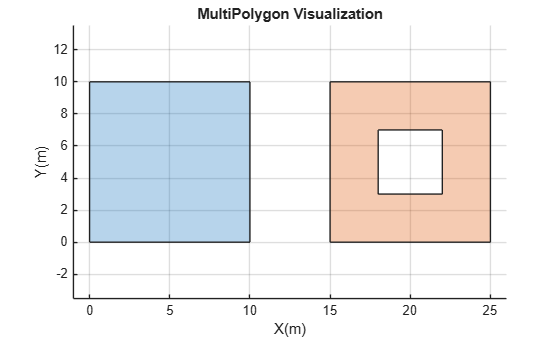
Version History
Introduced in R2022b

