Random Source (Obsolete)
(Obsolete) Generate randomly distributed values
This block has been updated. Please use the newer version of the Random Source block.

Libraries:
DSP System Toolbox /
Sources
Description
The Random Source block generates a frame of M values
drawn from a uniform or Gaussian pseudorandom distribution. Specify M
in the Samples per frame parameter.
Examples
Write and Read Binary Files in Simulink
Write data to a binary file and read the same data in Simulink®.
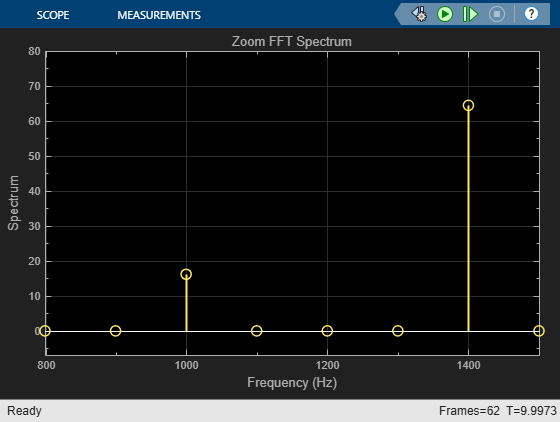
Analyze a Subband of Input Frequencies Using Zoom FFT
Compute the zoom FFT of a sine wave in Simulink.
Ports
Output
Parameters
The distribution from which to draw the random values,
Uniform or
Gaussian.
When you set the Source type parameter to
Uniform, the output samples are drawn from a
uniform distribution whose minimum and maximum values are specified by the
Minimum and Maximum
parameters, respectively. All values in this range are equally likely to be
selected. A length-N vector specified for one or both of
these parameters generates an N-channel output
(M-by-N matrix) containing a
unique random distribution in each channel.
For example, specify
Minimum =
[0 0 -3
								-3]
Maximum =
[10 10 20
								20]
to generate a four-channel output whose first and second columns contain random values in the range [0, 10], and whose third and fourth columns contain random values in the range [-3, 20]. When you specify only one of the Minimum and Maximum parameters as a vector, the block scalar expands the other parameter so it is the same length as the vector.
When you set the Source type parameter to
Gaussian, you must also set the
Method parameter, which determines the method by
which the block computes the output.
The method by which the block computes the Gaussian random values:
Ziggurat— Produces Gaussian random values by using the ziggurat method. This method is equivalent to theLegacy MATLAB version 5.0 normal generatormethod.Sum of uniform values— Produces Gaussian random values by adding and scaling uniformly distributed random signals based on the central limit theorem. This theorem states that the probability distribution of the sum of a sufficiently high number of random variables approaches the Gaussian distribution. You must set the Number of uniform values to sum parameter, which determines the number of uniformly distributed random numbers to sum to produce a single Gaussian random value.
For both settings of the Method parameter, the output samples are drawn from the normal distribution defined by the Mean and Variance parameters. A length-N vector specified for one or both of the Mean and Variance parameters generates an N-channel output (M-by-N frame matrix) containing a distinct random distribution in each column. When you specify only one of these parameters as a vector, the block scalar expands the other parameter so it is the same length as the vector.
Dependencies
To enable this parameter, set Source type to
Gaussian. For more information, see Distribution.
The number of uniformly distributed random values to sum to compute a single number in a Gaussian random distribution.
Dependencies
To enable this parameter, set Source type to
Gaussian and Method
to Sum of uniform values. For more
information, see Distribution.
The minimum value in the uniform distribution specified as a finite scalar or vector.
Tunable: Yes
Dependencies
To enable this parameter, set Source type to
Uniform.
Limitations
Tunable (Simulink) in Simulation mode only.
The maximum value in the uniform distribution specified as a finite scalar or vector.
Tunable: Yes
Dependencies
To enable this parameter, set Source type to
Uniform.
Limitations
Tunable (Simulink) in Simulation mode only.
The mean of the Gaussian (normal) distribution specified as a finite scalar or vector.
Tunable: Yes
Dependencies
To enable this parameter, set Source type to
Gaussian.
Limitations
Tunable (Simulink) in Simulation mode only.
The variance of the Gaussian (normal) distribution.
Dependencies
To enable this parameter, set Source type to
Gaussian.
Limitations
Tunable (Simulink) in Simulation mode only.
The Repeatability parameter determines if the block outputs the same signal each time you run the simulation. You can set the parameter to one of the following options:
Repeatable— Outputs the same signal each time you run the simulation. The first time you run the simulation, the block randomly selects an initial seed. The block reuses these same initial seeds every time you rerun the simulation.Specify seed— Outputs the same signal each time you run the simulation. Every time you run the simulation, the block uses the initial seeds specified in the Initial seed parameter. Also see Initial seed.Not repeatable— Does not output the same signal each time you run the simulation. Every time you run the simulation, the block randomly selects an initial seed.
The initial seed(s) to use for the random number generator specified as a finite scalar or vector. The generator produces an identical sequence of pseudorandom numbers each time it is executed with a particular initial seed.
To specify the N initial seeds for an
N-channel real-valued output, set the
Complexity parameter to
Real and provide one of the following in the
Initial seed parameter:
Length-N vector of initial seeds — Uses each vector element as an initial seed for the corresponding channel in the N-channel output.
Single scalar — Uses the scalar to generate N random values as the seeds for the N -channel output.
To specify the initial seeds for an N-channel
complex-valued output, set the Complexity parameter to
Complex and provide one of the following in
the Initial seed parameter:
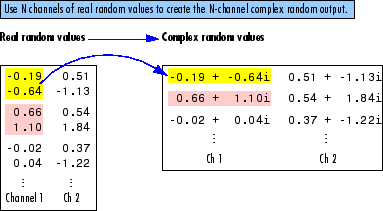
Length-N vector of initial seeds — Uses each vector element as an initial seed for generating N channels of real random values. The block uses pairs of adjacent values in each of these channels as the real and imaginary components of the final output, as illustrated in the following figure.
Single scalar — Uses the scalar to generate N random values as the seeds for generating N channels of real random values. The block uses pairs of adjacent values in each of these channels as the real and imaginary components of the final output, as illustrated in the following figure.
Dependencies
To enable this parameter, set Repeatability to
Specify seed.
Limitations
Tunable (Simulink) in Simulation mode only.
Tunable: Yes
When you select this check box, the block inherits the sample mode, sample time, output data type, complexity, and signal dimensions of the signal from the downstream block. When you select this check box, the Sample mode, Sample time, Samples per frame, Output data type, and Complexity parameters are disabled.
Suppose that you want to back propagate a 1-D vector. The output of the
Random Source block is a 1-D vector of length M, where
length M is inherited from the downstream block. When the
Minimum, Maximum,
Mean, or Variance parameter
specifies N channels, the 1-D vector output contains
M/N samples from each channel. An
error occurs in this case when M is not an integer
multiple of N.
Suppose that you want to back propagate a
M-by-N signal. When
N>1, your signal has
N channels. When N =
1, your signal has M channels. The
value of the Minimum, Maximum,
Mean, or Variance parameter
can be a scalar or a vector of length equal to the number of channels. You
can specify these parameters as either row or column vectors, except when
the signal is a row vector. In this case, the Minimum,
Maximum, Mean, or
Variance parameter must also be specified as a row
vector.
The sample mode, specified as Continuous or
Discrete.
When you set Sample mode to
Discrete, the Sample
time parameter value,
T
s, specifies the random
sequence sample period. In this mode, the block generates the number of
samples specified by the Samples per frame parameter
value, M, and outputs this frame with a period of
MT
s.
When you set Sample mode to
Continuous, the block is configured for
continuous-time operation, and the Sample time and
Samples per frame parameters are disabled. Note
that many DSP System Toolbox™ blocks do not accept continuous-time inputs.
Dependencies
To enable this parameter, clear the Inherit output port attributes check box.
The sample period, T
s, of the
random output sequence when the Sample mode is
Discrete, specified as a positive, finite,
scalar. The output frame period is
MT
s.
Dependencies
To enable this parameter, clear the Inherit output port
attributes check box and set Sample
mode to Discrete.
The number of samples, M, in each output frame, specified as a positive integer. The output frame period is MT s.
Dependencies
To enable this parameter, clear the Inherit output port
attributes check box and set Sample
mode to Discrete.
The data type of the output, specified as single-precision or double-precision.
Dependencies
To enable this parameter, clear the Inherit output port attributes check box.
The complexity of the output, specified as Real
or Complex. These settings control all channels
of the output, so real and complex data cannot be combined in the same
output. For complex output with a Uniform
distribution, the real and imaginary components in each channel are both
drawn from the same uniform random distribution, defined by the
Minimum and Maximum parameters
for that channel.
For complex output with a Gaussian
distribution, the real and imaginary components in each channel are drawn
from normal distributions with different means. In this case, the
Mean parameter for each channel should specify a
complex value; the real component of the Mean parameter
specifies the mean of the real components in the channel, while the
imaginary component specifies the mean of the imaginary components in the
channel. When either the real or imaginary component is omitted from the
Mean parameter, a default value of 0 is used for
the mean of that component.
For example, a Mean parameter setting of
[5+2i 0.5 3i] generates a three-channel output with
the following means.
|
Channel 1 mean |
real = 5 |
imaginary = 2 |
|
Channel 2 mean |
real = 0.5 |
imaginary = 0 |
|
Channel 3 mean |
real = 0 |
imaginary = 3 |
For complex output, the Variance parameter, σ2, specifies the total variance for each output channel. This is the sum of the variances of the real and imaginary components in that channel.
The specified variance is equally divided between the real and imaginary components, so that
Dependencies
To enable this parameter, clear the Inherit output port attributes check box.
Block Characteristics
Data Types |
|
Direct Feedthrough |
|
Multidimensional Signals |
|
Variable-Size Signals |
|
Zero-Crossing Detection |
|
Extended Capabilities
Version History
Introduced before R2006aSee Also
Blocks
- Discrete Impulse | Maximum | Minimum | Signal From Workspace | Standard Deviation | Variance | Constant (Simulink) | Random Number (Simulink) | Signal Generator (Simulink)
Functions
rand|randn|RandStream

