Registration Estimator
R2026bRegister 2-D grayscale images
Description
The Registration Estimator app aligns 2-D grayscale images using automatic image registration. Using this app, you can:
Compare feature-based, intensity-based, and nonrigid registration techniques interactively.
Obtain the registered image and the geometric transformation.
Generate a function with the desired registration technique and settings. Call this function to register other images using the same settings.
For more information about the different registration techniques supported by Registration Estimator, see More About.
Open the Registration Estimator App
MATLAB® Toolstrip: On the Apps tab, under Image Processing and Computer Vision, click the Registration Estimator app icon.
MATLAB command prompt: Enter
registrationEstimator.
Examples
Create two misaligned images in the workspace. This example creates the
moving image J by rotating the fixed image
I clockwise by 30 degrees.
I = imread("cameraman.tif");
J = imrotate(I,-30);
Open Registration Estimator from the command window. Specify the moving image and the fixed image as the two input arguments.
registrationEstimator(J,I)
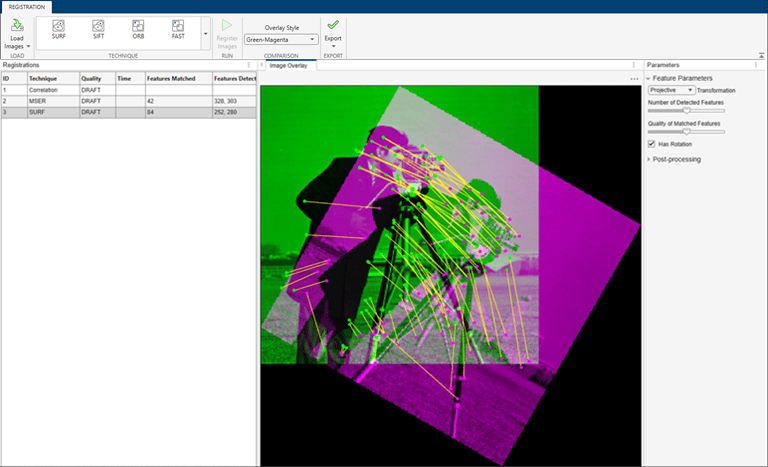
After you load the images, the app creates three registration trials: Correlation, MSER, and SURF. These trials appear as drafts in the Registrations list. The app also displays an overlay of the images. The default Green-Magenta overlay style shows the fixed image in green and the moving image in magenta. The overlay looks gray in areas where the two images have similar intensity. When you click a feature-based technique in the history list, the image overlay displays the matched features as a set of red and green dots connected by yellow lines.
Run the three default registration trials with the default settings. Click each trial in the history list, then click Register Images.
After the registration finishes, the trial displays a quality score and
computation time. The quality score is based loosely on the ssim
function and provides an overall estimate of registration quality. A score
closer to 1 indicates a higher quality registration.
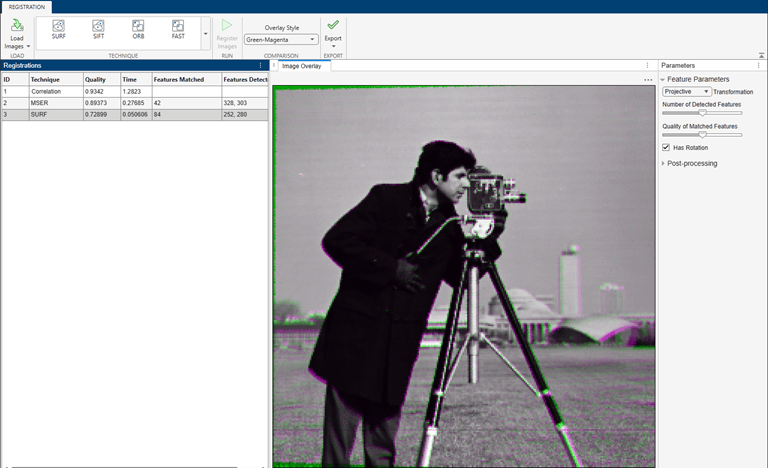
Inspect the image overlay to confirm which registration technique is the most acceptable. Colors in the image overlay indicate residual misalignment.
Programmatic Use
More About
Tips
You can register images and generate functions for all feature-based techniques without a Computer Vision Toolbox™ license. However, to run an autogenerated function that uses a feature-based registration technique, you must have Computer Vision Toolbox. For more information, see Export Results from Registration Estimator App.

