Clone Git Repository in MATLAB
R2026bYou can clone a remote Git™ repository, for example, from GitHub® or GitLab® using HTTPS or SSH.
To clone a remote Git repository, follow these steps:
On the Home tab, in the File section, select New > Git Clone.
Alternatively, in the Files panel, in the folder you want to clone in, right-click and select Source Control > Clone Git Repository.
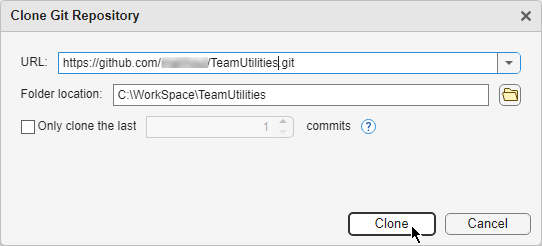
In the Clone Git Repository dialog box, select the source hosting service you want to clone a repository from:
URL
If you use an HTTPS URL, enter the login information for the remote repository, if prompted. For example, enter your GitHub username and personal access token. For instructions on how to create personal access tokens for GitHub, see Creating a personal access token.
An example HTTPS URL is
https://github.com/<name>/<project>.git.To prevent frequent login prompts when you interact with your remote repository using HTTPS, configure a Git credential manager to remember your credentials. For more information, see Manage Git Credentials.
If you use an SSH URL, you must configure MATLAB® to use SSH keys. For more information, see Configure MATLAB to Use Git SSH Authentication. Setting up SSH keys prevents frequent login prompts when you interact with your remote repository. An example SSH URL is
ssh://git@<server>/<name>/<project>.git.
GitHub or GitHub Enterprise Server
Account — Select the authenticated account to access the remote repository. MATLAB automatically populates this field with the account you configured in the Connections panel. If you have multiple accounts, you can select a different one.
Repository — Enter or select the name of the repository to clone.
Specify the location of the folder you want to clone in. The folder must be empty.
Click Clone.
By default, MATLAB performs a full clone of the repository. To create a shallow clone from a specific number of commits, select the Only clone the last number commits checkbox. Then, specify the number of commits you want to include in your clone.
See Also
Functions
gitrepo|gitclone|createBranch|switchBranch|fetch|merge|push

