boundaryshape
R2026bCreate polyshape from 2-D triangulation
Description
polyout = boundaryshape(TR)polyshape object from the boundary of a 2-D
triangulation. TR can be either a
triangulation object or a
delaunayTriangulation object.
Once you create the polyshape object polyout, you can analyze its
properties or perform additional computations using polyshape
functions. For example, you can access the vertices that define the boundary with
the property polyout.Vertices, and you can plot the shape using
the command plot(polyout).
Examples
Create and plot a simple triangulation object.
P = [2.5 8.0;
     6.5 8.0;
     2.5 5.0;
     6.5 5.0;
     1.0 6.5;
     8.0 6.5];
T = [5 3 1;
     3 2 1;
     3 4 2;
     4 6 2];
TR = triangulation(T,P);
triplot(TR)
xlim([0 9])
ylim([4.5 8.5])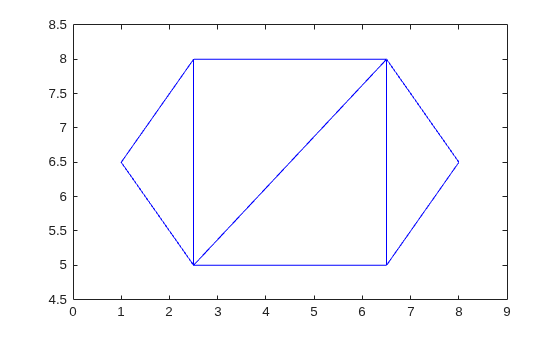
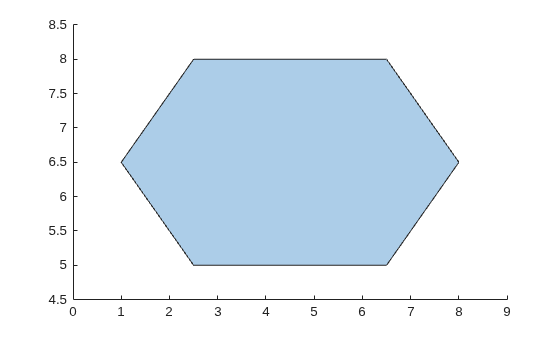
Create and plot a polyshape object whose boundary is equal to the boundary of the triangulation.
polyout = boundaryshape(TR);
plot(polyout)
Create and plot a triangulation object.
T = [5 1 3;
     6 1 4;
     5 4 1;
     2 6 3;
     3 6 5;
     2 1 6];
P = [3 0.5;
     3.5 1.5;
     4 0.5;
     3.25 0.6;
     3.75 0.6;
     3.5 1];
TR = triangulation(T,P);
triplot(TR)
xlim([2.8 4.2])
ylim([0.4 1.8])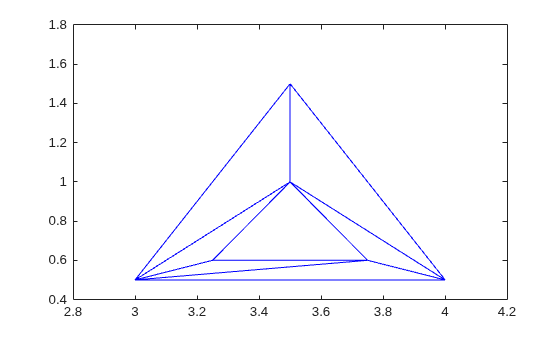
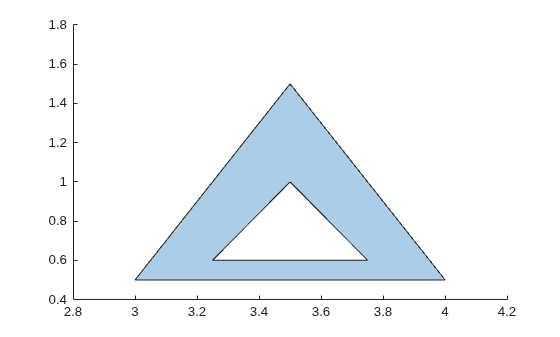
Create and plot a polyshape object whose boundaries are equal to the boundaries of the triangulation. Due to the inner and outer closed boundaries of the triangulation, polyout contains both a hole boundary and a solid boundary.
polyout = boundaryshape(TR)
polyout =
  polyshape with properties:

      Vertices: [7×2 double]
    NumRegions: 1
      NumHoles: 1
plot(polyout)
Input Arguments
Output Arguments
Version History
Introduced in R2018b

