Main Content

phased.AngleDopplerResponse

Angle-Doppler response

Description

The AngleDopplerResponse object calculates the angle-Doppler response of input data.

To compute the angle-Doppler response:

  1. Create the phased.AngleDopplerResponse object and set its properties.

  2. Call the object with arguments, as if it were a function.

To learn more about how System objects work, see What Are System Objects?

Creation

Description

response = phased.AngleDopplerResponse creates an angle-Doppler response System object™, response. This object calculates the angle-Doppler response of the input data.

response = phased.AngleDopplerResponse(Name=Value) creates angle-Doppler object, response, with each specified property Name set to the specified Value. You can specify additional name-value pair arguments in any order as (Name1=Value1,...,NameN=ValueN).

example

Properties

expand all

Unless otherwise indicated, properties are nontunable, which means you cannot change their values after calling the object. Objects lock when you call them, and the release function unlocks them.

If a property is tunable, you can change its value at any time.

For more information on changing property values, see System Design in MATLAB Using System Objects.

Specify the source of the PRF values for the STAP processor as "Property" or "Input port". When you set this property to "Property", the PRF is determined by the value of the PRF property. When you set this property to "Input port", the PRF is determined by an input argument at execution time.

Example: "Input port"

Data Types: char

Specify the pulse repetition frequency (PRF) in hertz of the input signal as a positive scalar. This property applies when you set the PRFSource property to "Property".

Example: 45

Data Types: single | double

Specify whether the elevation angle comes from the ElevationAngle property of this object. Values of this property are:

"Property"The ElevationAngle property of this object specifies the elevation angle.
"Input port"An input argument specifies the elevation angle.

Example: "Input port"

Data Types: char

Specify the elevation angle in degrees used to calculate the angle-Doppler response as a scalar. The angle must be between –90 and 90. This property applies when you set the ElevationAngleSource property to "Property".

Example: 45

Data Types: single | double

Specify the number of samples in the angular domain used to calculate the angle-Doppler response as a positive integer. This value must be greater than 2.

Example: 128

Data Types: single | double

Specify the number of samples in the Doppler domain used to calculate the angle-Doppler response as a positive integer. This value must be greater than 2.

Example: 192

Data Types: single | double

Sensor array specified as an array System object belonging to the phased package. A sensor array can contain subarrays.

Specify the propagation speed of the signal, in meters per second, as a positive scalar.

Data Types: single | double

Specify the operating frequency of the system in hertz as a positive scalar. The default value corresponds to 300 MHz.

Data Types: single | double

Usage

Description

[RESP,ANG_GRID,DOP_GRID] = response(X,...) calculates the angle-Doppler response of the data X. RESP is the complex angle-Doppler response. ANG_GRID and DOP_GRID provide the angle samples and Doppler samples, respectively, at which the angle-Doppler response is evaluated. This syntax is available when ElevationAngleSource is set to "Property".

The size of the first dimension of the input matrix can vary to simulate a changing signal length. A size change can occur, for example, in the case of a pulse waveform with variable pulse repetition frequency.

example

[RESP,ANG_GRID,DOP_GRID] = response(X,ELANG) calculates the angle-Doppler response using the specified elevation angle ELANG. This syntax is available when ElevationAngleSource is set to "Input port".

[RESP,ANG_GRID,DOP_GRID] = obj(H,X,PRF)uses PRF as the pulse repetition frequency. This syntax is available when PRFSource is set to "Input port".

Input Arguments

expand all

If X is a matrix, the number of rows in the matrix must equal the number of elements of the array specified in the SensorArray property of H.

If X is a vector, the number of rows must be an integer multiple of the number of elements of the array specified in the SensorArray property of H. In addition, the multiple must be at least 2.

Data Types: double
Complex Number Support: Yes

Elevation angle, specified as a scalar. Units are in degrees.

Data Types: single | double

Pulse repetition frequency specified as a positive scalar. To enable this argument, set PRFSource to "Input port". Units are in Hertz.

Example: 24

Data Types: single | double

Output Arguments

expand all

Angle-Doppler response, returned as a complex-valued P-by-Q matrix. P is determined by the NumDopplerSamples property. Q is determined by the NumAngleSamples property.

Data Types: double
Complex Number Support: Yes

Angle samples at which the angle-Doppler response is evaluated. ANG_GRID is a column vector of length Q.

Data Types: double

Doppler samples at which the angle-Doppler response is evaluated. DOP_GRID is a column vector of length P.

Data Types: double

Object Functions

To use an object function, specify the System object as the first input argument. For example, to release system resources of a System object named obj, use this syntax:

release(obj)

expand all

stepRun System object algorithm
releaseRelease resources and allow changes to System object property values and input characteristics
resetReset internal states of System object

Examples

collapse all

Calculate the angle-Doppler response of the 190th cell of a collected data cube.

Load data cube and construct a phased.AngleDopplerResponse System object™.

load STAPExampleData;
x = shiftdim(STAPEx_ReceivePulse(190,:,:));
response = phased.AngleDopplerResponse(...
    'SensorArray',STAPEx_HArray,...
    'OperatingFrequency',STAPEx_OperatingFrequency,...
    'PropagationSpeed',STAPEx_PropagationSpeed,...
    'PRF',STAPEx_PRF);

Plot angle-Doppler response.

[resp,ang_grid,dop_grid] = response(x);
contour(ang_grid,dop_grid,abs(resp))
xlabel('Angle')
ylabel('Doppler')
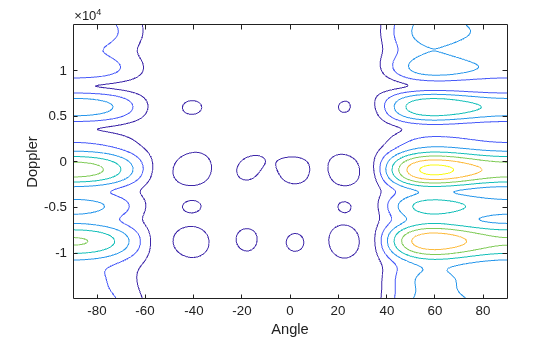
Figure contains an axes object. The axes object with xlabel Angle, ylabel Doppler contains an object of type contour.

Algorithms

expand all

References

[1] Guerci, J. R. Space-Time Adaptive Processing for Radar. Boston: Artech House, 2003.

Extended Capabilities

expand all

Version History

Introduced in R2011a