phased.BackscatterSonarTarget
R2026bSonar target backscatter
Description
The phased.BackscatterSonarTarget
System object™ models the backscattering of a signal from an
underwater or surface target. Backscattering is a special case of sonar target
scattering when the incident and reflected angles are the same. This type of scattering
applies to monostatic sonar configurations. The sonar target strength (TS) determines
the backscattering response of a target to an incoming signal. This object lets you
specify an angle-dependent sonar target strength model that covers a range of incident
angles.
The object lets you specify the target strength as an array of values at discrete azimuth and elevation points. The object interpolates values for incident angles between array points.
You can employ one of four Swerling models to generate random fluctuations in the
target strength. Choose the fluctuation model using the Model
property. Then, use the SeedSource and Seed
properties to control the fluctuations.
To model a backscattered reflected sonar signal:
Create the
phased.BackscatterSonarTargetobject and set its properties.Call the object with arguments, as if it were a function.
To learn more about how System objects work, see What Are System Objects?
Creation
Description
target = phased.BackscatterSonarTargettarget.
target = phased.BackscatterSonarTarget(Name=Value)target, with each specified property
Name set to the specified Value. You
can specify additional name and value arguments in any order as
(Name1=Value1,...,NameN=ValueN).
Properties
Usage
Description
refl_sig = target(sig,ang,update)update to control whether to update the target
strength (TS) values. This syntax applies when you set the
Model property to one of the fluctuating TS models:
"Swerling1", "Swerling2",
"Swerling3", or "Swerling4". If
update is true, a new TS value
is generated. If update is false,
the previous TS value is used.
Note
The object performs an initialization the first time the object is executed. This
initialization locks nontunable properties
and input specifications, such as dimensions, complexity, and data type of the input data.
If you change a nontunable property or an input specification, the System object issues an error. To change nontunable properties or inputs, you must first
call the release method to unlock the object.
Input Arguments
Output Arguments
Object Functions
To use an object function, specify the
System object as the first input argument. For
example, to release system resources of a System object named obj, use
this syntax:
release(obj)
Examples
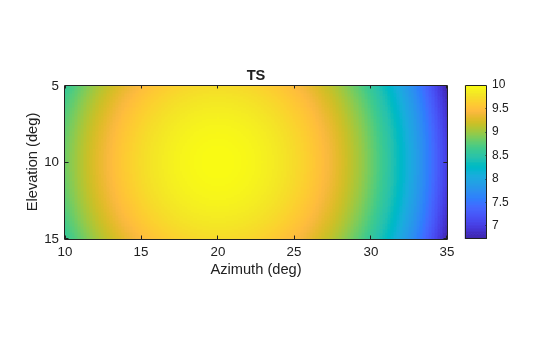
Calculate the reflected sonar signal from a nonfluctuating point target with a peak target strength (TS) of 10.0 db. For illustrative purposes, use a simplified expression for the TS pattern of a target. Real TS patterns are more complicated. The TS pattern covers a range of angles from 10° to 30° in azimuth and from 5° to 15° in elevation. The TS peaks at 20° azimuth and 10° elevation. Assume that the sonar operating frequency is 10 kHz and that the signal is a sinusoid at 9500 kHz.
Create and plot the TS pattern.
azmax = 20.0;
elmax = 10.0;
azpatangs = [10.0:0.1:35.0];
elpatangs = [5.0:0.1:15.0];
tspattern = 10.0*cosd(4*(elpatangs - elmax))'*cosd(4*(azpatangs - azmax));
tspatterndb = 10*log10(tspattern);
imagesc(azpatangs,elpatangs,tspatterndb)
colorbar
axis image
axis tight
title("TS")
xlabel("Azimuth (deg)")
ylabel("Elevation (deg)")
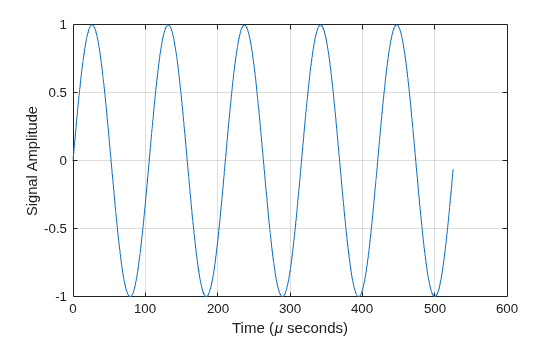
Generate and plot 50 samples of the sonar signal.
freq = 9.5e3;
fs = 100*freq;
nsamp = 500;
t = [0:(nsamp-1)]'/fs;
sig = sin(2*pi*freq*t);
plot(t*1e6,sig)
xlabel("Time (\mu seconds)")
ylabel("Signal Amplitude")
grid
Create the phased.BackscatterSonarTarget System object™.
target = phased.BackscatterSonarTarget(Model="Nonfluctuating", ...
    AzimuthAngles=azpatangs,ElevationAngles=elpatangs, ...
    TSPattern=tspattern);
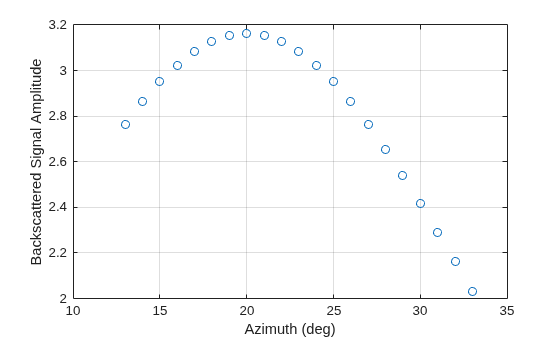
For a sequence of different azimuth incident angles (at constant elevation angle), plot the maximum scattered signal amplitude.
az0 = 13.0;
el = 10.0;
naz = 20;
az = az0 + [0:1:20];
naz = length(az);
ss = zeros(1,naz);
for k = 1:naz
    y = target(sig,[az(k);el]);
    ss(k) = max(abs(y));
end
plot(az,ss,'o')
xlabel('Azimuth (deg)')
ylabel('Backscattered Signal Amplitude')
grid
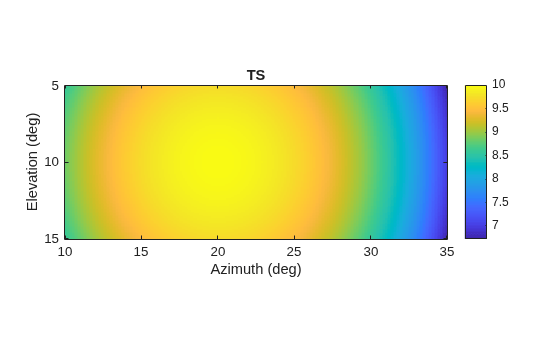
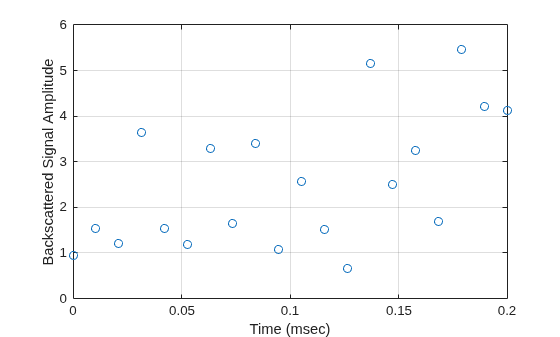
Calculate the reflected sonar signal from a Swerling2 fluctuating point target with a peak target strength (TS) of 10.0 db. For illustrative purposes, use a simplified expression for the TS pattern of a target. Real TS patterns are more complicated. The TS pattern covers a range of angles from 10°to 30° in azimuth and from 5° to 15° in elevation. The TS peaks at 20° azimuth and 10° elevation. Assume that the sonar operating frequency is 10 kHz and that the signal is a sinusoid at 9500 kHz.
Create and plot the TS pattern.
azmax = 20.0;
elmax = 10.0;
azpatangs = [10.0:0.1:35.0];
elpatangs = [5.0:0.1:15.0];
tspattern = 10.0*cosd(4*(elpatangs - elmax))'*cosd(4*(azpatangs - azmax));
tspatterndb = 10*log10(tspattern);
imagesc(azpatangs,elpatangs,tspatterndb)
colorbar
axis image
axis tight
title("TS")
xlabel("Azimuth (deg)")
ylabel("Elevation (deg)")
Generate the sonar signal.
freq = 9.5e3;
fs = 10*freq;
nsamp = 50;
t = [0:(nsamp-1)]'/fs;
sig = sin(2*pi*freq*t);
Create the phased.BackscatterSonarTarget System object™.
target = phased.BackscatterSonarTarget(Model="Nonfluctuating", ...
    AzimuthAngles=azpatangs,ElevationAngles=elpatangs, ...
    TSPattern=tspattern,Model="Swerling2");
Compute and plot the fluctuating signal amplitude for 20 time steps.
az = 20.0;
el = 10.0;
nsteps = 20;
ss = zeros(1,nsteps);
for k = 1:nsteps
    y = target(sig,[az;el],true);
    ss(k) = max(abs(y));
end
plot([0:(nsteps-1)]*1000/fs,ss,'o')
xlabel("Time (msec)")
ylabel("Backscattered Signal Amplitude")
grid
More About
References
[1] Urick, R.J. Principles of Underwater Sound, 3rd Edition. New York: Peninsula Publishing, 1996.
[2] Sherman, C.S., and J. Butler Transducers and Arrays for Underwater Sound. New York: Springer, 2007.
Extended Capabilities
Version History
Introduced in R2017a
See Also
Objects
phased.BackscatterRadarTarget|phased.IsoSpeedUnderwaterPaths|phased.WidebandBackscatterRadarTarget|phased.RadarTarget|backscatterPedestrian(Radar Toolbox) |backscatterBicyclist(Radar Toolbox)

