Main Content

galileoWaveformGenerator

Generate Galileo waveforms (E1, E5, and E6)

Since R2026a

Description

The galileoWaveformGenerator System object™ creates a Galileo waveform generator that supports these Galileo waveforms.

  • E1, E1B, and E1C

  • E5, E5a, and E5b

  • E6, E6B, and E6C

For comprehensive information on Galileo signal characteristics and navigation message formats, see Galileo Signals.

To create a Galileo waveform generator:

  1. Create the galileoWaveformGenerator object and set its properties.

  2. Call the object with arguments, as if it were a function.

To learn more about how System objects work, see What Are System Objects?

Creation

Description

galWaveObj = galileoWaveformGenerator

example

galWaveObj = galileoWaveformGenerator(PropertyName=Value) sets writable properties using one or more name-value arguments. For example, galileoWaveformGenerator(SVID=2) specifies the satellite vehicle identification (SVID) number as 2.

example

Properties

expand all

Unless otherwise indicated, properties are nontunable, which means you cannot change their values after calling the object. Objects lock when you call them, and the release function unlocks them.

If a property is tunable, you can change its value at any time.

For more information on changing property values, see System Design in MATLAB Using System Objects.

Type of signal to generate, specified as "E1", "E1B", "E1C", "E5", "E5a", "E5b", "E6", "E6B", or "E6C". The input is not case-sensitive.

The E1 waveform is a composite of the E1B and E1C waveforms. The E5 waveform is a composite of the E5a and E5b waveforms. The E6 waveform is a composite of the E6B and E6C waveforms.

Data Types: char | string

Satellite vehicle identifier number, specified as an integer in the range [1, 50].

Data Types: double | uint8

Initial time, in seconds, specified as a real scalar in the range [0, 604799]. The property indicates the initial time to start generating the waveform, and must be within one week.

Data Types: double

Sample rate for the signal, in hertz, specified as a scalar. This property specifies the sample rate of the signal output by the step object function.

Data Types: double

This property is read-only.

Chip rate of the spreading code, represented as one of these values.

  • 1.023e6 — Applies when the SignalType property is set to "E1", "E1B", or "E1C".

  • 10.23e6 — Applies when the SignalType property is set to "E5", "E5a", or "E5b".

  • 5.115e6 — Applies when the SignalType property is set to "E6", "E6B", or "E6C".

Data Types: double

This property is read-only.

Duration of one bit in the Galileo navigation data, represented as one of these values.

  • 4e-3 — Applies when the SignalType property is set to "E1", "E1B", or "E5b".

  • 20e-3 — Applies when the SignalType property is set to "E5" or "E5a".

  • 1e-3 — Applies when the SignalType property is set to "E1C", "E6", "E6B", or "E6C".

E1C and E6C are pilot signals and do not carry data bits. For these signals, the BitDuration value corresponds to the duration of one chip of their secondary code.

Data Types: double

Usage

Description

waveform = galWaveObj(bits) generates the time-domain Galileo waveform.

Note

This syntax is applicable when you set the SignalType property to a value other than "E5".

waveform = galWaveObj({fnavbits,inavbits}) generates the time-domain Galileo waveform.

Note

This syntax is applicable when you set the SignalType property to "E5".

Input Arguments

expand all

Navigation bits, specified as one of these options.

  • Scalar — Use this option for a single satellite.

  • Vector — Use this option for multiple satellites or multiple navigation data bits for one satellite. When specified as a row vector, each column represents the satellite at the corresponding index of the SVID property. When specified as a column vector, each element is a navigation data bit to use to generate the waveform, specified for a single satellite.

  • Matrix — Use this option for multiple satellites with multiple navigation data bits. The size of the matrix is N × length(SVID), where N is the number of navigation data bits to use to generate the waveform.

The elements of the navigation bits must be binary, irrespective of the input format.

Note

When you set the SignalType property to "E5", navigation bits must be specified as a binary cell array using {fnavbits,inavbits} argument.

Data Types: double | int8 | cell

Navigation bits, specified as a two-element binary-valued cell array.

  • fnavbits — F/NAV navigation bits, specified as the first element in the binary cell array of input navigation data. fnavbits has the same input format as the bits argument.

    The data symbol rate of F/NAV is 50 symbols per second (sps).

  • inavbits — I/NAV navigation bits, specified as the second element in the binary cell array of input navigation data. inavbits has the same input format as the bits argument.

    The data symbol rate of I/NAV is 250 sps, which is five times higher than that of F/NAV. Therefore, the number of rows in inavbits must be five times the number of rows in fnavbits.

Note

This argument is applicable only when you set the SignalType property to "E5".

Data Types: double | int8 | cell

Output Arguments

expand all

Generated Galileo waveform, returned as a vector or matrix. Each column is the waveform of the corresponding index of the SVID property.

The number of rows is equal to the product of BitDuration × SampleRate × N, where N is the number of navigation data bits used to generate the waveform.

Data Types: double
Complex Number Support: Yes

Object Functions

To use an object function, specify the System object as the first input argument. For example, to release system resources of a System object named obj, use this syntax:

release(obj)

expand all

infoCharacteristic information about object

expand all

stepRun System object algorithm
releaseRelease resources and allow changes to System object property values and input characteristics
resetReset internal states of System object

Examples

collapse all

Generate random bits of navigation data.

numNavBits = 9;
bits = randi([0 1],numNavBits,1);

Create a Galileo waveform generation System object™, and set its properties.

fs = 25e6;
galwavegen = galileoWaveformGenerator(SignalType="E6", ...
               InitialTime=4023,SampleRate=fs);

Generate a Galileo E6 waveform.

waveform = galwavegen(bits);
size(waveform)
ans = 1×2

      225000           1

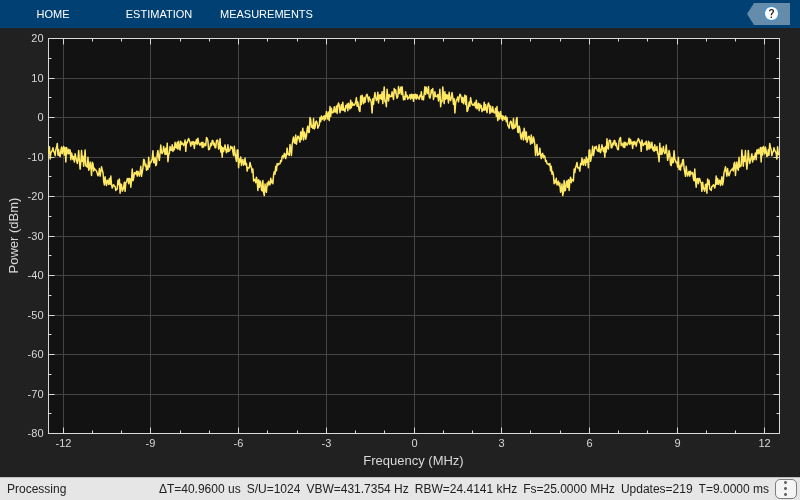
Visualize the spectrum of the waveform.

scope = spectrumAnalyzer(SampleRate=fs);
scope(waveform)
Generate a Galileo E5 waveform for five satellites.

Specify the SVIDs of the five satellites.

svid = [2 9 10 12 25];

Create and set the properties of a Galileo waveform generation System object.

galwavegen = galileoWaveformGenerator(SVID=svid,SignalType="E5");

Generate random bits of navigation data.

numNavBits = 50;
fnavbits = randi([0 1],numNavBits,length(svid));
inavbits = randi([0 1],5*numNavBits,length(svid));
navdata = {fnavbits inavbits};

Generate a Galileo E5 waveform.

waveform = galwavegen(navdata);
size(waveform)
ans = 1×2

    10230000           5

Get the characteristic information about the Galileo E5 waveform generation object.

info(galwavegen)
ans = struct with fields:
         CurrentTime: 1
      SecondsElapsed: 1
    NumBitsProcessed: 50

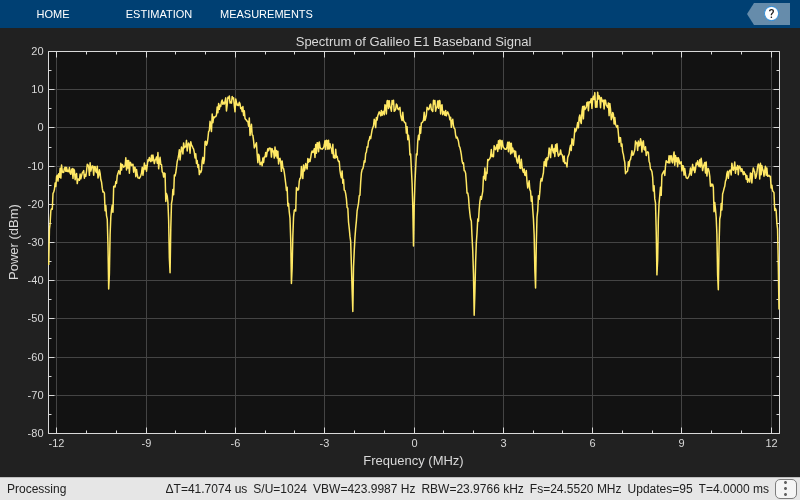
Generate E1A, E1B, and E1C signals and interplex them to form the complete Galileo E1 signal that includes both Open Service (OS) and Public Regulated Service (PRS) components.

Generate random bits of navigation data.

numNavDataBits = 1;
data = randi([0 1],numNavDataBits,1);

Create waveforms for E1B and E1C.

fs = 24*1.023e6;
galwavegen = galileoWaveformGenerator(SignalType="E1B",SampleRate=fs);
e1b = galwavegen(data);
galwavegen = galileoWaveformGenerator(SignalType="E1C",SampleRate=fs);
e1c = galwavegen(data);

Specify the number of chips per bit, assuming it is the same as OS.

numChipsPerBit = 4092;

Generate random data for the PRS signal.

dummyPRSdata = randi([0 1],numNavDataBits*numChipsPerBit,1);
e1a = bocmod(dummyPRSdata,15,2.5,2,"cos");

Specify the amplitude factor for interplex modulation.

alpha = sqrt(2)/3;
beta = 2/3;

Interplex all the three components of the E1 signal.

[E1BBWaveform,efficiency] = interplexmod([e1a e1b e1c],[beta alpha alpha]);
disp("Efficiency of Galileo interplex modulation: "+string(efficiency*100)+"%")
Efficiency of Galileo interplex modulation: 88.8889%

Visualize the power spectrum.

bbscope = spectrumAnalyzer(SampleRate=fs, ...
    Title="Spectrum of Galileo E1 Baseband Signal", ...
    SpectrumType="power");
bbscope(E1BBWaveform)
References

[1] European GNSS Service Centre (GSC). Galileo Open Service Signal-In-Space Interface Control Document. OS SIS ICD v2.1. GSC, November 2023.

Extended Capabilities

expand all

Version History

Introduced in R2026a