Control Lyapunov Function
R2026bModify control actions to satisfy Lyapunov stability constraints and optional barrier certificate constraints, subject to control bounds
Since R2026b
Control Lyapunov Function block
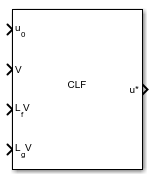
To add a block to a model, double-click the canvas and start typing the block name. Then, select the block from the list.
Libraries:
Simulink Control Design /
Constraint Control
Description
The Control Lyapunov Function block computes the modified control actions that are closest to specified control actions subject to Lyapunov stability constraints, optional barrier certificate constraints, and control bounds.
The block uses a quadratic programming (QP) solver to find the control action u and the decision variable δ that minimize the cost function . Here, u0 is the unmodified control action. p is the relaxation penalty weight and δ is the relaxation variable.
The solver applies the following constraints to the optimization problem.
Here:
V(x) is the Lyapunov function.
LfV(x) is the partial derivative of the Lyapunov function V(x) over the plant states multiplied by the state function f(x).
LgV(x) is the partial derivative of the Lyapunov function V(x) over the plant states multiplied by the input function g(x).
c is the CLF rate.
h(x) is the control barrier function.
Lfh(x) is the partial derivative of the control barrier function h(x) over the plant states multiplied by the state function f(x).
Lgh(x) is the partial derivative of the control barrier function h(x) over the plant states multiplied by the input function g(x).
γ is the constraint factor.
β is the constraint power.
umin is a lower bound for the control action.
umax is an upper bound for the control action.
Additionally,
f(x) and g(x) are functions defined by the plant dynamics .
LfV(x)+LgV(x)u+cV(x)≤δ is the CLF constraint.
Lfh(x)+Lgh(x)u+γhβ(x)≥0 is the barrier certificate constraint.
The Control Lyapunov Function block requires Optimization Toolbox™ software.
Examples
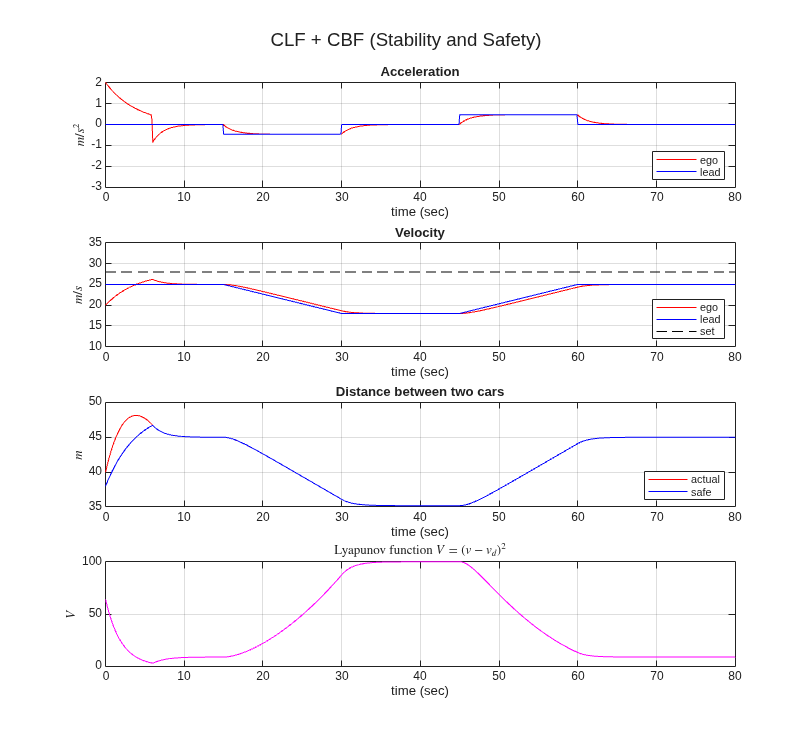
Enforce Lyapunov Stability for Adaptive Cruise Control
Enforce exponential convergence of adaptive cruise control system using the Control Lyapunov Function block.
Ports
Input
Output
Parameters
To edit block parameters interactively, use the Property Inspector. From the Simulink® Toolstrip, on the Simulation tab, in the Prepare gallery, select Property Inspector.
Parameters Tab
Specify the exponential decay rate.
When the relaxation variable δ=0, the CLF constraint enforces , where V is the Lyapunov function and c is the exponential decay rate or the CLF rate.
Programmatic Use
Block Parameter:
c |
| Type: character vector |
Default:
'0.1' |
Specify the penalty on δ2 in the cost function.
If you specify a small value of p, the QP solver relaxes the CLF constraint. If p is too small, the solver ignores the CLF constraint and the modified control action will be approximately equal to the unmodified control action.
If you specify a large value of p, the QP solver strongly enforces the CLF constraint. If p is too large, the modified control action will be aggressive.
Programmatic Use
Block Parameter:
p |
| Type: character vector |
Default:
'10' |
Specify the number of barrier certificate constraints to enforce.
Programmatic Use
Block Parameter:
nh |
| Type: character vector |
Default:
'0' |
Specify the constraint factor γ in the barrier certificate constraint.
If the Number of barrier certificates parameter is
1, specify CBF gain (γ) as a finite positive
scalar. Otherwise, you can specify CBF gain (γ) as either a finite
positive scalar value or a column vector of positive scalars with length equal to
Number of barrier certificates.
Programmatic Use
Block Parameter:
gamma |
| Type: character vector |
Default:
'10' |
Dependencies
To specify CBF gain (γ), specify the Number of barrier certificates parameter as a positive integer.
Specify the constraint power β in the barrier certificate constraint.
If the Number of barrier certificates parameter is
1, specify CBF exponent (β) as a positive odd
integer. Otherwise, you can specify CBF exponent (β) as either a
positive odd integer or a column vector of positive odd integers with length equal to
Number of barrier certificates.
Programmatic Use
Block Parameter:
beta |
| Type: character vector |
Default:
'1' |
Dependencies
To specify CBF exponent (β), specify the Number of barrier certificates parameter as a positive integer.
Specify the number of control actions to apply bounds to and optimize.
Programmatic Use
Block Parameter:
nu |
| Type: character vector |
Default:
'1' |
Select this parameter to add the umax input port for external upper control bounds.
Programmatic Use
Block Parameter:
external_umax |
| Type: boolean |
Values:
'off'|'on' |
Default:
'off' |
Select this parameter to add the umin input port for external lower control bounds.
Programmatic Use
Block Parameter:
external_umin |
| Type: boolean |
Values:
'off'|'on' |
Default:
'off' |
Block Tab
Specify the output data type.
The Data Type Assistant helps you set data
attributes. To use the Data Type Assistant, click  .
.
You can specify the following data types.
Built in—singleordoubledata types.Expression— Use a MATLAB® expression that specifies the type.
For more information, see Specify Data Types Using Data Type Assistant.
Programmatic Use
Block Parameter:
DataType |
| Type: character vector |
| Default: double |
Specify the sample time for running the optimization.
Programmatic Use
Block Parameter:
Ts |
| Type: character vector |
Default:
'0.1' |
Specify the maximum number of optimization iterations.
Programmatic Use
Block Parameter:
maxiter |
| Type: character vector |
Default:
'200' |
Specify a tolerance value for constraint violations.
Programmatic Use
Block Parameter:
tol |
| Type: character vector |
Default:
'1e-6' |
Select this parameter to add the exitflag output port for the optimization status of the QP solver.
Programmatic Use
Block Parameter:
output_exitflag |
| Type: boolean |
Values:
'off'|'on' |
Default:
'off' |
Select this parameter to add the δ output port for the value of the relaxation variable.
Programmatic Use
Block Parameter:
output_delta |
| Type: boolean |
Values:
'off'|'on' |
Default:
'off' |
Extended Capabilities
Version History
Introduced in R2026b

