sltest.testmanager.registerTestAdapter
R2026bDescription
sltest.testmanager.registerTestAdapter(
registers an adapter function to convert an Excel® or MAT file that contains test data to a format supported by the Test Manager.
For information about the supported Excel format, see Microsoft Excel Import, Export, and Logging Format.adapterfcn,adapterdefault)
Examples
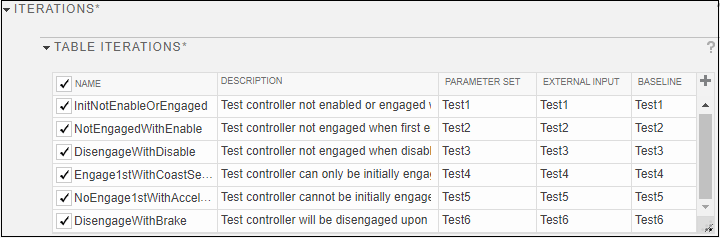
This example shows how to use and register a function that converts the formatting of an Excel spreadsheet so it can be used in the Test Manager. The spreadsheet has 6 sheets, each corresponding to an iteration. Each sheet has a header with the iteration name and description. The sheets also include the built-in formats for specifying test inputs, parameters, and baselines. This examples uses the CruiseContol model.
The files used in this example are:
CruiseControlTests_CustomHeader.xlsx- Excel spreadsheetHybridBuiltInAdapter.m- Adapter functionCruiseControlTests_HybridBuiltInAdapter.mldatx- Test file
View the adapter function.
type HybridBuiltInAdapter.mfunction HybridBuiltInAdapter(testCase, inputFileName)
% Find iteration test specs (worksheets)
[sheets] = sheetnames(inputFileName);
% Configure test case from each worksheet
for ii=1:numel(sheets)
% Create new iteration object and get iteration information
testItr = sltestiteration();
[testItr.Name, testItr.Description,specRange] = ...
getTestInfo(inputFileName,sheets{ii});
% Add a single input set from worksheet and map to ports
testInput = testCase.addInput(inputFileName,Sheet=sheets(ii),...
Ranges={specRange},SimulationIndex=1,CreateIterations=false);
testInput.map('Mode',0,'CompileModel',true);
setTestParam(testItr,'ExternalInput',testInput.Name);
% Add a single baseline set from worksheet
baseline = testCase.addBaselineCriteria(inputFileName, ...
Sheet=sheets(ii),Ranges={specRange});
setTestParam(testItr,'Baseline',baseline.Name);
% Add iteration to run in this test case
addIteration(testCase,testItr);
end
end
function [name,desc,specRange] = getTestInfo(inputFileName,sheetName)
% Get test name and description, input/output cell range, and
% parameter data from worksheet
rawT = readcell(inputFileName,'Sheet',sheetName,'UseExcel',false);
% Assign missing data to '' for "isempty" checks
rawT(cellfun(@(x) all(ismissing(x)), rawT)) = {''};
% Find row with "Name" and find row with "Description"
nameRow = find(cellfun(@(x) strcmpi(x,'Name'),rawT(:,1)),1);
name = rawT{nameRow,2};
descRow = find(cellfun(@(x) strcmpi(x,'Description'),rawT(:,1)),1);
desc = rawT{descRow,2};
% Find test vector row range
timeRow = find(cellfun(@(x) strcmpi(x,'Time'), rawT(:,1)));
endRow = numel(rawT(:,1));
specRange = [num2str(timeRow) ':' num2str(endRow)];
end
Register the adapter.
sltest.testmanager.registerTestAdapter...
    ('HybridBuiltInAdapter',true);
Open the CruiseControlTests_HybridBuiltInAdapter test file in the Test Manager.
tf = sltest.testmanager.TestFile...
    ('CruiseControlTests_HybridBuiltInAdapter.mldatx');
sltest.testmanager.view
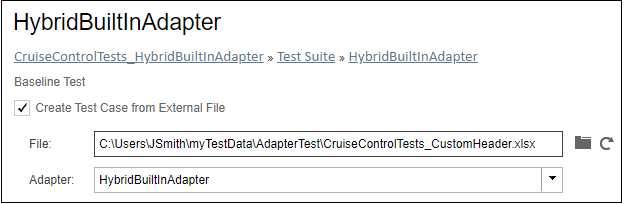
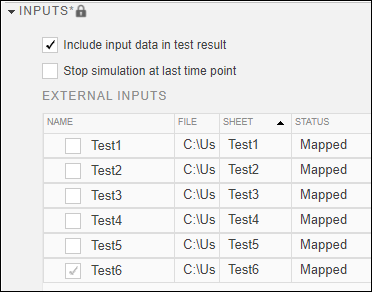
Selecting the Create Test Case from External File and specifying the File and Adapter in the Test Manager adds the data and information adapted from the Excel file. For example, see the Inputs and Iterations sections of the test case.
Create and register a function to format a MAT file to use in the
Test Manager. This example assumes that you have a MAT file that has x,
y, and z parameters and xin and
yin inputs.
Create a function that converts a baseline test parameter set in the MAT file.
function Adapter_InputBaselineParamSet(test,externalMATFile)
   load(externalMATFile);

   % Set model property for the test case
   setProperty(test,'Model',mdl_name);

   % Save external file parameters to a supported format
   % MAT file and add parameter set to test case
   save('param.mat','x','y','z');
   paramset = addParameterSet(test,'FilePath',...
       'param.mat','SimulationIndex',1)

   % Save external file inputs to a supported format MAT
   % file and add inputs to test case
   save('input.mat','xin','yin');
   inputs = addInput(test,'input.mat');
   inputs.map(3);

   % Capture baseline criteria and add to test case
   captureBaselineCriteria(test,'base.mat',true);
Then register the function by using its function handle.
sltest.testmanager.registerTestAdapter(...
    @Adapter_InputBaselineParamSet,true);
Input Arguments
Version History
Introduced in R2022b

