detectPatternPoints
R2026bDetect keypoints of calibration pattern in images from multiple cameras
Since R2025a
Syntax
Description
Natively Supported Patterns
imagePoints = detectPatternPoints(imageFileNames,"charuco-board",patternDims,markerFamily,checkerSize,markerSize)imageFileNames, with dimensions specified by
patternDims, markerFamily, and
checkerSize.
Note
To use the detectPatternPoints function, first install the related features
using the installMultiSensorCalibrationTools function.
imagePoints = detectPatternPoints(imageFileNames,"aprilgrid",patternDims,tagFamily)imageFileNames, with dimensions specified by
patternDims.
imagePoints = detectPatternPoints(imageFileNames,"checkerboard",patternDims)imageFileNames, with dimensions specified by
patternDims. The values of the elements of
patternDims must not be equal.
imagePoints = detectPatternPoints(imageFileNames,"circle-grid-asymmetric",patternDims)imageFileNames, with dimensions specified by
patternDims.
Custom Pattern Detector
imagePoints = detectPatternPoints(imageFileNames,patternDetector,numKeyPoints)numKeyPoints of a custom calibration pattern that can be detected
in an image using the specified detector function
patternDetector.
Optional Arguments
imagePoints = detectPatternPoints(___,Name=Value)Verbose=true displays
the progress of the detection process.
Examples
Download the calibration images.
calibImagesURL = "https://www.mathworks.com/supportfiles/vision/data/overlapping-cameras-aprilgrid-with-intrinsics.zip";
calibImagesDir = fullfile(pwd,"overlapping-cameras-aprilgrid-with-intrinsics");
calibImagesZip = fullfile(pwd,"overlapping-cameras-aprilgrid-with-intrinsics.zip");
if ~exist(calibImagesZip,"file")
    disp("Downloading calibration images (51 MB)...")
    websave(calibImagesZip,calibImagesURL);
end
if ~exist(calibImagesDir,"dir")
    unzip(calibImagesZip,calibImagesDir)
end
Specify calibration image filenames for each camera.
numCameras = 6;
camDirPrefix = "Cam00";
imageFiles = cell(1,numCameras);
for i = 1:numCameras
    camDir = fullfile(calibImagesDir,camDirPrefix+i);
    imds = imageDatastore(camDir);
    imageFiles{i} = imds.Files;
end
imageFiles = [imageFiles{:}];
Define the AprilGrid properties.
patternDims = [6 6];
tagFamily = "tag36h11";
Detect the key points of the AprilGrid in the calibration images.
imagePoints = detectPatternPoints(imageFiles, "aprilgrid", ...
    patternDims,tagFamily);
[==================================================] 100%
Elapsed time: 00:00:23
Estimated time remaining: 00:00:00
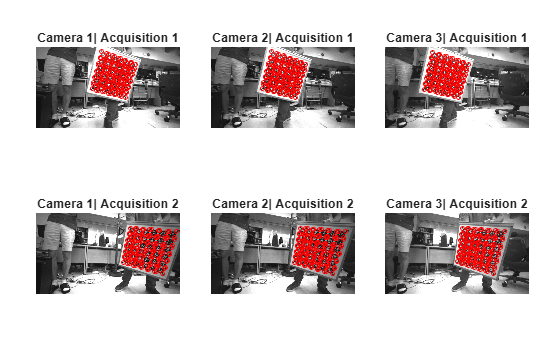
Display the detected keypoints of the AprilGrid in the first two acquisitions for three of the six cameras.
tiledlayout(2,3,TileSpacing="compact",Padding="compact");
for acqIdx = 1:2
    for camIdx = 1:3
        nexttile
        imshow(imageFiles{acqIdx,camIdx})
        title("Camera " + camIdx + "| Acquisition " + acqIdx)
        hold on
        plot(imagePoints(:,1,acqIdx,camIdx),imagePoints(:,2,acqIdx,camIdx), ...
            "ro",MarkerSize=3)
    end
end
Estimate the relative position and orientation of six cameras with overlapping fields of view by using calibration images that contain a single ChArUco board.
Download the calibration images.
calibImagesURL = "https://www.mathworks.com/supportfiles/vision/data/overlapping-cameras-charuco-with-intrinsics.zip";
calibImagesDir = fullfile(pwd,"overlapping-cameras-charuco-with-intrinsics");
calibImagesZip = fullfile(pwd,"overlapping-cameras-charuco-with-intrinsics.zip");
if ~exist(calibImagesZip,"file")
    disp("Downloading calibration images (50 MB)...")
    websave(calibImagesZip,calibImagesURL);
end
if ~exist(calibImagesDir,"dir")
    unzip(calibImagesZip,calibImagesDir)
end
Specify calibration image filenames for each camera.
numCameras = 6;
camDirPrefix = "Cam00";
imageFiles = cell(1,numCameras);
for i = 1:numCameras
    camDir = fullfile(calibImagesDir,camDirPrefix+i);
    imds = imageDatastore(camDir);
    imageFiles{i} = imds.Files;
end
imageFiles = [imageFiles{:}];
Define the ChArUco board properties. Specify checker size and marker size in centimeters.
checkerSize = 9.15; % in cm
markerSize = 6.8;   % in cm
markerFamily = "DICT_6X6_1000";
patternDims = [5 5];
numKeyPoints = prod(patternDims-1);
minMarkerId = 144;
Detect the key points of the ChArUco board in the calibration images.
imagePoints = detectPatternPoints(imageFiles,"charuco-board",patternDims, ...
    markerFamily,checkerSize,markerSize,MinMarkerID=minMarkerId);
[==================================================] 100%
Elapsed time: 00:00:03
Estimated time remaining: 00:00:00
Generate the world points for the pattern.
worldPoints = patternWorldPoints("charuco-board",patternDims,checkerSize);Load the intrinsic parameters of the six cameras. These parameters have been estimated using the Using the Single Camera Calibrator App.
intrinsics = cell(numCameras,1);
for i = 1:numCameras
    camDir = fullfile(calibImagesDir,camDirPrefix+i);
    intrinsics{i} = load(fullfile(camDir,"intrinsics"+i)).intrinsics;
end
Perform multi-camera calibration.
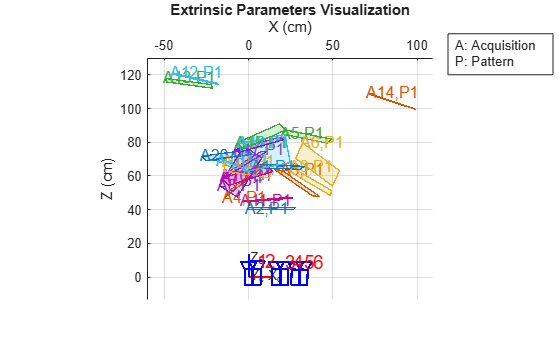
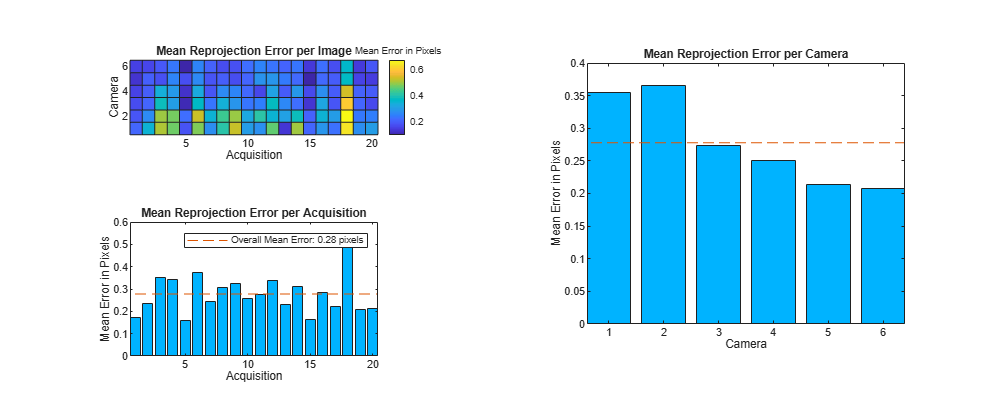
params = estimateMultiCameraParameters(imagePoints,worldPoints,intrinsics,WorldUnits="cm");Visualize the calibration accuracy.
figure(Position=[100,100,1000,400])
showReprojectionErrors(params)
Visualize the camera extrinsic parameters.
figure
showExtrinsics(params)
view(2)