Main Content

queryImage

R2026b

Query image using Moondream vision-language model (VLM)

Since R2026b

    Description

    Add-On Required: This feature requires the Computer Vision Toolbox Model for Moondream Vision Language Model add-on.

    response = queryImage(mdModel,I,question) queries the image I with a question, question, about its content and returns a response using the Moondream™ vision-language model mdModel.

    example

    response = queryImage(mdModel,I,question,roi) generates a response to a question about the content within one or more rectangular search regions roi of the image I.

    response = queryImage(mdModel,imds,question) generates a response to a question about the content of each image returned by the read function of the datastore imds.

    response = queryImage(___,ExecutionEnvironment=executionEnv) specifies the hardware resource on which to run the model, in addition to any combination of input arguments from previous syntaxes.

    Examples

    collapse all

    Load a pretrained Moondream vision-language model with approximately 1.6 billion parameters into the workspace.

    mdModel = moondream("moondream-1.6B");

    Load an image into the workspace, and display the image.

    I = imread("flamingos.jpg");
    imshow(I)
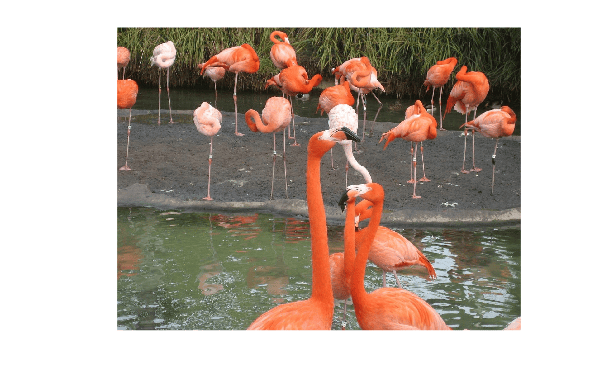
    Figure contains an axes object. The hidden axes object contains an object of type image.

    Specify a question about the image content.

    question = "Which birds are present in the image and what colors do they have?";

    Query the image with the question using the queryImage object function.

    response = queryImage(mdModel,I,question);
    display(response)
    response = 
    "The image features a flock of flamingos, with various shades of orange and pink feathers."
    

    Input Arguments

    collapse all

    Moondream vision-language model, specified as a moondream object.

    Input image, specified as a numeric array of size H-by-W-by-C. You must specify real, nonsparse, grayscale or RGB images.

    • H— Height of the image.

    • W— Width of the image.

    • C— Number of channels in the image. The channel size of each image must be equal to the input channel size of the network. For example, for grayscale images, C must be 1. For RGB color images, it must be 3.

    Question about the image content, specified as a string scalar or character vector.

    Data Types: char | string

    Rectangular regions of interest, specified as a four-element row vector or M-by-4 matrix. If you specify this argument as a matrix, each row specifies the location of a rectangular region of interest in the image using the same format as the vector. The vector specifies a region of interest within the input image in the form [x y width height], where [x y] specifies the coordinates of the upper-left corner of the region, and [width height] specifies the size of the rectangular region of interest, in pixels. Each rectangle must be fully contained within the input image I.

    Datastore of images, specified as any type of datastore that returns image data. When using the read function of the datastore, it must return a table or a cell array with the image data in the first cell.

    Hardware resource on which to run the detector, specified as "auto", "gpu", or "cpu". The table shows the valid hardware resource values.

    Resource Action
    "auto" Use a GPU if it is available. Otherwise, use the CPU.
    "gpu" Use the GPU. To use a GPU, you must have Parallel Computing Toolbox™ and a CUDA® enabled NVIDIA® GPU. Currently, GPU execution is supported for only the pretrained Moondream vision-language model with approximately 1.6 billion parameters. If a suitable GPU is not available, the function returns an error. For information about the supported compute capabilities, see GPU Computing Requirements (Parallel Computing Toolbox).
    "cpu" Use the CPU.

    Output Arguments

    collapse all

    Response to the question, returned as one of these options, depending on the format of the input image.

    • I, a single RGB image with single ROI — String scalar.

    • Input is a single RGB or grayscale image with multiple ROIs — M-by-1 vector of strings, in which each element is the response for the corresponding ROI.

    • Input is imds, an image datastore — B-by-1 vector of strings, where B is the number of images in the datastore imds.

    Tips

    • The quality of Moondream outputs can vary across different data domains. Validate its predictions using a data set from a domain similar to your intended application.

    Extended Capabilities

    expand all

    GPU Arrays
    Accelerate code by running on a graphics processing unit (GPU) using Parallel Computing Toolbox™.

    Version History

    Introduced in R2026b