Updated Discussions

Hey, so I have a simple air quality measurement IoT system but the values are not arriving in my ThingSpeak channel. I use basic tutorials for it and tried some kind of variation but the code is so simple, I don't see any problem code-wise. Maybe someone here can help me?
I am working with a Raspberry Pi 3 and the following code for a SDS011 sensor:
import time
from datetime import datetime
import paho.mqtt.publish as publish
import paho.mqtt.client as mqtt
import psutil
from sds011 import *
import aqi
sensor = SDS011("/dev/ttyUSB0", use_query_mode=True)
def get_data(n=3):
sensor.sleep(sleep=False)
pmt_2_5 = 0
pmt_10 = 0
time.sleep(10)
for i in range (n):
x = sensor.query()
pmt_2_5 = pmt_2_5 + x[0]
pmt_10 = pmt_10 + x[1]
time.sleep(2)
pmt_2_5 = round(pmt_2_5/n, 1)
pmt_10 = round(pmt_10/n, 1)
sensor.sleep(sleep=True)
time.sleep(2)
return pmt_2_5, pmt_10
def conv_aqi(pmt_2_5, pmt_10):
aqi_2_5 = aqi.to_iaqi(aqi.POLLUTANT_PM25, str(pmt_2_5))
aqi_10 = aqi.to_iaqi(aqi.POLLUTANT_PM10, str(pmt_10))
return aqi_2_5, aqi_10
def save_log():
with open("/YOUR PATH/air_quality.csv", "a") as log:
dt = datetime.now()
log.write("{},{},{},{},{}\n".format(dt, pmt_2_5, aqi_2_5, pmt_10, aqi_10))
log.close()
channelID = "YOUR CHANNEL ID"
apiKey = "YOUR WRITE KEY"
clientID = "YOUR CLIENT ID"
tUsername = "YOUR USERNAME"
tPassword = "YOUR PASSWORD"
topic = "channels/" + channelID + "/publish/" + apiKey
mqttHost = "mqtt3.thingspeak.com"
tTransport = "tcp"
tPort = 1883
tTLS = None
tProtocol = mqtt.MQTTv311
while True:
pmt_2_5, pmt_10 = get_data()
aqi_2_5, aqi_10 = conv_aqi(pmt_2_5, pmt_10)
print ("AQI2.5 =", aqi_2_5," AQI10 =", aqi_10)
tPayload = "field1=" + str(pmt_2_5)+ "&field2=" + str(aqi_2_5)+ "&field3=" + str(pmt_10)+ "&field4=" + str(aqi_10)
try:
publish.single(topic, payload=tPayload, hostname=mqttHost, port=tPort, client_id=clientID, auth={'username':tUsername, 'password':tPassword}, tls=tTLS, transport=tTransport, protocol=tProtocol)
print ("[INFO] Published data")
save_log()
time.sleep(60)
except Exception as e:
print ("[INFO] Failure in sending data")
print (e)
time.sleep(60)
eye(3) - diag(ones(1,3))
11%
0 ./ ones(3)
9%
cos(repmat(pi/2, [3,3]))
16%
zeros(3)
20%
A(3, 3) = 0
32%
mtimes([1;1;0], [0,0,0])
12%
3009 votes
Chen Lin
Chen Lin
Last activity on 12 Apr 2024

What's the weather like in your place?
I created an ellipse visualizer in #MATLAB using App Designer! To read more about it, and how it ties to the recent total solar eclipse, check out my latest blog post:
Github Repo of the app (you can open it on MATLAB Online!):
Introduction
Comma-separated lists are really very simple. You use them all the time. Here is one:
a,b,c,d
That is a comma-separated list containing four variables, the variables a, b, c, and d. Every time you write a list separated by commas then you are writing a comma-separated list. Most commonly you would write a comma-separated list as inputs when calling a function:
fun(a,b,c,d)
or as arguments to the concatenation operator or cell construction operator:
[a,b,c,d]
{a,b,c,d}
or as function outputs:
[a,b,c,d] = fun();
It is very important to understand that in general a comma-separated list is NOT one variable (but it could be). However, sometimes it is useful to create a comma-separated list from one variable (or define one variable from a comma-separated list), and MATLAB has several ways of doing this from various container array types:
1) from a field of a structure array using dot-indexing:
struct_array.field % all elements
struct_array(idx).field % selected elements
2) from a cell array using curly-braces:
cell_array{:} % all elements
cell_array{idx} % selected elements
3) from a string array using curly-braces:
string_array{:} % all elements
string_array{idx} % selected elements
Note that in all cases, the comma-separated list consists of the content of the container array, not subsets (or "slices") of the container array itself (use parentheses to "slice" any array). In other words, they will be equivalent to writing this comma-separated list of the container array content:
content1, content2, content3, .. , contentN
and will return as many content arrays as the original container array has elements (or that you select using indexing, in the requested order). A comma-separated list of one element is just one array, but in general there can be any number of separate arrays in the comma-separated list (zero, one, two, three, four, or more). Here is an example showing that a comma-separated list generated from the content of a cell array is the same as a comma-separated list written explicitly:
>> C = {1,0,Inf};
>> C{:}
ans =
1
ans =
0
ans =
Inf
>> 1,0,Inf
ans =
1
ans =
0
ans =
Inf
How to Use Comma-Separated Lists
Function Inputs: Remember that every time you call a function with multiple input arguments you are using a comma-separated list:
fun(a,b,c,d)
and this is exactly why they are useful: because you can specify the arguments for a function or operator without knowing anything about the arguments (even how many there are). Using the example cell array from above:
>> vertcat(C{:})
ans =
1
0
Inf
which, as we should know by now, is exactly equivalent to writing the same comma-separated list directly into the function call:
>> vertcat(1,0,Inf)
ans =
1
0
Inf
How can we use this? Commonly these are used to generate vectors of values from a structure or cell array, e.g. to concatenate the filenames which are in the output structure of dir:
S = dir(..);
F = {S.name}
which is simply equivalent to
F = {S(1).name, S(2).name, S(3).name, .. , S(end).name}
Or, consider a function with multiple optional input arguments:
opt = {'HeaderLines',2, 'Delimiter',',', 'CollectOutputs',true);
fid = fopen(..);
C = textscan(fid,'%f%f',opt{:});
fclose(fid);
Note how we can pass the optional arguments as a comma-separated list. Remember how a comma-separated list is equivalent to writing var1,var2,var3,..., then the above example is really just this:
C = textscan(fid,'%f%f', 'HeaderLines',2, 'Delimiter',',', 'CollectOutputs',true)
with the added advantage that we can specify all of the optional arguments elsewhere and handle them as one cell array (e.g. as a function input, or at the top of the file). Or we could select which options we want simply by using indexing on that cell array. Note that varargin and varargout can also be useful here.
Function Outputs: In much the same way that the input arguments can be specified, so can an arbitrary number of output arguments. This is commonly used for functions which return a variable number of output arguments, specifically ind2sub and gradient and ndgrid. For example we can easily get all outputs of ndgrid, for any number of inputs (in this example three inputs and three outputs, determined by the number of elements in the cell array):
C = {1:3,4:7,8:9};
[C{:}] = ndgrid(C{:});
which is thus equivalent to:
[C{1},C{2},C{3}] = ndgrid(C{1},C{2},C{3});
Further Topics:
MATLAB documentation:
Click on these links to jump to relevant comments below:
Dynamic Indexing (indexing into arrays with arbitrary numbers of dimensions)
Nested Structures (why you get an error trying to index into a comma-separated list)
Summary
Just remember that in general a comma-separated list is not one variable (although they can be), and that they are exactly what they say: a list (of arrays) separated with commas. You use them all the time without even realizing it, every time you write this:
fun(a,b,c,d)
The latest release is pretty much upon us. Official annoucements will be coming soon and the eagle-eyed among you will have started to notice some things shifting around on the MathWorks website as we ready for this.
The pre-release has been available for a while. Maybe you've played with it? I have...I've even been quietly using it to write some of my latest blog posts...and I have several queued up for publication after MathWorks officially drops the release.
At the time of writing, this page points to the pre-release highlights. Prerelease Release Highlights - MATLAB & Simulink (mathworks.com)
What excites you about this release? why?
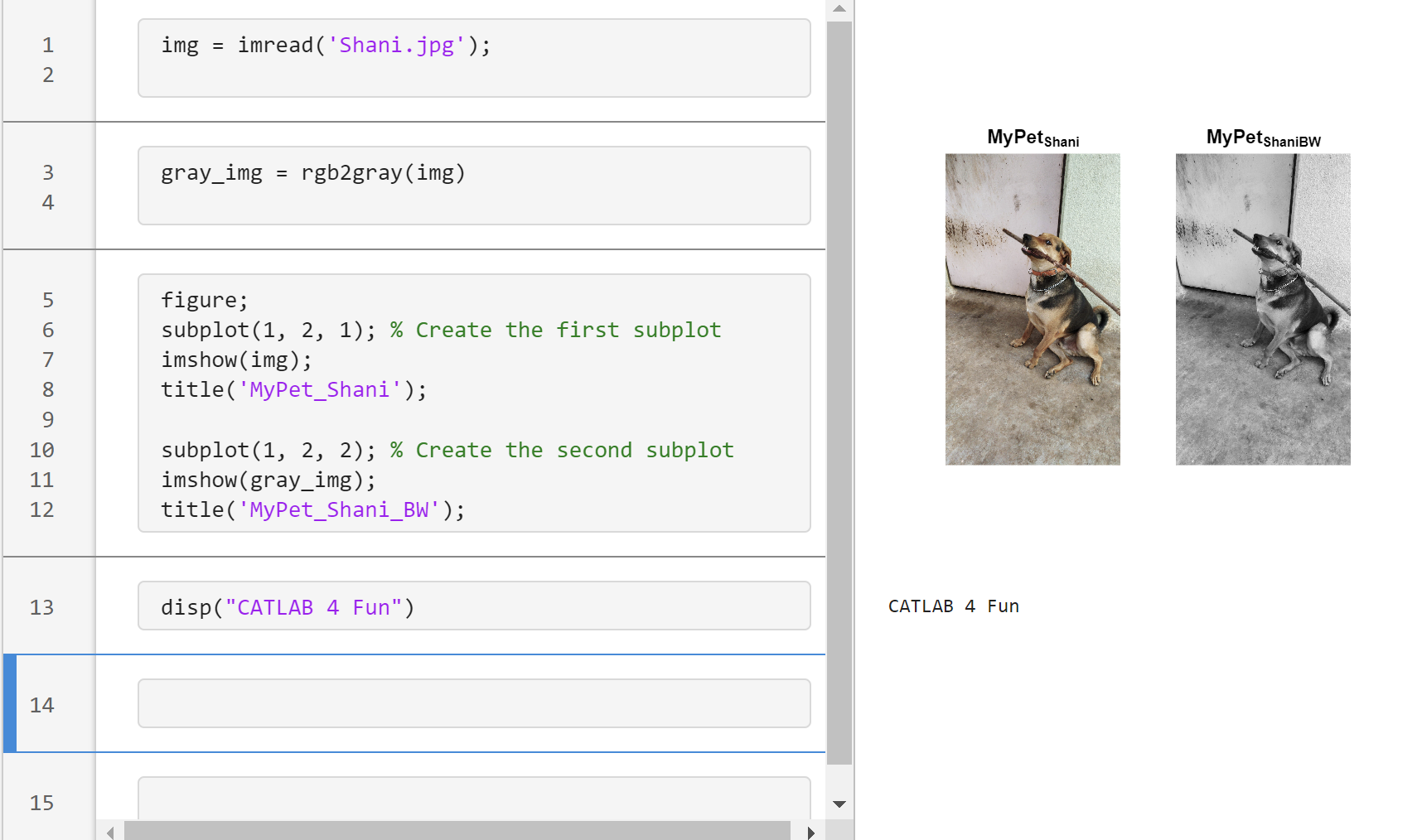
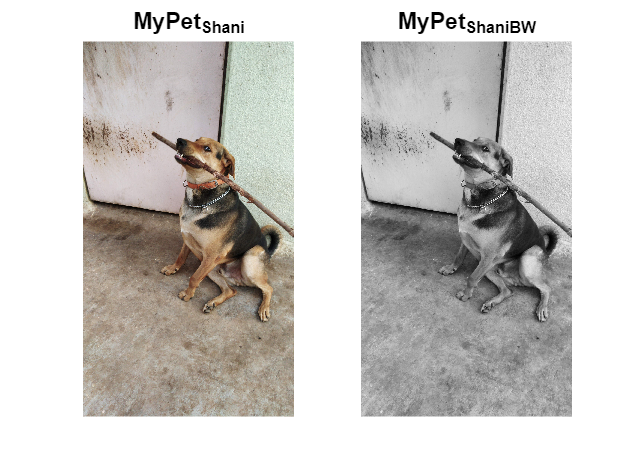
Transforming my furry friend into a grayscale masterpiece with MATLAB! 🐾 #MATLABPetsDay
This is Stella while waiting to see if the code works...
Hey MATLAB Community! 🌟
As we continue to explore, learn, and innovate together, it's essential to take a moment to recognize the remarkable contributions that have sparked engaging discussions, solved perplexing problems, and shared insightful knowledge in the past two weeks. Let's dive into the highlights that have made our community even more vibrant and resourceful.

Interesting Questions

Burhan Burak brings up an intriguing issue faced when running certain code in MATLAB, seeking advice on how to refactor the code to eliminate a warning message. It's a great example of the practical challenges we often encounter
Jenni asks for guidance on improving linear models to fit data points more accurately. This question highlights the common hurdles in data analysis and model fitting, sparking a conversation on best practices and methodologies.

Popular Discussions

A thought-provoking question posed by goc3 that delves into the intricacies of MATLAB's logical operations. It's a great discussion starter that tests and expands our understanding of MATLAB's behavior.
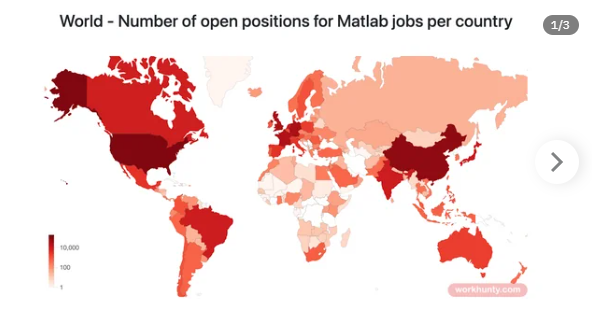
Toshiaki Takeuchi shares an insightful visualization of the demand for MATLAB jobs across different regions, based on data from LinkedIn. This post not only provides a snapshot of the job market but also encourages members to discuss trends in MATLAB's use in the industry.

From the Blogs

Mike Croucher shares his excitement and insights on two long-awaited features finally making their way into MATLAB R2024a. His post reflects the passion and persistence of our community members in enhancing MATLAB's functionality.
In this informative post, Sivylla Paraskevopoulou offers practical tips for speeding up the training of deep learning models. It's a must-read for anyone looking to optimize their deep learning workflows.
A Heartfelt Thank You 🙏
To everyone who asked a question, started a discussion, or wrote a blog post: Thank you! Your contributions are what make our community a fountain of knowledge, inspiration, and innovation. Let's keep the momentum going and continue to support each other in our journey to explore the vast universe of MATLAB.
Happy Coding!
Note: If you haven't yet, make sure to check out these highlights and add your voice to our growing community. Your insights and experiences are what make us stronger.
Feature Request -- To add section highlighting to the editor, just like in 2021a!
isempty( [ ] )
10%
isempty( { } )
13%
isempty( '' ) % 2 single quotes
13%
isempty( "" ) % 2 double quotes
24%
c = categorical( [ ] ); isempty(c)
18%
s = struct("a", [ ] ); isempty(s.a)
22%
1324 votes
Congratulations, @Fangjun Jiang for achieving 10K reputation points.
You reached this milestone by providing valuable contribution to the community since you started answering questions in Since September 2011.
You were very active in the first year, and took some break, but you steadily rose ranks in the recent years to achieve this milestone.
You provided 3954 answers and received 1503 votes. You are ranked #25 in the community. Thank you for your contribution to the community and please keep up the good track record!
MATLAB Central Team

Englisch Translate Französisch Deutsch Deutsch Russisch PONS Deepl übersetzer Spanisch Deutsch DeepL kostenlos Deutsch Englisch hallo, ich bitte um Hilfe! Seit Jahren habe ich Konto auf Thingspeak, den ich für meinen Zweck nicht richtig nutzen kann. Ich kann "Upoad to meine private Chanel", aber das lesen funktioniert nicht, weder in ArdunioIDE, noch Ardunio iot kann ich die gesendete Daten (Temperatur) von einem anderen Board lesen, es ist egal, ob ESP8266, ESP32, MKR, oder UnoWifi Rev2. Nichts! Die Beispiele im Bibliotek sind eine Katastrophe, "wetter-chanel" und diese funktionieren auch nicht. Auch nicht die von GitHub. Es sollte aber einfach sein, denn auf meiner Seite sehe ich ja "GET"+ url. inkl json+result.

Wo gibt es eine richtige sketch für "read private chanel/field" , welche funktioniert? Man braucht nicht die Wifi-Enstellungen, sondern den code für die Abfrage, "Serial.print"(value)"

Bitte um Hilfe, danke schön.

hello, I ask for help! I've had an account on Thingspeak for years, but I can't use it properly for my purpose. I can "Upoad to my private Chanel", but reading doesn't work, neither in ArdunioIDE nor Ardunio iot can I read the sent data (temperature) from another board, it doesn't matter whether ESP8266, ESP32, MKR, or UnoWifi Rev2. Nothing! The examples in the library are a disaster, "weather-chanel" and they don't work either. Not even the one from GitHub. But it should be easy, because on my site I see “GET”+ url. including json+result.

Where is there a proper sketch for "read private chanel/field" that works? You don't need the WiFi settings, but the code for the query, "Serial.print"(value)"

Please help, thank you very much.

#include <WiFiS3.h>
#define LDR_PIN A0 // LDR sensor pin
#define WIFI_SSID "Nahi Chalega"
#define WIFI_PASSWORD "12234556889"
#define THINGSPEAK_HOST "api.thingspeak.com"
#define THINGSPEAK_API_KEY "xxxxxxxxxxxxxxxx" // Replace YOUR_API_KEY with your ThingSpeak Write API key
#define CHANNEL_ID "2498369" // Replace YOUR_CHANNEL_ID with your ThingSpeak channel ID
WiFiSSLClient client;
void setup() {
Serial.begin(9600);
connectWiFi();
}
void loop() {
int ldrValue = analogRead(LDR_PIN); // Read LDR sensor value
Serial.print("LDR Sensor Value: ");
Serial.println(ldrValue);
sendToThingSpeak(ldrValue);
delay(2000); // Send data every 20 seconds
}
void connectWiFi() {
Serial.println("Connecting to WiFi");
WiFi.begin(WIFI_SSID, WIFI_PASSWORD);
while (WiFi.status() != WL_CONNECTED) {
delay(500);
Serial.print(".");
}
Serial.println("\nConnected to WiFi");
}
void sendToThingSpeak(int value) {
if (client.connect(THINGSPEAK_HOST, 80)) {
String data = "field1=" + String(value);
String request = "POST /update HTTP/1.1\nHost: " + String(THINGSPEAK_HOST) + "\nConnection: close\nX-THINGSPEAKAPIKEY: " + String(THINGSPEAK_API_KEY) + "\nContent-Type: application/x-www-form-urlencoded\nContent-Length: " + String(data.length()) + "\n\n" + data;
client.print(request);
Serial.println("Data sent to ThingSpeak!");
} else {
Serial.println("Failed to connect to ThingSpeak!");
}
client.stop();
}
In honor of National Pet Day on April 11th, we're excited to announce a fun contest that combines two of our favorite things: our beloved pets and our passion for MATLAB/Simulink! Whether you're a cat enthusiast, a dog lover, or a companion to any other pet, we invite you to join in the fun and showcase your creativity.
How to Participate:
  • Take a photo of your pet featuring any element of MATLAB/Simulink.
  • Post it in the Fun channel of the Discussions area.
  • Include a brief description or story behind the photo - we love to hear about your pets and your creative process!

🏆 Prizes:
We will be selecting 3 winners for this contest, and each winner will receive a MathWorks T-shirt or hat! Winners will be chosen based on creativity, originality, and how well they incorporate the MATLAB/Simulink element into their photo.
📅Important Dates:
Contest ends on April 12th, 2024, at 11:59:59 pm, Eastern Time
We can't wait to see all of your adorable and creative pet photos. Let's celebrate National Pet Day in true MathWorks style. Good luck, and most importantly, have fun!
Are you going to be in the path of totality? How can you predict, track, and simulate the solar eclipse using MATLAB?
Hi guys
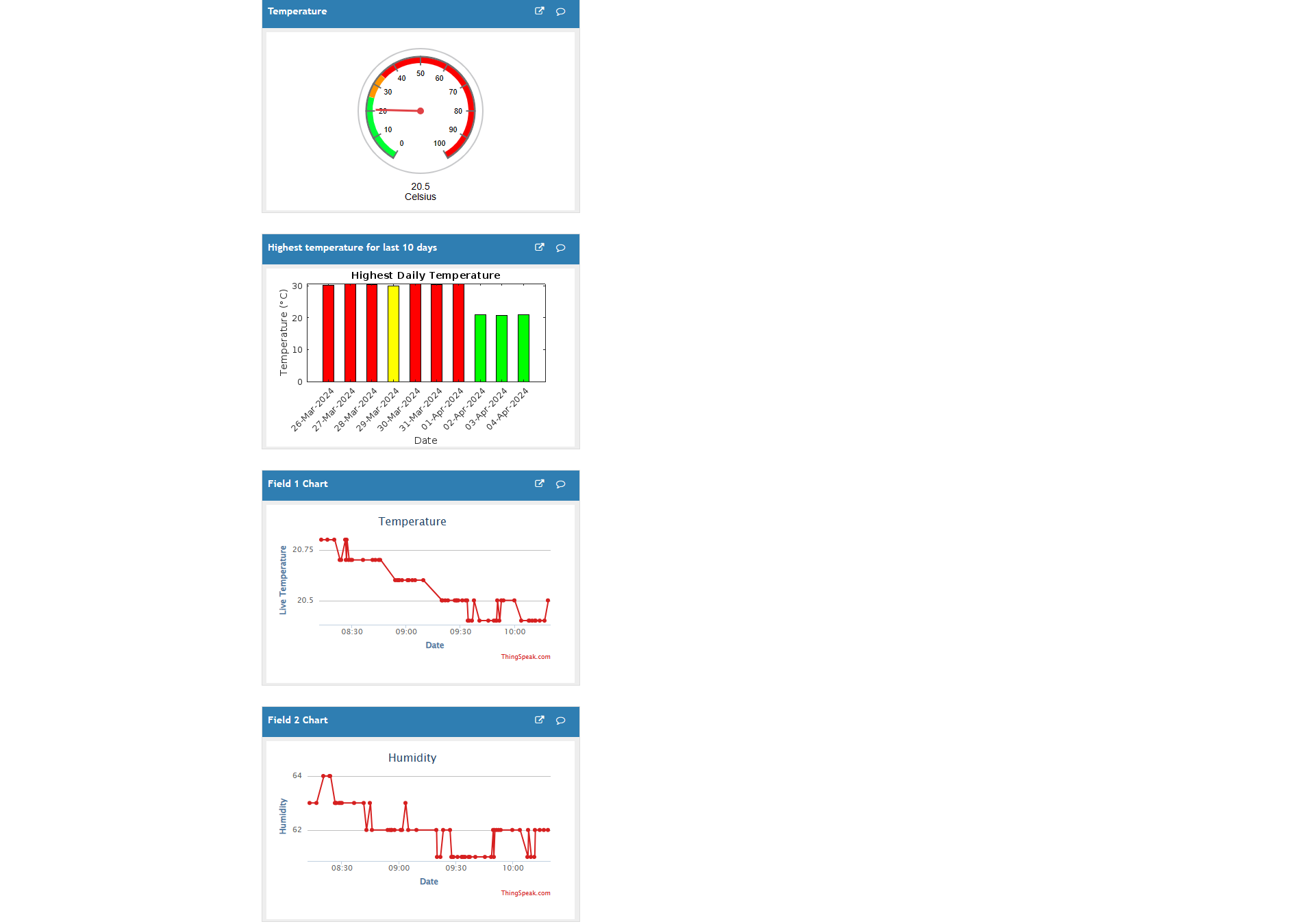
This is regarding my shared ThingSpeak channel. Previously it was showing the widgets side by side but in recent days it's showing widget under widget.
Why is that? Please help.
In my struggle to get my SIM7600 connected to thingspeak using MQTT, i went to the basics: simple testing of my connection:
Protocol :tcp
Host : mqtt3.thingspeak.com
Port : 1883
Username : got it from my device (double checked !)
Password : got it from my device (double checked !)
When i try to connect I get the message Connection refused : bad user name or password.
I am completely lost. What basic stupi mistake am i missing. I thoroughly read the MQTT help pages.
Any help is appreciated.
Update :
When i select Dedicated connection and i also fill in the will message and will topic, i am able to update my channel. At least some progress.
I found this link posted on Reddit.
https://workhunty.com/job-blog/where-is-the-best-place-to-be-a-programmer/Matlab/

About Discussions

Discussions is a user-focused forum for the conversations that happen outside of any particular product or project.

Get to know your peers while sharing all the tricks you've learned, ideas you've had, or even your latest vacation photos. Discussions is where MATLAB users connect!

More Community Areas

MATLAB Answers

Ask & Answer questions about MATLAB & Simulink!

File Exchange

Download or contribute user-submitted code!

Cody

Solve problem groups, learn MATLAB & earn badges!

Blogs

Get the inside view on MATLAB and Simulink!

AI Chat Playground

Use AI to generate initial draft MATLAB code, and answer questions!